For LogicRF Hawk H102 Rev.B with Kuiper 1.2.1. Use the same released image on each board; no per-board RTL, Linux or profile rebuild is required. PC means the Linux host and H102 means the new board. Do not clone a card from a running device as a new-device template.
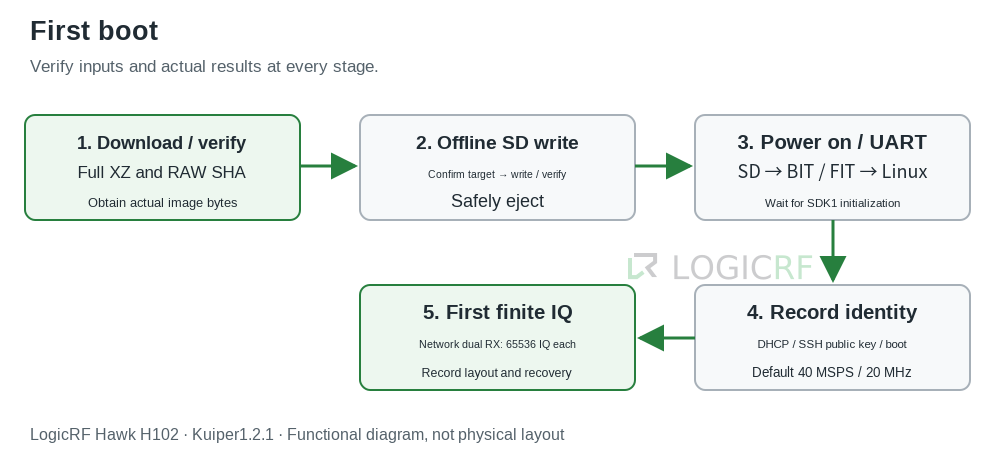
For a first deployment, start with the illustrated quick start. This page retains complete writing commands, report states and administrator checks.
¶ 1. Obtain the tools and image
- Deployment tools1.2.1: the shell launcher, deployment and network helpers, a read-only board checker, fixed release pins, instructions and SHA256SUMS. No image or credentials are included.
- Released image, hashes and download instructions. Obtain the actual
LogicRF-Hawk-H102-Kuiper-1.2.1-2024.1.img.xz, not a Git LFS pointer or source ZIP. - The scripts are also at
scripts/h102_sd_deploy.pyandscripts/h102_check_new_board.py, with pins inmanifests/h102-deployment-1.2.1.json. Use the fixed tool bundle in this image release with its matching manifest.
The PC needs Linux, Python 3.10+, lsblk, udisksctl, OpenSSH, debugfs, e2fsck and kernel loop-device support. The last two commands are supplied by e2fsprogs. Writing needs sudo; the read-only new-board check does not. Install dependencies using the distribution's packages; the scripts do not install them automatically. Windows users may write a decompressed IMG with a suitable image writer. This deployment CLI supports Linux only.
Check the complete ZIP SHA in the download table. Extract H102-Deployment-Tools-1.2.1-en-r3.zip into a new directory and enter that destination root, which directly contains scripts, manifests and docs. Keep the image separately. The writer streams XZ directly without another 11.82 GB raw image file, but fully checks both compressed and decoded hashes.
¶ 2. Write a new SD card on Linux
Use a 32 GB or 64 GB MicroSD card. Total target capacity must be at least 11,823,742,976 bytes. See SD card requirements for capacity, speed and readers. Writing overwrites the entire card: back up its contents first. The card cannot remain in a running H102. No initial formatting is required.
Shut down H102 before removing its card, or use a blank card. Insert it into the PC reader, close applications using it and unmount its mounted partitions through the file manager without ejecting the device yet. The script refuses a mounted or busy target; it does not unmount it or guess the target.
From the extracted tool directory, run this one command. Replace both image and whole-card paths and choose a new report filename:
Imaging PC · Verify the image hash and removable medium; substitute the image path and target device.
sudo sh scripts/h102_write_sd.sh \
  --image /path/to/LogicRF-Hawk-H102-Kuiper-1.2.1-2024.1.img.xz \
  --device /dev/disk/by-id/actual-sd-reader-device \
  --report "$PWD/H102-SD-001.json"
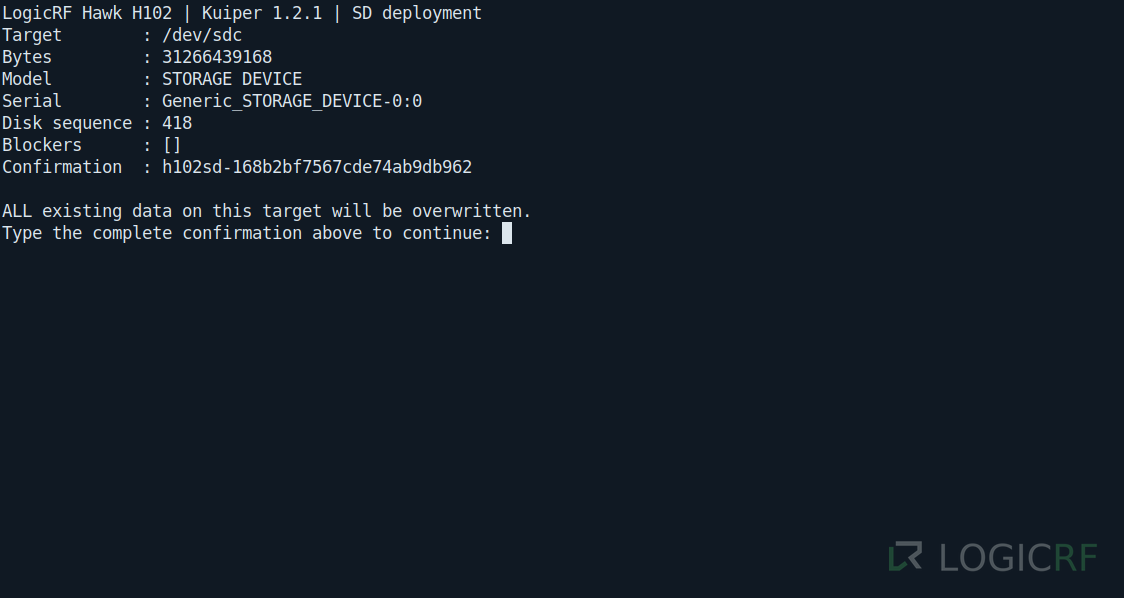
Historical target screen; use the actual device, diskseq and token shown for this operation
The launcher displays the card capacity, model, serial number, disk sequence and confirmation token. Check the physical card and enter the complete token shown. A missing or duplicate serial number does not uniquely identify a card. Replacing the card requires a new inspection. sudo authorizes writing the PC SD device; it is separate from H102 login.
No extra decompression, dd, formatting or resizing is needed. The command performs these stages:
| Stage | Checks and failure behavior |
|---|---|
| Input | Fixed XZ/RAW lengths, complete hashes and decompression integrity; rejects mismatches, LFS pointers or source changes before writing |
| Target | Removable/USB whole disk, capacity, current diskseq, mount namespaces, swap, holders, other block FDs and read-only status; no force option |
| Write | O_EXCL exclusive FD, partial-write handling and fsync; source changes or I/O errors fail immediately |
| Complete readback | Same FD, cache invalidation, page-aligned O_DIRECT reads over the entire image length and RAW SHA; no fallback to cached reads |
| Network customization | Check the root filesystem, install and read back the selected network files and their permissions, then check the filesystem again |
| Safe eject | Recheck original target, disconnect with udisksctl and confirm disappearance |
Exit 0 with PASS_WRITE_DIRECT_READBACK_EJECT means writing, readback and eject passed for this card. It does not mean H102 has booted. WRITE_VERIFIED_NOT_EJECTED (exit 3) means write/readback passed but safe eject remains required. FAIL (exit 1) records the phase, write progress and original error; no automatic rewrite occurs. Inspection blockers return exit 2. Report paths must be new; existing reports are never overwritten. Reports created by sudo can be read with sudo cat.
For auto, also check network_personalization.status=PASS_NETWORK_PROFILES_READBACK_EXT4 in the report. Full RAW readback occurs before customization; the final card is expected to differ from the unmodified image.
Safe ejection waits up to five seconds for transient block-device use; persistent use, mounts or a changed card still cause refusal. If write/readback passed but ejection failed, close the reported users and safely eject through the operating system. Do not rewrite a verified card merely to resolve ejection.
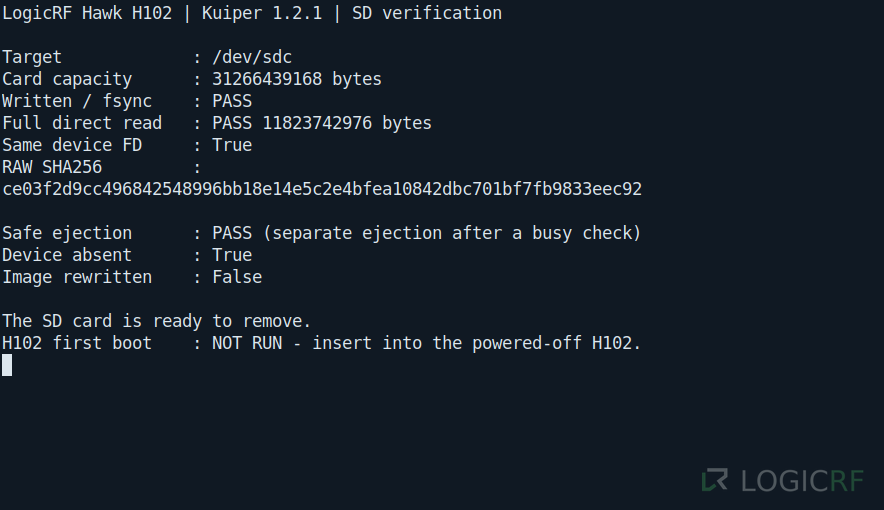
Historical receipts: full readback passed, followed by separate safe ejection after a busy-device result
¶ DHCP first, with a static fallback
With deployment tools 0.3.0, packaged as 1.2.1-en-r3, the SD write command defaults to --network auto:
| Network available at startup | H102 address | Computer setup |
|---|---|---|
| DHCP lease obtained | Address assigned by the server | Use a reachable address on the same network |
| No usable DHCP lease | 10.168.1.199/24 | Use an unused address such as 10.168.1.200/24; no gateway or DNS is needed for a direct connection |
Connect Ethernet before powering on. The DHCP transaction times out after approximately 15 seconds before static fallback; this is not the complete board boot time. Read the actual address on UART0 with ip -4 address show dev eth0, or use the DHCP server's lease list. A DHCP address need not be 10.168.1.199.
Once fallback is active, a returning DHCP server does not move the address during reception. Stop the session before restarting the board or changing network settings. Without DHCP, provision one unconfigured H102 at a time: each device on the same subnet needs a distinct fallback address. Add --address 10.168.1.198/24 when writing another card, for example.
| Optional write arguments | Behavior |
|---|---|
Omit network arguments, or --network auto |
DHCP first, then 10.168.1.199/24 |
--network auto --address 10.168.1.198/24 |
DHCP first, then the specified fallback |
--network dhcp |
DHCP only |
--network static --address 10.168.1.199/24 |
Start with the specified static address |
The original Kuiper 1.2.1 image is unchanged. These network files are installed by r3 during writing. Writing the original image without r3 network provisioning uses DHCP only. Select the required mode before writing; writing a card again replaces its data.
¶ 3. Boot the new H102
- With H102 powered off, insert the card and connect Ethernet to the intended network. Check power input and boot selection, then power on. UART0 at 115200, 8N1, no flow control is recommended for first boot. Basic network checks do not require USB3 or an RF loopback.
- Wait for filesystem expansion, per-device identity creation and default SDK initialization. If expansion triggers a reboot, let it finish without removing power or the card.
- Find the new IP using
ip -4 address show dev eth0on UART, or the router's DHCP list. Do not assume another board's previous IP. - For normal operation, open the GUI or GNU Radio and enter the device IP. No Linux login is required. Start with a finite reception using a profile that fits the network bandwidth.
- Administrators and integrators can optionally run the basic check below. Initial maintenance credentials are
logicrf/logicrf; before SSH, verify the new host-key fingerprint using UART or a trusted administration record. These maintenance steps are separate from ordinary IIO use.
First boot creates machine-id, a stable per-device MAC policy and SSH identity, expands the root partition and initializes 40 MSPS / 20 MHz, independent LO, configuration services, iiod and 58 packages. No manual MAC, machine-id, SSH-key or per-package setup is needed. The default hostname is logicrf; distinguish boards by actual IP and recorded identity.
¶ 4. Optional administrator check
Run this check on a newly written 1.2.1 image. Matching device and network services are included; no separate service installation is required. For an upgraded device or a custom boot profile, use the relevant upgrade package's checks rather than overwriting upgraded files to match base-image counts or defaults.
Linux PC · Use the connected device’s actual IP or URI and your local installation paths.
H102_IP=replace-with-actual-board-ip
python3 scripts/h102_check_new_board.py \
  --host "$H102_IP" \
  --report "$PWD/deployment-reports/H102-003-check.json"
SSH uses an existing key/agent or prompts normally. The tool neither stores passwords nor changes authentication. --known-hosts /path/known_hosts selects an existing trust file. --identity-file /path/to/existing-key passes the path to SSH without reading the private key or including it in reports. The board probe runs from stdin in RAM; it installs nothing, enables no services, changes no configuration and starts no capture.
With a report from another board, compare identities:
Linux PC · Use the connected device’s actual IP or URI and your local installation paths.
python3 scripts/h102_check_new_board.py --host "$H102_IP" \
  --compare-with deployment-reports/H102-002-check.json \
  --report deployment-reports/H102-003-unique-check.json
A duplicate machine-id, MAC or SSH public key of the same algorithm is rejected. Without a previous-board report, cross-device uniqueness is NOT_RUN; one well-formed machine-id does not prove uniqueness. Compare different boards, not repeated checks of the same board.
You can also copy the complete tool directory to H102 and run python3 scripts/h102_check_new_board.py --report /home/logicrf/H102-check.json. That checks the board locally; PC reachability and client enumeration still need separate checks.
¶ Report contents
| Check | Basis |
|---|---|
| Version and board | Actual FDT board model, running kernel and pinned metadata SHA; the internal 1.2.1-rc2 marker is compatible with this release |
| Installed files | 587 files, four links, 58 packages / 29 logical combinations, both real LO modes and pinned software stack |
| First-boot identity | machine-id, actual MAC, boot and SSH public-key fingerprints; no private-key reads |
| SD expansion | Actual mmcblk0p2 start, partition end and root filesystem capacity |
| Services/network | Bootstrap, profile broker, iiod_ffs, Ethernet policy, zero failed units, 1000 Mbps and actual IP / port 30431 listener |
| Initial IIO state | Actual four-channel 40/20 values, managed default package, TX/DDS/DMA off; existing work is not stopped automatically |
| PC access | TCP 30431 connectivity; actual IIO enumeration if iio_info is installed, otherwise explicitly NOT_RUN |
PASS_BASIC_CHECKS_ONLY covers these basic checks, not full RF or data qualification. A device with changed configuration or active work may report non-default or busy state; the tool does not restore it automatically. If first-boot services are still starting, wait, then use a new report path. Preserve the earlier report.
¶ 5. First reception
Connect the GUI and choose a profile that fits network capacity; 4 MSPS / 2 MHz is recommended for a first dual-RX session. Capture a finite block and inspect IQ/spectrum. Validate recording, TX loopback or USB according to the application. Noise on an unconnected input is expected. RF loopback requires fixed attenuation and allowed input levels; never directly connect TX to RX.
¶ Find the controls on screen
In the GUI, enter the device IP, connect, select the profile and channel, then start a timed reception. Ordinary GUI use does not ask for the Linux account password. See GUI installation and the step-by-step first reception.
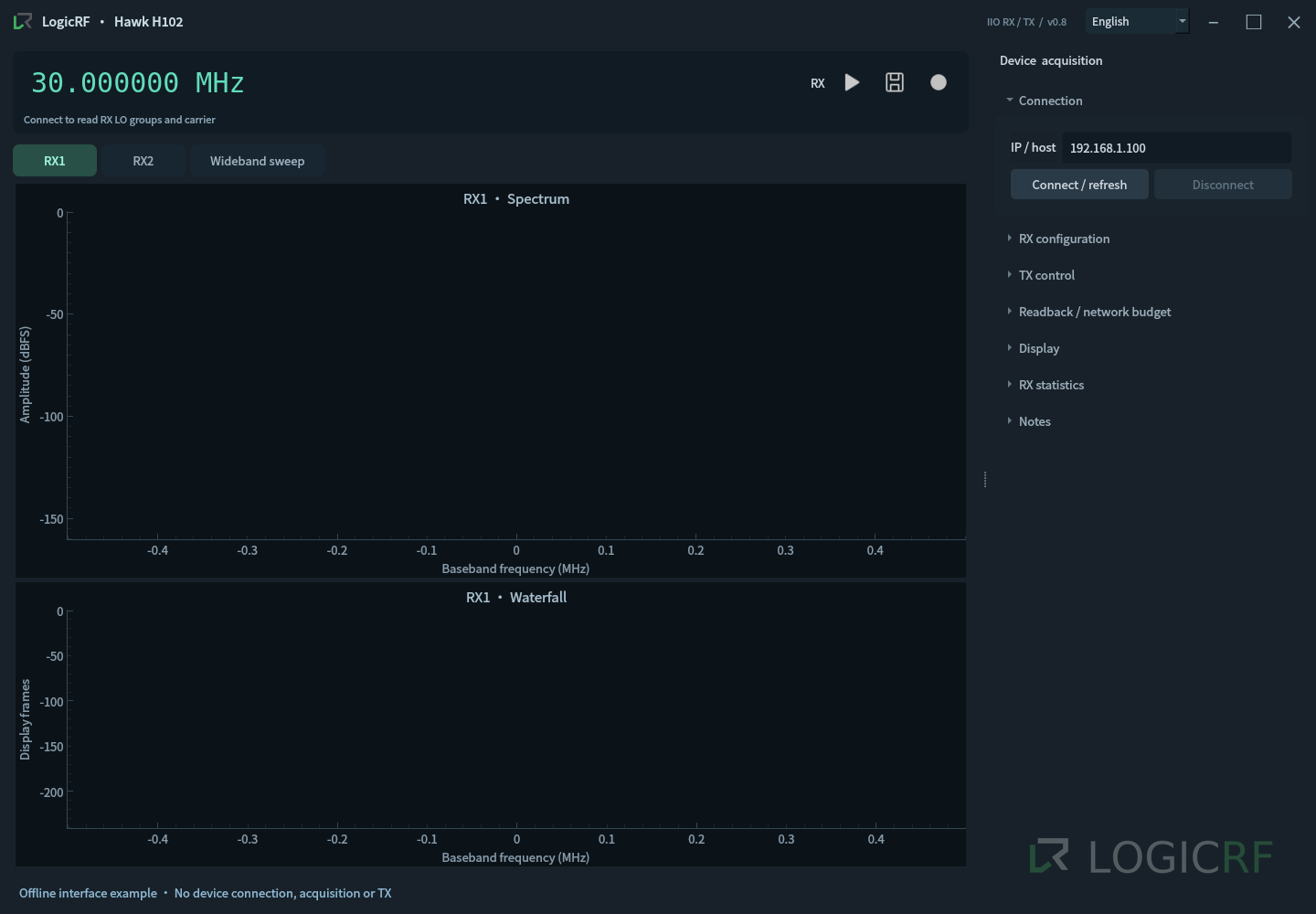
GUI connection controls, shown offline. Replace the example IP with your H102 address. An entered address alone does not indicate a connected device.
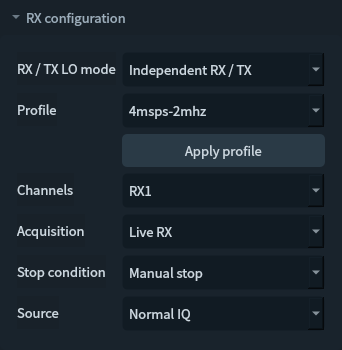
Profile controls, shown offline. Select Apply profile and wait for actual readback before starting. For a first low-rate check, 4 MSPS / 2 MHz is also suitable; increase the rate within the available network budget.
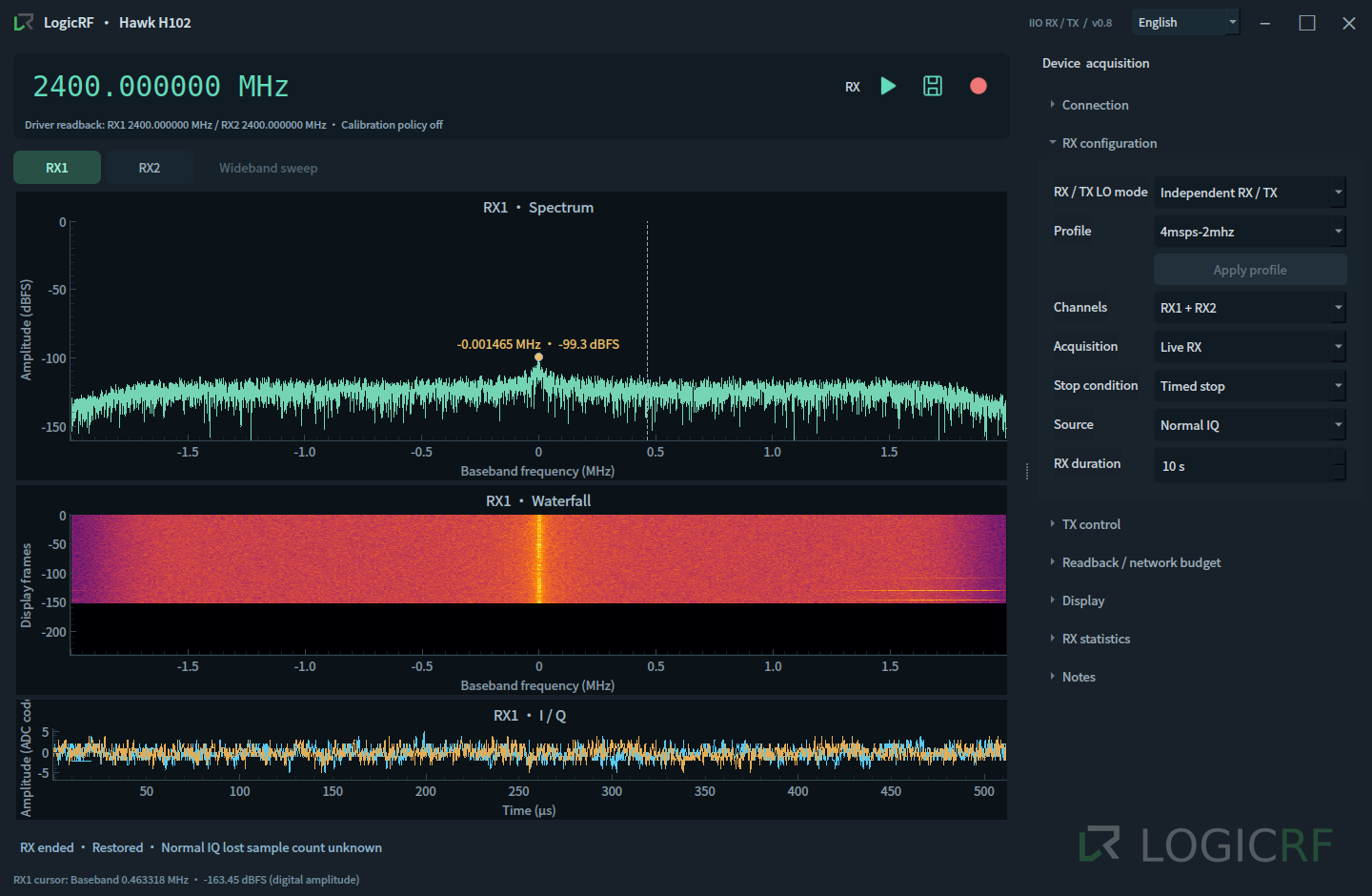
RX1 after a completed 10-second dual-RX session at 4 MSPS / 2 MHz and 2.4 GHz. The retained received data shows spectrum, waterfall and I/Q waveforms. Signal appearance depends on the connected input.
Recording also requires disk bandwidth. The GUI records complex IQ16 at 4 bytes per sample per channel. At 4 MSPS with two RX channels, the raw file rate is 32 MB/s; its short write/fsync admission check requires at least 40 MB/s. Slow or busy storage can refuse recording even when live reception works. Choose faster storage or a lower sample rate, and check the final recording report and files.
The basic checker does not capture IQ, transmit RF, transfer USB data or measure timing accuracy; these report items are NOT_RUN. After deploying each device, check reception, recording and the interfaces needed for its application, and keep its results.
¶ After deployment
Check first boot, expansion, unique identity, matched services and actual network access on the target board. Verify RX/TX, USB and GNSS as required. The basic checker does not replace application checks.
Retain upstream ADI/Kuiper attribution, licenses and release notes with the materials. Deployment tools do not redistribute a complete vendor SDK.
For a network without DHCP, use r3 automatic fallback as described above. The system network guide also covers manual setup on cards written from the original DHCP-only image.