¶ Recommended delivery and applicability
| Item and version | Platform and file type | Access | Verify and use |
|---|---|---|---|
| Recommended system · Kuiper 1.2.1 / RTL 1.2.1 · 2024.1 | Hawk H102 Rev.B · SD image | Authorized GitHub | 31d554358ab80111c8b9244a93261e184c0766a13680fb860199a4154df5aea5 · Guide |
| IIO GUI · 0.8.1 | Linux x86_64 · host GUI | Authorized GitHub | File SHA-256 · Guide |
| GNU Radio module · gr-logicrf 1.2.3 · GNU Radio 3.10.12.0 | Host · GNU Radio module | Authorized GitHub | File SHA-256 · Guide |
¶ Recommended image and compatibility archive
For Hawk H102 Rev.B use Kuiper/RTL 1.2.1 / 2024.1 (delivery record 2026-10-27), IIO GUI 0.8.1 and gr-logicrf 1.2.3. Download all parts with an authorized GitHub account. The reassembled LogicRF-Hawk-H102-Kuiper-1.2.1-2024.1.img.xz is 2,760,770,292 bytes, SHA-256 31d554358ab80111c8b9244a93261e184c0766a13680fb860199a4154df5aea5.
The IIO GUI delivery archive is version 0.8.1. Its window title displays v0.8.0. Use the archive filename and SHA-256 on this page to identify the installed release.
The historical LogicRF-Hawk-H102-Kuiper-1.2.0-2024.1.img.xz is for existing 1.2.0 installations. SHA-256 is 5a09380de3cea3219cc2ffb2cff2a2281e03b5e1c2fee2070c4e77aa9cd170a7. Match host components to the original delivery manifest. The historical image tag h102-kuiper-1.2.0-image is dated 2026-10-20. Its reassembled file is 2,759,144,392 bytes.
Recommended image · authorized GitHub
¶ Product document editions
For Hawk H102. The detailed specification and hardware guide apply to Rev.B / Kuiper 1.2.1. Each filename and SHA-256 identifies the exact language edition.
| Purpose and access | Revision | File identifier and SHA-256 |
|---|---|---|
| Selection brief (two pages) · request by email | 1.0 | Hawk-H102-Datasheet-en.pdf · a61f4e52821bdebe3bab3b6de0707ad74e23612da1af80371ef365cf35ae1c77 |
| Product specification (detailed configuration) · customer access | 2.0.2 | hawk-h102-product-datasheet-2.0.2-en.pdf · eb778b848d34fb97556d2b73cf5a728ce92b6d99f95d30c0a6393dc52471e9a3 |
| Hardware guide (connections and installation) · customer access | 2.0.5 | hawk-h102-hardware-2.0.5-en.pdf · f325db929971562a2cf2cbd8e31a86349fc11e2600083cc18bc9bb0ec97883bd |
Use Kuiper/RTL 1.2.1, IIO GUI 0.8.1 and gr-logicrf 1.2.3 together. Kuiper 1.2.1 already includes the matching device API and network services. Check the included services after writing and booting the card. GitHub repositories and assets currently require an authorized account. A documentation-site login does not grant GitHub access. Ordinary device connections use the H102 IP only.
| Component | Matching version | Download |
|---|---|---|
| SD system image | Kuiper 1.2.1 / 2024.1, RTL 1.2.1 | Image release; all three parts are required |
| SD deployment tools | 1.2.1 English | H102-Deployment-Tools-1.2.1-en-r3.zip in the same image release |
| Device API / network services | API 0.1.0-ip36-panel1 / cap3, included | Included in the image; no separate installation required |
| IIO GUI | 0.8.1, English default with Simplified Chinese | GUI release |
| GNU Radio module | gr-logicrf 1.2.3, GNU Radio 3.10.12.0 | Module release |
| Optional USB host tools | 1.0.0-r2, separate setup for USB IQ | USB host tools |
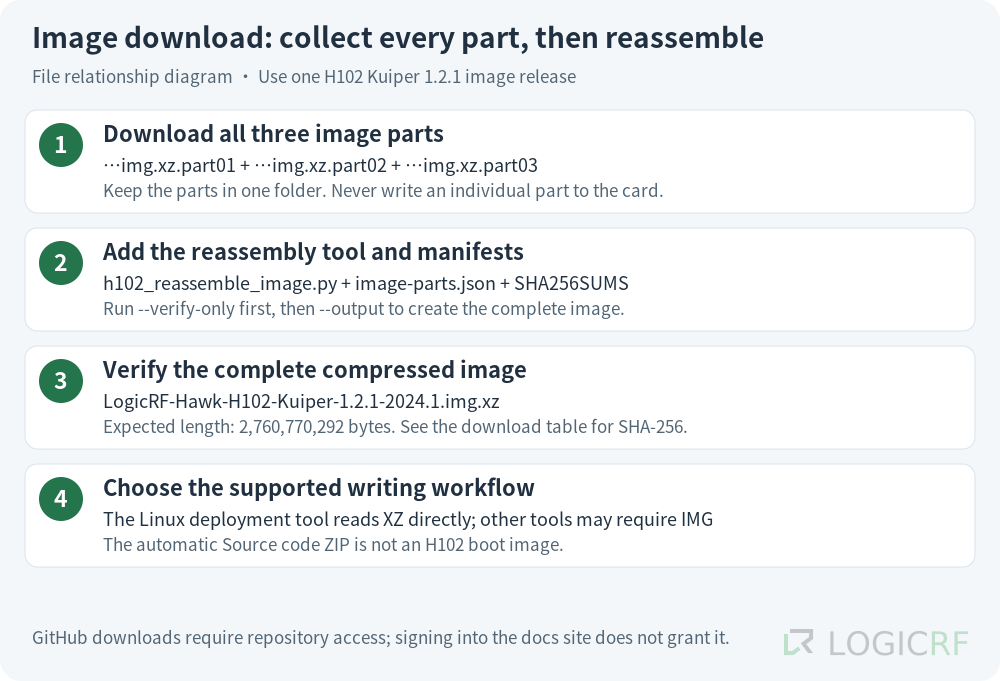
Image download file relationships
Deployment tools 0.3.0 (1.2.1-en-r3) install DHCP-first networking with 10.168.1.199/24 as the default fallback. The original image remains DHCP-only when written by another program. See network choices. The tools ZIP contains no image.
¶ Verify downloads
The image release includes all three .img.xz.part01/02/03 files, image-parts.json, h102_reassemble_image.py, SHA256SUMS, the deployment-tool ZIP and instructions. GitHub automatic Source code ZIP files are source, not the SD image. Never write one part to a card. The image intentionally retains its internal 1.2.1-rc2 label because the stable image uses the same bytes.
| Complete file | Bytes | SHA-256 |
|---|---|---|
LogicRF-Hawk-H102-Kuiper-1.2.1-2024.1.img.xz |
2,760,770,292 | 31d554358ab80111c8b9244a93261e184c0766a13680fb860199a4154df5aea5 |
Expanded .img |
11,823,742,976 | ce03f2d9cc496842548996bb18e14e5c2e4bfea10842dbc701bf7fb9833eec92 |
| H102-Deployment-Tools-1.2.1-en-r3.zip | 34,059 | f8bce13e52fd56e30a7692a6a1fc3b145a1cbddf546e646885342067a357eace |
gr-logicrf-1.2.3-source.zip |
605,625 | b6536598f440952577689faee37a016f9e5485bb666c9f67db5a7b4fd5e6fe4b |
hawk-h102-iio-gui-0.8.1-source.zip |
198,219 | e838b138abc46a9acc6237993f96e1f3d4560fcc41a50414ba23a8a4a0c2ddca |
On the Linux PC, create a download folder containing all parts, manifests and the reassembly script. Open a terminal there. Verify first, then reassemble into a filename that does not already exist.
Linux PC · Run in the tool or project directory named here; set paths to the actual installation and files.
python3 h102_reassemble_image.py --verify-only
python3 h102_reassemble_image.py --output LogicRF-Hawk-H102-Kuiper-1.2.1-2024.1.img.xz
¶ Windows profile generation: tools and inputs
Use these downloads when adding or regenerating ADRV9002 profiles. First reception can use installed configurations.
| Download | Version and source | Next step |
|---|---|---|
| ADI ADRV9001-SDK Evaluation Software, including TES/DLLs/resources/API | 1.0.0: ADI installation guide · official SDK ZIP | Verify SHA-256 and extract completely. ADI's adjacent ZC706/ZCU102 images are not H102 images |
| Microsoft .NET Framework | Official 4.8 download | Check the installed runtime and csc.exe before installing again |
| LogicRF generator and Linux importer | Matching source tag | Keep the complete source directory; authorized GitHub account required |
| H102 request templates | Request ZIP · customer access · 1.2.1-r1 | Two 29-entry catalogs plus two single-entry 8/4 examples; not TES Load Session files, and no SDK/generated output included |
| Native TES session templates | 29-session ZIP · customer access · SDK1-1.0.0-r1 | 29 .taxidi files matching the built-in configuration index; TES v1.0.0, independent LO; use File → Load Session |
If the official ZIP is unavailable from your network, ask your delivery contact for the matching version and how to obtain it. Technical support
SDK filename: adrv9001-sdk-1pt0pt0.zip; SHA-256: 5bd9ae08e9eedda15b48c643c01328557dcce9a52172dc52f4f32e180aad6653.
Request ZIP SHA-256: c4dfddc6161d03ea385a350bdb53dd58de8b86b527d686240cc3fc2bc25950af. Its source is pinned to 57d5baaf88c70d70922bc4c818accf8f343fbc1c; single-entry examples select original entries without parameter changes. Generate files through the matching tools and validate new configurations as described in the profile-generation guide.
TES session ZIP SHA-256: d68ec787565318ca21b8a1c08b9187fba4cd155f6696c74378a75f0164a7e2b9. The package provides independent-LO sessions for offline viewing and editing. Select built-in configurations directly for everyday device operation. See the illustrated session workflow.
The official version page listed 1.0.0 and the ZIP address was checked on 2026-10-28. Complete ADI's own login/license process if prompted. Keep this guide's pinned version and do not mix DLLs; the docs site does not mirror the vendor SDK.
Follow Windows setup and profile generation for the complete procedure and completion checks.
¶ Setup order
- Verify and reassemble the image. Follow new-device deployment to inspect the exact whole SD card, write it, perform complete direct readback and safely eject it. A 32-GB card is suitable. Writing overwrites the selected card.
- Insert the card with H102 powered off, keep the factory SD-boot setting, connect Ethernet and power on. Allow identity creation, expansion and initialization to finish; find the actual address: the DHCP lease, or the fallback when using r3 auto mode without a lease.
- Complete the deployment guide's read-only identity/system/service checks. The API and network services are already included; no separate installation is required.
- Install IIO GUI or GNU Radio on the PC. Connect by IP, then check a bounded admitted receive window, recording, stop and reconnect. GNU Radio does not depend on the standalone GUI.
- For USB IQ, separately complete USB host preparation on the computer physically connected to the USB cable.
The GUI reference host is Ubuntu 22.04 x86_64, Python 3.10+, a Qt graphics desktop and libiio 0.x with networking. The GNU Radio combination is GNU Radio 3.10.12.0 with GRC/QtGUI, Python 3.10, libiio >=0.23 and <1.0, and libpulse >=15. Obtain the FTDI library/header inputs separately from official sources for USB. Stop and release one application before another uses the same H102.
¶ Link and version limits
The Ethernet IQ16 aggregate admission budget is 64 MB/s, calculated as sample rate × channels × 4. Check actual sample counts, file sizes and recording integrity even within that budget; a displayed spectrum is not a lossless-recording guarantee. The boot default is 40 MSPS / 20 MHz. Select a suitable rate/channel combination, such as 4 MSPS / 2 MHz, before initial Ethernet reception.
The system uses API 68.21.6, firmware 1.0.2 and stream 0.7.22.0, with 29 sample-rate/bandwidth choices in two LO modes, 58 packages. Boot, persistent identity, representative Ethernet/USB paths and Linux ADI IIO Oscilloscope were checked for this image. Use the documented RF, UTC and data-duration limits; do not infer them from a plot or panel light.
See source materials for component licensing and the user guide for operation.
¶ Product documents and offline manuals
These PDFs correspond to the online chapters. Document and software versions are separate. Chinese and English editions are available; the links below are in English.
| Document | Revision | Download |
|---|---|---|
| Product datasheet | 2.0.2 · Rev.B / Kuiper 1.2.1 | PDF · customer access |
| Hardware guide | 2.0.5 · Rev.B / Kuiper 1.2.1 | PDF · customer access |
SHA256 checksums: product datasheets2.0.2, hardware guides2.0.5. Read online: product specifications, hardware reference, mechanical integration.
¶ USB host source archive
This is a source archive, not a ready-to-run binary installation. After checking the ZIP, prepare the separate FTDI/libusb inputs, build a payload and install it on the USB-connected PC. A prepared payload is a later local build output.
| File | Bytes | SHA-256 |
|---|---|---|
| H102-USB-Host-Tools-1.0.0-r2-source.zip | 72,183 | a0cf0f2ca2cf9fa05c67c29e4a55eca8cb0ac10bc9b9614521a19ce5ae28b153 |