LogicRF Hawk H102 Kuiper 1.2.1 is based on ADI Kuiper 2025-03-18 Full userspace and integrates H102 boot files, SDK1 kernel/modules, 29 profile combinations (58 packages) and LogicRF tools.
The integrated image also includes h102-control-api.service (TCP30432) and h102-network-affinity.service. Check the included services after startup.
¶ Boot chain
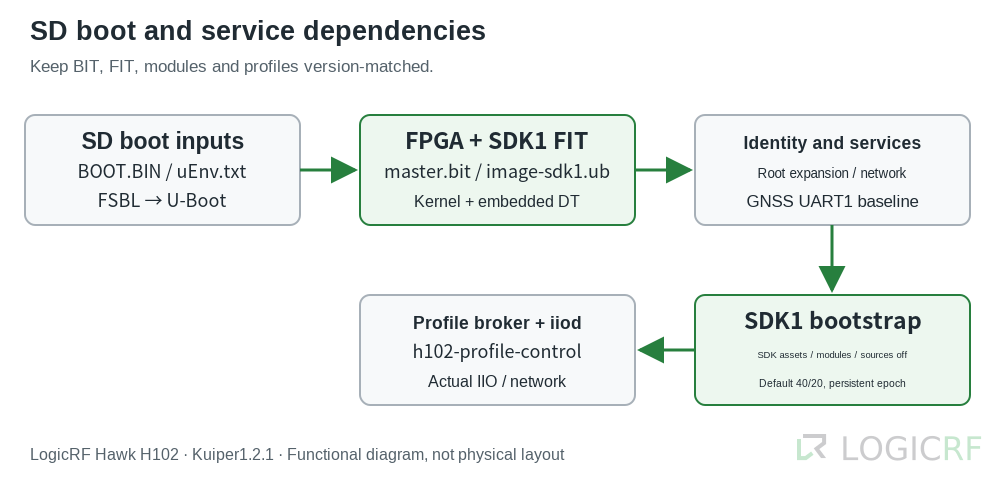
| Component / Location | Responsibility |
|---|---|
/boot/BOOT.BIN |
FSBL/U-Boot input |
/boot/uEnv.txt |
Load the default BIT and SDK1 FIT |
/boot/h102_logicrf_master.bit |
FPGA artifact pinned by the 1.2.1 manifest |
/boot/image-sdk1.ub |
Kernel and FIT-embedded device tree; no separate h102.dtb is required |
/usr/lib/modules/6.6.0-h102-sdk1-candidate-calfix1-regbounds1-sharedlo1 |
Modules matching the kernel |
h102-sdk1-bootstrap.service |
Check boot files/device identity, initialize the default profile and confirm RX/TX are off |
h102-profile-control.service |
Broker between configuration requests and the actual manager |
iiod_ffs.service |
Actual iiod instance in the exact boot; network port 30431 |
h102-gnss-uart-baseline.service |
UART1 38400/raw/no-echo baseline |
An inactive iiod.service does not mean IIO is unavailable. This version uses iiod_ffs.service; also check the port and enumeration.
Kuiper 1.2.1 starts with 40 MSPS / 20 MHz and independent RX/TX LO. Changing a runtime profile in GUI/GRC affects the current session; it does not change the next boot default. Read actual state with h102-config-sdk1 status after startup, then select a suitable low-rate runtime profile before Ethernet reception.
¶ First boot and persistent state
The shared image does not embed a board MAC, machine-id, SSH private key or static IP. Identity is generated on first boot. NetworkManager uses a stable per-device MAC strategy. The original image uses DHCP; r3 writing adds the selected network mode described below. Root filesystem expansion uses remaining SD space; subsequent boots preserve geometry.
The system stores the time epoch in /var/lib/h102-rx/time-epoch.json to distinguish newly established time-association intervals. The system creates it during initial setup and preserves the existing count across later boots. Do not delete, reset or copy this file from another device.
| Information | Deployment rule |
|---|---|
| IMG, BIT/FIT, 29-group package | Version inputs may be identical |
| machine-id, MAC-strategy key, SSH private key | Independent per device; never copy a running device's identity |
| DHCP IP, boot_id | Read per device / per boot |
| time_epoch | Device-local state; do not reset as a template |
| configuration_id | Manager sequence within this boot, not a global device identity |
¶ Health checks (H102)
H102 shell · Run after SSH or serial login. Use the interface and configuration names on this unit.
uname -r
cat /etc/h102/sdk1-image.json
sudo h102-config-sdk1 status
systemctl show h102-sdk1-bootstrap.service h102-profile-control.service \
  iiod_ffs.service --property=Id,ActiveState,SubState,Result
systemctl --failed --no-pager
df -h /
The image manifest records the matching boot files and their digests. Compare it with the running components when checking versions; candidate is a retained build string in the kernel name.
¶ Upgrades, rollback and multiple devices
- Record versions, boot, MAC, configuration, customer data and application settings. Keep a recoverable backup of the current card.
- Shut down normally and write the new complete image offline.
- On the new card, check default UART, kernel/API, IP/SSH identity and default configuration before restoring business settings.
- Manage BIT, kernel, modules and profile/stream as a matching set. Do not mix old inputs.
- Roll back with a verified old card or complete old image; retain failure logs from the new version.
The same released image can be deployed on multiple H102 units, but each first boot must generate its own device identity, MAC strategy and SSH keys. Follow new-device deployment to check default services and data connections, then restore that device's application settings. Do not copy another device's persistent transactions or whole-card identity.
¶ Network and accounts
Initial board access uses logicrf/logicrf, SSH port 22 and IIO port 30431. Manage access under site policy. IIO attributes/sampling, USB host permissions, SSH accounts and website download authorization have different roles.
See troubleshooting and downloads and versions for complete images and SHA values.
¶ Network-service configuration
After boot and network connection, eth0 effective IRQ affinity is CPU1. The iiod/iiod_ffs services use CPUAffinity=0 and their workers inherit CPU0. System services apply these policies. Read back actual effective settings when diagnosing performance and check matching versions for any required network-performance add-on.
¶ Deploy another device
Use the Linux PC deployment tool for target confirmation, complete image verification, writing, direct readback and safe ejection. After first boot, check IP, identity, partition expansion and services. Successful card writing, system boot and application RX/TX are separate checks; complete them in order.
¶ DHCP first, with a static fallback
With deployment tools 0.3.0, packaged as 1.2.1-en-r3, the SD write command defaults to --network auto:
| Network available at startup | H102 address | Computer setup |
|---|---|---|
| DHCP lease obtained | Address assigned by the server | Use a reachable address on the same network |
| No usable DHCP lease | 10.168.1.199/24 | Use an unused address such as 10.168.1.200/24; no gateway or DNS is needed for a direct connection |
Connect Ethernet before powering on. The DHCP transaction times out after approximately 15 seconds before static fallback; this is not the complete board boot time. Read the actual address on UART0 with ip -4 address show dev eth0, or use the DHCP server's lease list. A DHCP address need not be 10.168.1.199.
Once fallback is active, a returning DHCP server does not move the address during reception. Stop the session before restarting the board or changing network settings. Without DHCP, provision one unconfigured H102 at a time: each device on the same subnet needs a distinct fallback address. Add --address 10.168.1.198/24 when writing another card, for example.
| Optional write arguments | Behavior |
|---|---|
Omit network arguments, or --network auto |
DHCP first, then 10.168.1.199/24 |
--network auto --address 10.168.1.198/24 |
DHCP first, then the specified fallback |
--network dhcp |
DHCP only |
--network static --address 10.168.1.199/24 |
Start with the specified static address |
The original Kuiper 1.2.1 image is unchanged. These network files are installed by r3 during writing. Writing the original image without r3 network provisioning uses DHCP only. Select the required mode before writing; writing a card again replaces its data.
¶ Static IPv4 without a DHCP server
The following manual procedure applies to the original DHCP-only image or a card provisioned with --network dhcp; r3 auto-mode cards should use the fallback described above. For a DHCP-only card without a server, configure the H102 once through UART0 (115200 baud, 8N1, no flow control). Stop reception/transmission and close device-control applications before changing the address. Normal GUI and GNU Radio use then requires only the configured IP.
For a direct Ethernet connection, use two unused addresses in the same subnet:
| Setting | Computer Ethernet interface | H102 |
|---|---|---|
| IPv4 address | 10.168.1.200 |
10.168.1.199 |
| Subnet prefix | /24 (255.255.255.0) |
/24 |
| Gateway and DNS | Leave blank for this direct connection | Leave blank |
These are example addresses. On an existing network, obtain suitable unused addresses and any required gateway/DNS values from the network administrator.
On the H102 UART console, log in with the maintenance account and run:
H102 shell · Run after SSH or serial login. Use the interface and configuration names on this unit.
sudo nmcli connection modify USRP \
  ipv4.method manual ipv4.addresses 10.168.1.199/24 \
  ipv4.gateway "" ipv4.dns "" ipv4.never-default yes \
  ipv4.may-fail no ipv4.dad-timeout 3000 ipv6.method disabled
sudo nmcli connection up USRP
ip -4 address show dev eth0
This saves the per-device connection settings; it does not rebuild RTL or Linux. Changing the IP disconnects an existing network session, so perform initial setup through UART.
On the computer, select Manual IPv4 configuration for the wired adapter and enter the address and mask from the table. Apply the settings, then check connectivity with ping 10.168.1.199. In the GUI or GNU Radio, enter 10.168.1.199; this local data connection does not require a router or IPv4 DHCP lease. Select a low-rate profile for the first reception.
To restore H102 DHCP, use UART:
H102 shell · Run after SSH or serial login. Use the interface and configuration names on this unit.
sudo nmcli connection modify USRP \
  ipv4.method auto ipv4.addresses "" ipv4.gateway "" ipv4.dns "" \
  ipv4.never-default no ipv4.may-fail yes ipv4.dad-timeout -1 ipv6.method auto
sudo nmcli connection up USRP
Read the newly assigned IP before reconnecting. Restore the computer adapter's previous IPv4 settings when leaving the direct network. For r3 cards, select automatic fallback or static addressing in the write command before deployment. See the NetworkManager connection commands for profile management.