H102 boots from a MicroSD card. Choose capacity, endurance and measured performance for the intended workload. The system boot card and storage for high-rate IQ recording serve different purposes.
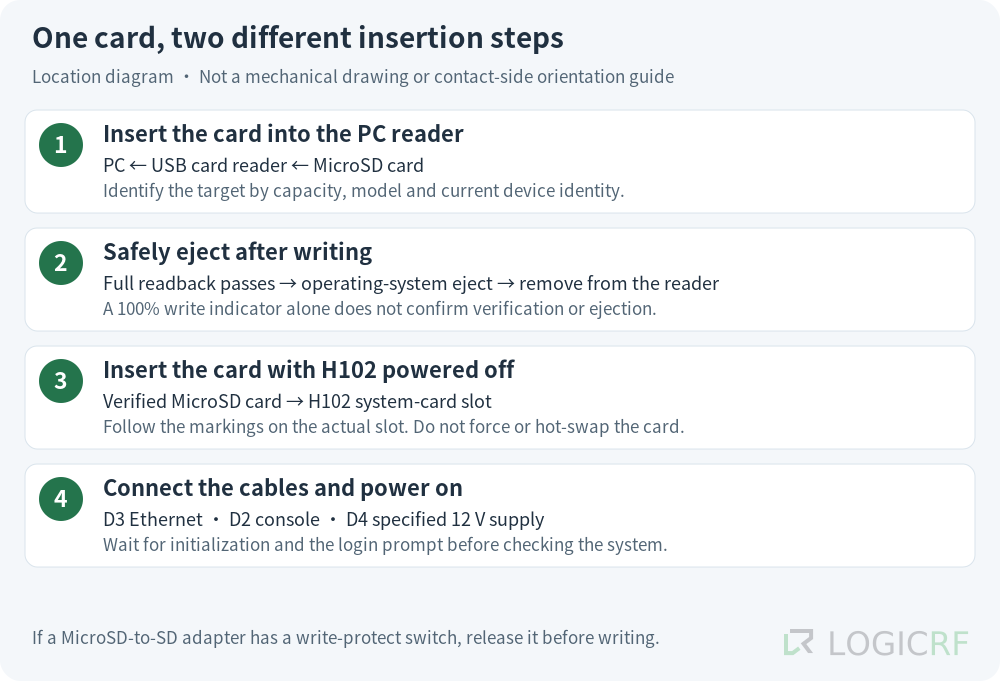
Card location and operation order; follow the markings on the actual slot
See the illustrated quick start for the full procedure.
¶ Choose a card
| Item | Requirement or recommendation |
|---|---|
| Form factor | MicroSD; 32 GB cards are commonly microSDHC, and 64 GB cards are commonly microSDXC |
| Recommended capacity | 32 GB or 64 GB, allowing room for first-boot expansion, logs, application dependencies and user files |
| Minimum writable capacity | The actual whole-device capacity must be at least 11,823,742,976 bytes, the current 1.2.1 RAW image length. A nominal 16 GB card normally fits the image, but is not the recommended capacity for continued use |
| Speed | Use a reputable Class 10 or U1 card, or better. This is not a guarantee of sustained H102 write performance |
| Random access | Prefer A1. An A2 card may operate in a host-compatible mode; H102 support for A2 acceleration is not guaranteed |
| Continuous operation | Consider high-endurance cards for frequent log or data writes, and keep a recoverable image and data backups |
| Cards larger than 64 GB | Capacity alone does not establish compatibility. Verify the complete write, readback, first-boot expansion and reboot before deployment |
Speed classes describe performance under specified conditions; they do not replace measurement on H102 with the actual filesystem and workload. A2 performance also requires host support. See the SD Association application performance classes and speed classes.
¶ Reader and host
Use a reader that supports the selected microSDHC/microSDXC card. A USB3 reader can reduce writing and readback time, but actual speed also depends on the card and connection. Check MicroSD-to-SD adapter contacts and release any write-protect switch before writing.
The Linux deployment tool requires Python 3.10+, lsblk, udisksctl, OpenSSH, debugfs, e2fsck, kernel loop-device support and sudo permission to write a whole device. When writing directly from XZ, the host only needs space for the compressed image. If extracting IMG separately, allow room for both the approximately 2.76 GB XZ and 11.82 GB IMG; reserve at least 15 GB.
¶ Is formatting required before writing?
No preformatting or manual FAT32/exFAT selection is required. The deployment tool writes a complete disk image, including its partition layout and filesystems. Writing replaces the card's existing contents.
- Back up files that must be retained.
- List devices with the deployment tool. Check the whole-device path, capacity, model and current device identity.
- Unmount the card's mounted partitions before writing. Select the whole device, not a partition or the system disk.
- Complete image verification, writing and direct readback, then eject safely. Retain the report if writing or verification fails, and check the card and reader.
Copying an .img.xz file into a normal partition, or writing only one image part, does not produce a bootable system card.
¶ First boot and maintenance
Insert the card with H102 powered off and keep the factory-default SD boot setting. The standard image requires no change to the boot hardware settings. First boot expands the root partition to the available card capacity and generates the device identity. Wait for expansion and any automatic reboot to finish, then check the IP and services using quick start.
Shut down normally before removing the card. Retain the original image, checksums and modified configuration. To restore the system, repeat the same deployment procedure.
¶ Recording IQ on the card
Class 10/U1/A1/A2 labels alone cannot guarantee recording without missing samples. Required write bandwidth also depends on channel count, sample rate and file format:
| Format | Write bandwidth, excluding headers |
|---|---|
| IQ16 | sample rate × channel count × 4 bytes |
| complex float32 | sample rate × channel count × 8 bytes |
For example, two channels at 8 MSPS in complex float32 require approximately 128 MB/s. Do not assume the system SD card can sustain this. Use host storage with measured sustained bandwidth for high-rate recording, and check recording results and counters. See data streaming and GNU Radio examples.
With deployment tools 1.2.1-en-r3, network customization follows full base-image readback. The default is DHCP first, then 10.168.1.199/24 without a lease. The original image written with other programs remains DHCP-only. See network provisioning.