For routine IIO GUI or GNU Radio use, enter only the H102 IP address. No device Linux username, password or SSH private key is required. An administrator handles initial deployment, upgrades and recovery.
¶ One-time setup
- Deploy the matching image and identify the IP using quick start.
- Kuiper 1.2.1 already includes matching services; complete new-device checks.
- Install the matching GUI or GNU Radio software on the user's computer. See downloads.
- For GNU Radio USB data, connect the FT601 USB3 port to the acquisition computer and follow USB host setup for the matching FTDI library, local backend and user permissions. Skip USB setup when using Ethernet IIO only.
Do not copy another board's device identity or installation transaction directory. Routine connections do not require reinstalling services.
¶ Connection paths
| Path | Interface | Purpose |
|---|---|---|
| Device control | TCP30432 | Identity, profiles, tuning and managed sessions |
| Network IQ | IIO / TCP30431 | Network receive and transmit data |
| USB IQ | FT601 USB3.0 | FPGA data path physically connected to the current computer |
| Linux maintenance | SSH or UART0 | Initial setup, upgrades, troubleshooting and recovery; not routine GUI sign-in |
USB data is not automatically forwarded to another computer through the device IP. Place control and IIO services on a trusted device network: the current device service provides neither Internet-account authentication nor TLS. A documentation-site account is also separate from the device Linux account.
¶ Install the IIO GUI on Ubuntu 22.04
Use Ubuntu 22.04 x86_64, Python 3.10 and a graphical desktop session. An administrator installs the system runtime libraries once:
Linux PC · Run in the tool or project directory named here; set paths to the actual installation and files.
sudo apt install python3-venv libiio0 libgl1 libegl1 libopengl0 \
  libglib2.0-0 libfontconfig1 libdbus-1-3 libxkbcommon-x11-0 \
  libxcb-cursor0 libxcb-icccm4 libxcb-image0 libxcb-keysyms1 \
  libxcb-render-util0 libxcb-xinerama0 libxcb-xkb1 libxcb-shape0 \
  libx11-xcb1 fonts-noto-cjk
Obtain hawk-h102-iio-gui-0.8.1-source.zip from matching downloads, verify its SHA-256 against that table, and extract to a new source directory. Change the downloaded path below; if this source directory already exists, choose a new location instead of extracting over it. Run the remaining commands from the extracted package root as your ordinary login user:
Linux PC · Run in the tool or project directory named here; set paths to the actual installation and files.
GUI_ZIP="$HOME/Downloads/hawk-h102-iio-gui-0.8.1-source.zip"
sha256sum "$GUI_ZIP"
mkdir -p "$HOME/LogicRF/hawk-h102/src"
python3 -m zipfile -e "$GUI_ZIP" "$HOME/LogicRF/hawk-h102/src"
cd "$HOME/LogicRF/hawk-h102/src/hawk-h102-iio-gui-0.8.1"
python3 -m venv .venv
.venv/bin/python -m pip install -r requirements.txt
.venv/bin/python -m pip check
bash ./launch.sh
The window starts in English; choose English or Simplified Chinese in the title bar. Enter the device IP in the connection panel. The shell launcher selects this package's virtual environment. Using bash also works when ZIP extraction has not preserved executable permissions.
pip check verifies Python package dependencies; Qt also needs the system OpenGL/XCB libraries listed above. Run the application from your desktop session. A successful command-line check over SSH does not provide a desktop display. For an existing virtual environment, set H102_GUI_PYTHON=/absolute/path/to/python when launching. GUI IQ uses Ethernet IIO; GNU Radio and FTDI USB setup are separate.
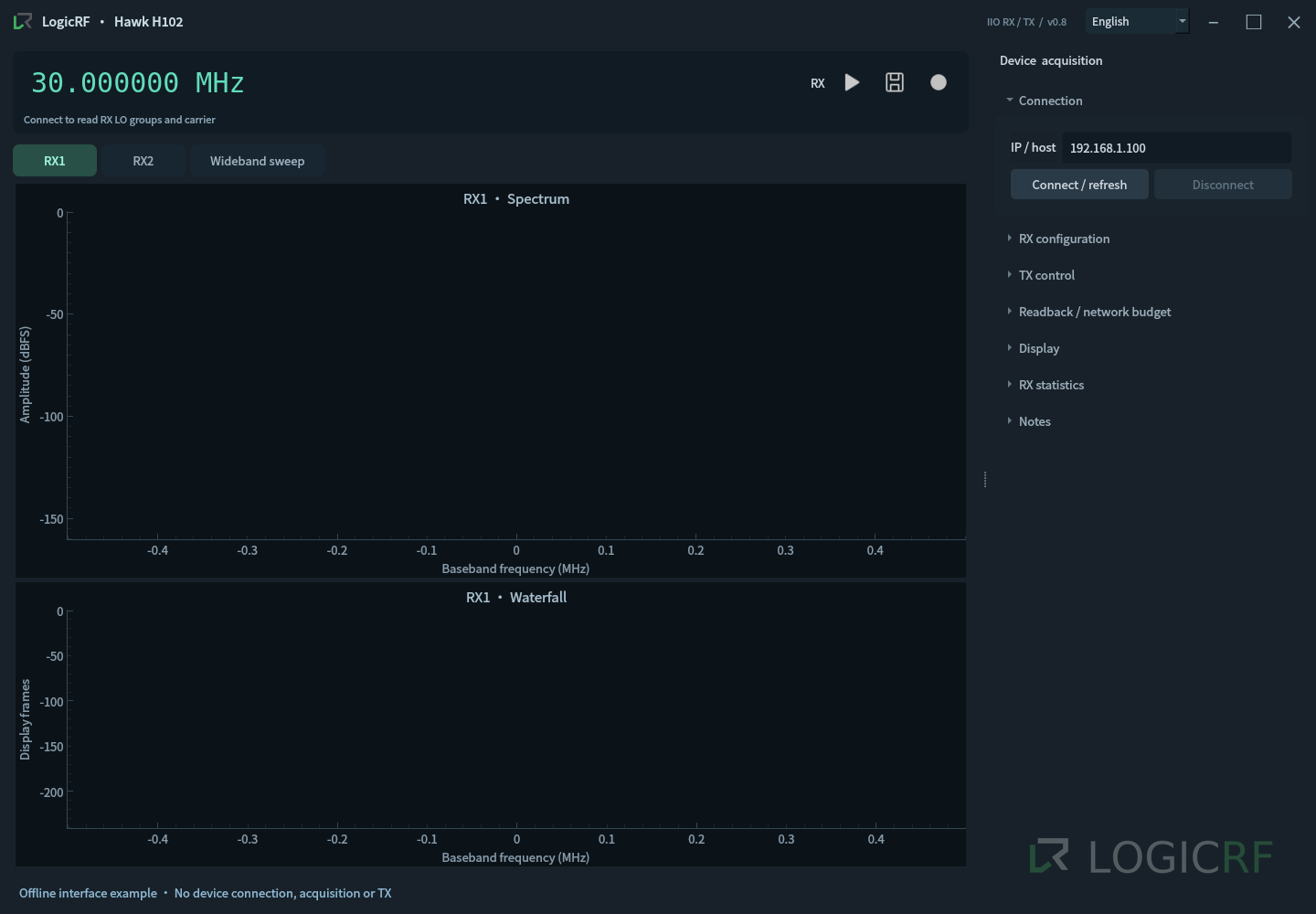
Expand Connection, replace the example IP with your device address, then select Connect / refresh. Change the language in the title bar. This is an offline interface example with no device connected; after connecting, check the active profile and actual settings.
¶ GUI workflow
- Enter the IP and connect. Wait for device identity, active profile and channel state.
- For first network reception, select 4 MSPS / 2 MHz and RX1. After applying it, verify the actual rate and bandwidth. For other profiles, calculate throughput using the transport budget.
- Set the center frequency using the frequency control. Verify device readback before receiving.
- Use spectrum, waterfall, IQ display or recording as needed. Keep configuration fixed during recording.
- After stopping, wait for data drain and device recovery before disconnecting or handing control to another application.
IQ16 and GNU Radio complex-float32 files use different formats; select the parser using recording metadata. A complete recording also differs from saving the latest block. Check files and final state; a smooth display does not establish data completeness.
¶ If connection fails
Check the IP, network reachability and TCP30432/30431 services, then compare device and host versions. An administrator resolves missing or mismatched services using the installation guide. Entering the default Linux password does not bypass client version checks. Stop the owning application if the device is busy; avoid concurrent controllers changing configuration.