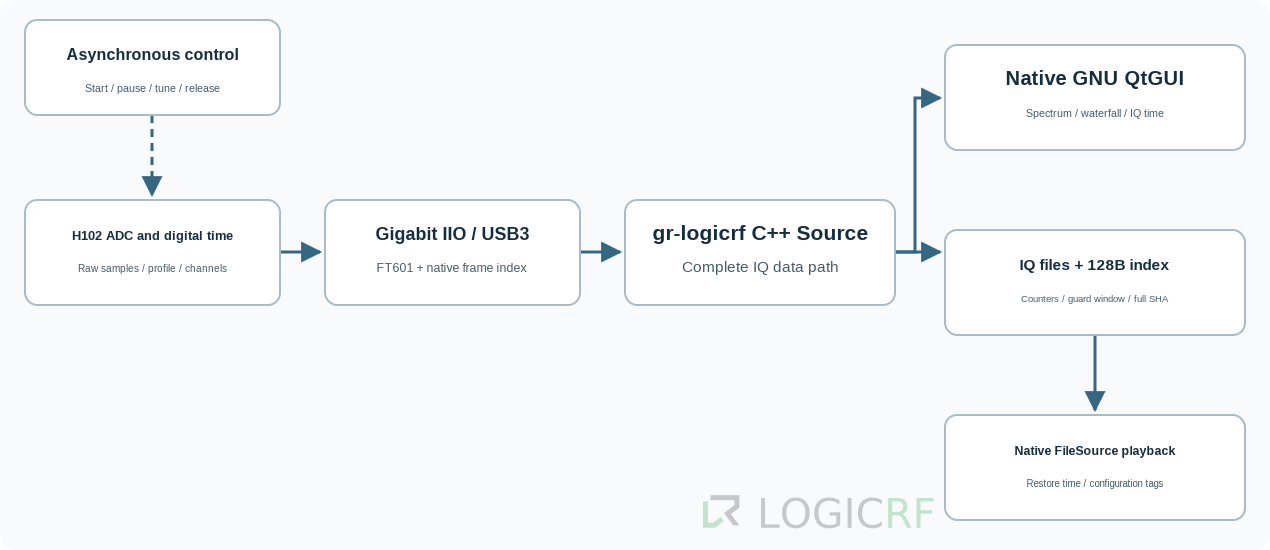
gr-logicrf connects H102 to GNU Radio. FM and SDR applications are editable native .grc flowgraphs with GNU Radio Qt GUI interfaces. Open an installed example in GNU Radio Companion, enter the device IP and run it.
¶ Prerequisites
| Location | Preparation |
|---|---|
| H102 | Kuiper 1.2.1 with included API36-panel1/cap3; complete new-device checks |
| User computer | For source package 1.2.3: Ubuntu 22.04 x86_64, Python 3.10, GNU Radio 3.10.12.0 with GRC/QtGUI, libiio >=0.23 and <1.0, and libpulse >=15 |
| Network | PC and H102 are reachable; control port 30432 and IIO port 30431 are accessible |
| USB data | FT601 physically connected to the flowgraph computer, with matching FTDI D3XX library, local backend and user permissions |
| FM reception | An antenna for the intended band connected to RX1A or the selected receive port; audio output on the PC |
Obtain gr-logicrf from matching downloads. Follow the matching release’s installation instructions. Host software and the base system update separately: prepare device services first, then install the host module. Ordinary flowgraphs do not request Linux or host sudo passwords.
¶ Install gr-logicrf
Verify the supplied SHA before installation. Use the package's pinned installation guide; private GitHub releases still require an authorized GitHub account.
The source package targets the reference environment in the table above. Its registrar checks the exact GNU Radio version 3.10.12.0; an arbitrary distribution package from the 3.10 series is not a substitute. Windows and other Python/GNU Radio combinations are outside this delivery's installation scope.
An administrator prepares the following Ubuntu dependencies once:
Linux PC · Run in the tool or project directory named here; set paths to the actual installation and files.
sudo apt install build-essential cmake ninja-build pkg-config python3-dev \
  pybind11-dev libiio-dev libpulse-dev python3-numpy python3-paramiko \
  python3-pyqt5 python3-gi python3-gi-cairo gir1.2-gtk-3.0
These packages do not install the required GNU Radio build. Install GNU Radio 3.10.12.0 with GRC and QtGUI to a separate user prefix following the GNU Radio source-installation guide. The prefix is the directory supplied as GNU Radio's CMAKE_INSTALL_PREFIX: it contains bin/gnuradio-config-info, its Python modules and libraries. It is not the GNU Radio source or build directory, nor the future gr-logicrf installation directory.
For example, if GNU Radio was installed to $HOME/opt/gnuradio-3.10.12.0, use that exact path below. If it was installed elsewhere, change GNU_PREFIX. Check the existing installation before building gr-logicrf:
Linux PC · Run in the tool or project directory named here; set paths to the actual installation and files.
GNU_PREFIX="$HOME/opt/gnuradio-3.10.12.0"
LD_LIBRARY_PATH="$GNU_PREFIX/lib${LD_LIBRARY_PATH:+:$LD_LIBRARY_PATH}" \
  "$GNU_PREFIX/bin/gnuradio-config-info" --version
pkg-config --modversion libiio libpulse
/usr/bin/python3 --version
Expected versions are 3.10.12.0, libiio >=0.23,<1.0, libpulse >=15 and Python 3.10.x. If an executable is missing or a version differs, complete the host preparation before continuing; do not create an empty prefix directory or change version checks.
Verify gr-logicrf-1.2.3-source.zip against the download table, then extract it on the PC. The example uses a new source directory:
Linux PC · Run in the tool or project directory named here; set paths to the actual installation and files.
GR_ZIP="$HOME/Downloads/gr-logicrf-1.2.3-source.zip"
sha256sum "$GR_ZIP"
mkdir -p "$HOME/LogicRF/hawk-h102/src"
python3 -m zipfile -e "$GR_ZIP" "$HOME/LogicRF/hawk-h102/src"
cd "$HOME/LogicRF/hawk-h102/src/gr-logicrf-1.2.3"

GR_INSTALL="$HOME/LogicRF/hawk-h102/install/gr-logicrf/1.2.3"
GR_WORKSPACE="$HOME/LogicRF/hawk-h102"
bash scripts/install_from_source.sh "$GNU_PREFIX" "$GR_INSTALL" "$GR_WORKSPACE"

/usr/bin/python3 "$GR_INSTALL/launch.py" grc
Change the downloaded ZIP path before running. If this version's source or installation already exists, choose a new directory rather than extracting over it. Keep GNU_PREFIX, GR_INSTALL and the workspace separate. The installer builds, runs offline checks, installs and registers the pinned control runtime; a successful receipt is PASS_SOURCE_INSTALL_RUNTIME_AND_NATIVE_MOCK. This confirms the host installation, not a connection to H102. Use its launch.py for each GRC session so the matching module, libraries and runtime are selected.
The installer does not modify the board, system Python paths or global linker settings. Source installation does not deploy FTDI libraries or USB host services. The standalone IIO GUI, PySide6 and pyqtgraph are not required for gr-logicrf; its panels use GNU Radio/PyQt5.
¶ USB host setup
For USB data, obtain host tools 1.0.0-r2 from matching downloads. The GNU Radio module source installer does not install this service.
The ZIP below contains buildable source, not installed executables. First verify the archive, then supply the separately licensed FTDI/libusb files, build a local payload and install that payload. Reuse an existing installation only when its own version and readiness checks match.
Verify the archive SHA-256 against matching downloads, then extract to a new source directory. These commands use the separate USB host tools archive, not the GNU Radio module archive:
Linux PC · Run in the tool or project directory named here; set paths to the actual installation and files.
USB_ZIP="$HOME/Downloads/H102-USB-Host-Tools-1.0.0-r2-source.zip"
sha256sum "$USB_ZIP"
mkdir -p "$HOME/LogicRF/hawk-h102/src"
python3 -m zipfile -e "$USB_ZIP" "$HOME/LogicRF/hawk-h102/src"
cd "$HOME/LogicRF/hawk-h102/src/H102-USB-Host-Tools-1.0.0-r2-source"
If that source directory already exists, choose a new location. Run the build and installation commands below from this extracted source root.
Administrator: install or roll back the USB host backend
USB host tools 1.0.0-r2 install the FT601 receive/transmit helpers and local control service for one ordinary login user. The supported reference host is Ubuntu 22.04 x86_64 with Python 3.10. Configure the username, project directory and external D3XX location for that computer. Routine GNU Radio connections require only the H102 IP; administrator authentication is used during installation and maintenance.
Connect USB to the computer running the flowgraph. Device control still uses Ethernet and matching H102 API36/capability-3 services. The standalone IIO GUI uses Ethernet IQ. The existing USB service accepts one FT601 at a time and rejects ambiguous device identification.
These tools retain the existing receive/transmit implementation. They do not install board firmware or add RF, timestamp-accuracy, host-platform or arbitrary-duration recording qualification. Installation and service readiness are separate from a successful data test.
Prepare the external inputs
Obtain the following matching D3XX 1.1.8 inputs separately. Neither this source package nor a prepared LogicRF payload includes these vendor files. The tools do not download them or accept vendor agreements on your behalf.
Choose Linux x64 1.1.8 on the official FTDI D3XX driver page and extract the shared library, ftd3xx.h and Types.h. Obtain the fourth file, libusb.h, from the official libusb v1.0.27 source and save it in the same input directory. Verify all four hashes below; a different system header is not a substitute.
If the FTDI page is unavailable, ask your delivery contact how to obtain and verify the official Linux x64 1.1.8 package. Technical support
| File | SHA-256 |
|---|---|
libftd3xx.so.1.1.8 |
949445eb019a6fe3e314e54cc45af1b8ddb1fcdf0c377f1144a59143d0a08752 |
ftd3xx.h |
06ba4fc2d11680f974c1cfa76d504c61ef7325a089133e5247271d25d7111cb4 |
Types.h |
1f1669cea660bddffc9e42197201b2f17dec6c8a81fb2e12b268748d4ce9d66b |
libusb.h |
e55b50eeedab44f0aa62ce6c2126d47ba80e8d9be1a67a62c27d2349bbf00c02 |
The host needs systemd, fuser from psmisc, a C/C++ compiler, CMake 3.20 or later and Ninja. An administrator can install the build prerequisites on Ubuntu:
Linux PC · Run in the tool or project directory named here; set paths to the actual installation and files.
sudo apt install build-essential cmake ninja-build psmisc
Build and prepare a payload as the application user
Run from the extracted source root. Set the paths for your host. Use new build and bundle directories; keep an existing installation intact.
Linux PC · Run in the tool or project directory named here; set paths to the actual installation and files.
PROJECT="$HOME/LogicRF/hawk-h102"
D3XX="$HOME/LogicRF/vendor/ftd3xx/1.1.8"
BUILD="$PROJECT/build/usb-host/1.0.0-r2"
BUNDLE="$PROJECT/releases/usb-host-1.0.0-r2"
mkdir -p "$PROJECT/build/usb-host" "$PROJECT/releases" "$PROJECT/envs/gr-usb"
chmod 700 "$PROJECT/envs/gr-usb"
cmake -S tools/usb-host -B "$BUILD" -G Ninja \
  -DCMAKE_BUILD_TYPE=RelWithDebInfo -DLOGICRF_D3XX_ROOT="$D3XX"
cmake --build "$BUILD" -j8
python3 -B scripts/install_usb_host_portable.py prepare --build-root "$BUILD" --output "$BUNDLE"
The independent helper build does not require GNU Radio. Preparation freezes the helper binaries and their LogicRF source files, then prints manifest_sha256. Keep that exact hash for the administrator. A different build may produce different binaries and requires its own reviewed payload. A prepared bundle can be rebuilt using source/tools/usb-host and the same external inputs.
Keep the project path short enough for Unix sockets: the socket directory plus its generated filename must fit within 107 bytes. An unsupported path is rejected before installation.
Stage a new installation as an administrator
Review the source and prepared manifest first. Replace the approval placeholder below with the exact printed SHA-256. --user selects the existing ordinary login account that will run GNU Radio. It does not create an account. Root and service accounts are rejected.
Linux PC · Run in the tool or project directory named here; set paths to the actual installation and files.
LOGIN_USER="$(id -un)"
INSTALL="/opt/logicrf/hawk-h102/usb-host/1.0.0-r2"
APPROVED_MANIFEST_SHA=REPLACE_WITH_THE_VERIFIED_MANIFEST_SHA256
sudo python3 -B scripts/install_usb_host_portable.py install \
  --bundle "$BUNDLE" --manifest-sha256 "$APPROVED_MANIFEST_SHA" \
  --user "$LOGIN_USER" --project-root "$PROJECT" --install-root "$INSTALL" \
  --d3xx-library "$D3XX/libftd3xx.so.1.1.8"
The installation directory must be new and have root-owned ancestors without external write access. The application user must already own the private envs/gr-usb directory created above. STAGED_NOT_ACTIVATED confirms checked files were staged; it leaves the current service selected.
On a host with a recognized existing installation, the tools preserve its user, original lock path and inode. An original private lock may belong to root or the registered application user; do not change its owner to bypass a check. If only a existing lock exists without the service, select that exact original lock using --lock-file. Never delete a lock or create a parallel lock to clear an error.
Activate the service
Stop reception, recording and transmission, disconnect all clients and wait for device release. Connect the FT601 at SuperSpeed and confirm it is idle. On a host with an existing service, read its current unit hash and supply it explicitly:
Linux PC · Run in the tool or project directory named here; set paths to the actual installation and files.
sudo sha256sum /etc/systemd/system/logicrf-h102-usb-api.service
sudo python3 -B scripts/install_usb_host_portable.py activate \
  --install-root "$INSTALL" --previous-unit-sha256 REPLACE_WITH_CURRENT_UNIT_SHA256
systemctl is-active logicrf-h102-usb-api.service
Omit --previous-unit-sha256 only on a new host where that service does not exist. Activation checks the original lock, USB idleness, service syntax and unchanged previous unit. It waits for the selected user's private control socket before returning ACTIVE_NOT_DATA_QUALIFIED.
A new host with no FT601 attached may use explicit --offline activation to prepare the service in advance. This option is rejected when an FT601 is present; it cannot bypass an occupied device or an unsuitable USB link.
After connecting USB, use the matching GNU Radio installation to check bounded reception, recording counts and checksums, playback and normal device release. A running service or a negotiated 5000 Mbps link alone does not establish successful IQ transfer.
Roll back or remove the service selection
Stop and disconnect clients first, then run:
Linux PC · Run in the tool or project directory named here; set paths to the actual installation and files.
sudo python3 -B scripts/install_usb_host_portable.py rollback --install-root "$INSTALL"
Rollback verifies that the selected unit still belongs to this activation, then restores the previous unit and its enabled/running state. On a new host, it disables and removes the service created by these tools. Use --offline only for a new host with no FT601 attached.
Version files, the original lock and installation/recovery records are retained. Other installations, vendor inputs and recorded IQ are not removed. Each installation directory records one activation transaction; use a new directory for a subsequent installation rather than overwriting its history.
If the unit, code, binaries or lock identity changes, preserve the diagnostic output and investigate. Do not edit checksums or repeatedly reinstall to bypass the error. FAILED_RESTORE_REQUIRED or ROLLBACK_FAILED_RESTORE_REQUIRED requires administrator recovery before further use.
¶ Open and run a flowgraph
- Start GRC using the launcher above. Open
$GR_INSTALL/share/gr-logicrf/examples/h102_sdr_single_rx.grcwith File → Open, then Save As a writable copy outside the installation, such as your ownflowgraphsdirectory. - Double-click the named blocks and set the values below. Keep the existing
radio_profileexpressions in the session, sources and displays; the profile selector supplies matching sample-rate/bandwidth values. - Choose Generate, then Execute. In the new Qt window choose Device status to check the connection without starting RX, then ▶ Start receiving. Editing or generating a receive flowgraph does not enable RF TX.
- Wait for Receiving · First valid IQ and inspect the spectrum, waterfall and time-domain tabs. Profile initialization may take more than 20 seconds; wait for the current operation instead of opening another instance.
- ■ Stop receiving pauses acquisition and can keep the device reserved for fast resume. Before handing it to another application or changing graph construction parameters, choose Disconnect, wait for Disconnected, then stop/close the flowgraph. A failed recovery must be resolved before another client starts. Do not add Throttle to a real hardware Source.
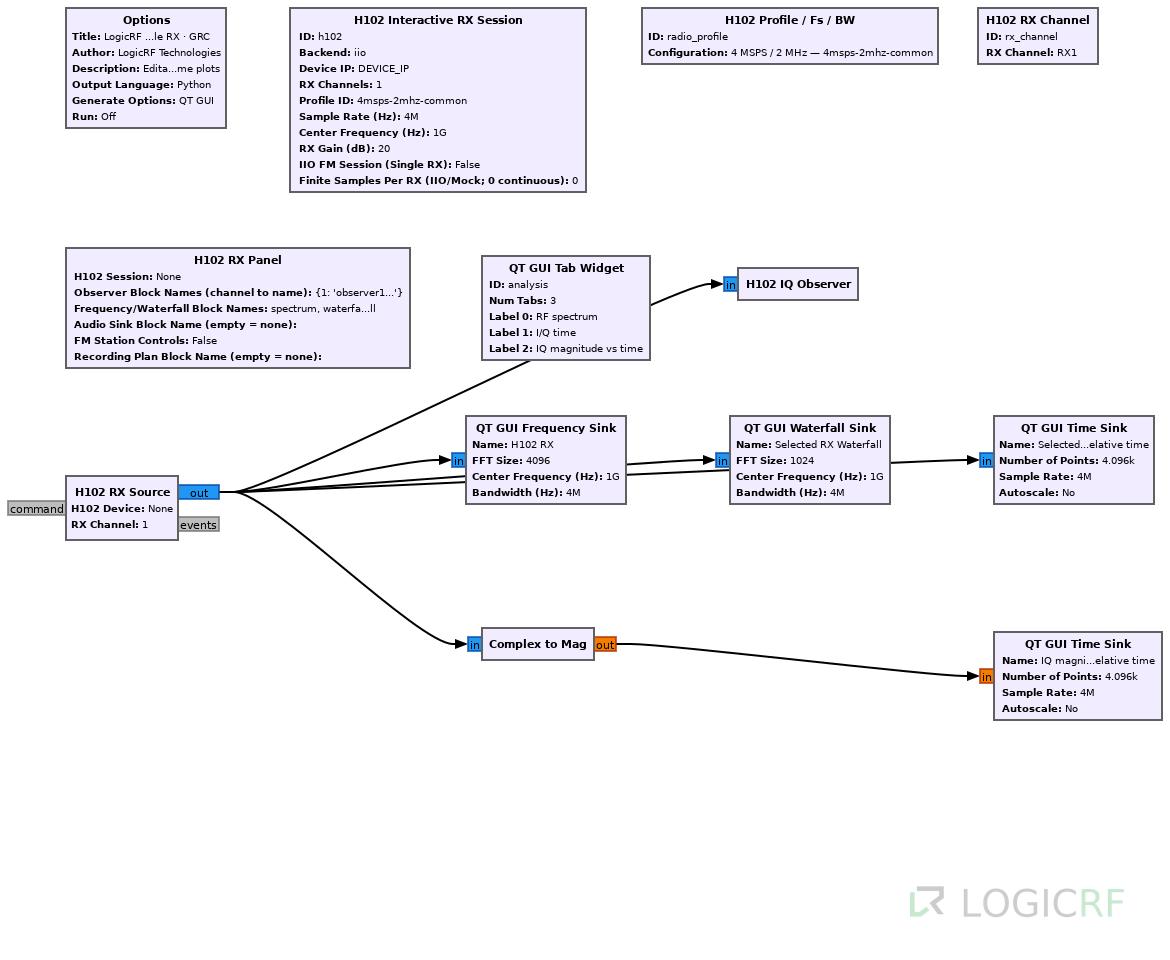
Native export of h102_sdr_single_rx.grc. Only canvas positions were arranged for readability; blocks, parameters and connections are unchanged. The graph was not executed and no device was connected. h102 manages the device, radio_profile and rx_channel supply common settings, and RX Source sends IQ to spectrum, waterfall and time-domain processing.
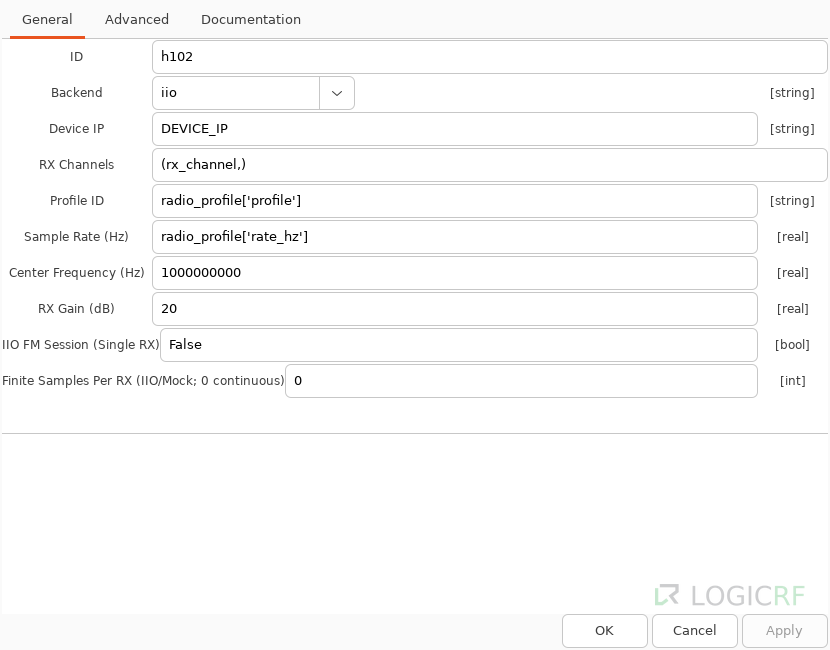
Double-click h102 to open General. For first network reception, use Backend = iio and replace DEVICE_IP with the device address. Enter center frequency in Hz. Preserve the existing RX Channels, Profile ID and Sample Rate expressions so the variable blocks supply consistent settings. This is the native editor before execution.
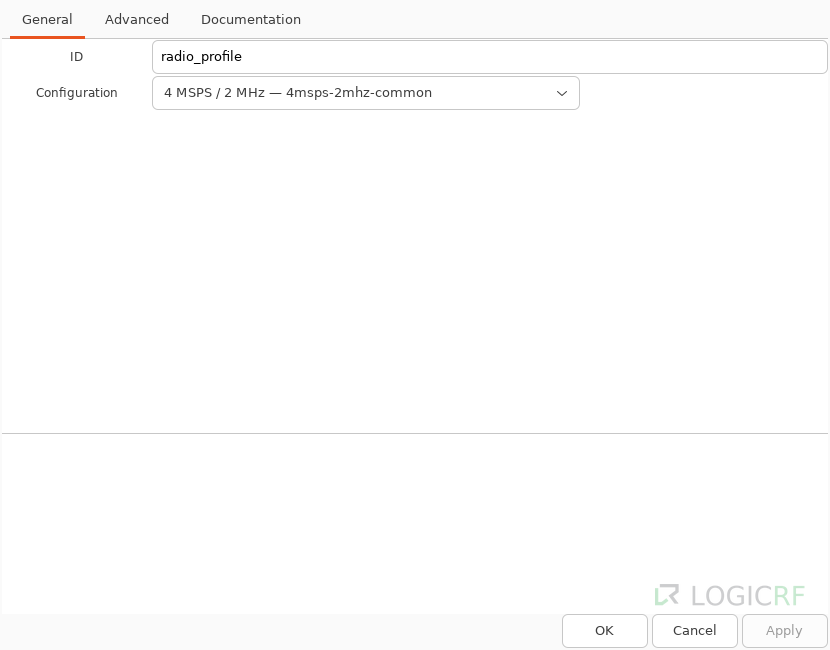
Double-click radio_profile and choose a built-in rate/bandwidth pair under Configuration. The shipped example selects the 4 MSPS / 2 MHz shared-LO profile. Regenerate and run after editing, then wait for actual readback. Editing this window does not apply a profile to H102.
| Block / field | First single-RX spectrum | FM example |
|---|---|---|
| Example file | h102_sdr_single_rx.grc |
h102_fm_broadcast.grc |
h102 → Backend |
iio |
iio |
h102 → Device IP |
Replace DEVICE_IP with your H102 IP |
Same |
radio_profile → Configuration |
4msps-2mhz-common (4 MSPS / 2 MHz) |
Keep 1p536msps-0p5mhz (1.536 MSPS / 0.5 MHz) |
rx_channel → channel |
1 for RX1A, or 2 for RX2A |
Same; one RX only |
h102 → Center Frequency (Hz) |
The shipped example starts at 1000000000 (1 GHz); change to your receive target |
98100000 means 98.1 MHz; choose a local broadcast frequency within 88–108 MHz |
h102 → IIO FM Session (Single RX) |
Keep False |
Keep True |
For FM, connect an appropriate antenna to the selected A input and use the PC's audio output. Keep the FM example's profile and DSP rates together: changing only the radio sample rate breaks its decimation/audio-rate relationship. Use the running panel to tune stations, adjust volume or mute; an example frequency does not guarantee a station at your location. Stop, disconnect and reopen/regenerate before changing profile or RX channel. Within one profile, panel tuning and pause/resume are available.
| Example | Purpose |
|---|---|
h102_fm_broadcast.grc |
FM reception, tuning, volume/mute, candidate station search, spectrum and audio time domain |
h102_sdr_receive.grc |
Separate spectrum, waterfall and IQ time-domain displays for both RX channels |
h102_sdr_single_rx.grc |
RX1 or RX2; a common channel variable controls the entire receive chain |
h102_iq_record.grc / h102_iq_record_single_rx.grc |
Dual/single-RX recording and integrity checks |
h102_iq_replay.grc |
Verified offline replay to EOF without device access |
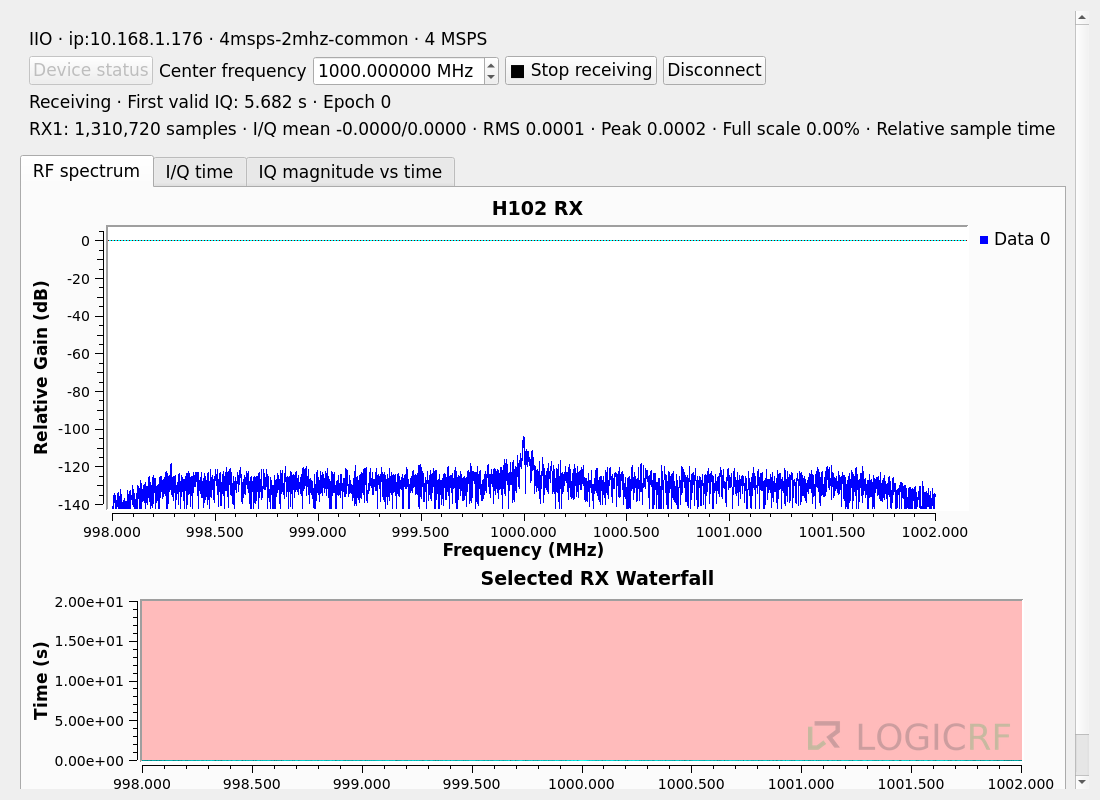
Actual single-RX IIO reception at 4 MSPS / 2 MHz and 1 GHz. The running panel provides status, tuning, receive start/stop and device release. Its top line identifies backend, profile, sample count and state. The pictured IP belongs to an example device; enter your own address when connecting.
¶ Sample rate and storage
The aggregate network IQ16 budget is 64 MB/s: sample rate × channel count × 4 bytes. Meet link, host-processing and storage requirements together. USB has separate limits and host requirements; do not substitute USB capability for Ethernet capability.
| Format | Bytes per complex sample | Dual 8 MSPS storage rate |
|---|---|---|
| IQ16 | 4 | 64 MB/s |
| complex float32 | 8 | 128 MB/s |
The examples' rx1.cf32 / rx2.cf32 files are little-endian complex float32, not IQ16. An SD speed rating does not guarantee these sustained rates; use host storage with measured bandwidth.
¶ Recording, replay and timestamps
Keep channels, profile and frequency fixed while recording. Afterward, check normal completion, sample counts, file sizes, checksums and device recovery in recording.json. Failed/interrupted partial files remain failed recordings; renaming them does not make them complete.
The USB companion index retains original integer frame headers, sample indices, configuration, clocks and time validity. IIO does not invent the same hardware-UTC index. Valid USB time establishes device digital-time association, not calibrated antenna-port delay or RF amplitude/phase.
Verify files and indexes before offline replay. Restore the corresponding GNU Radio tags and stop normally at EOF. Update the flowgraph when changing format or sample rate; do not infer the original sample rate from playback speed.
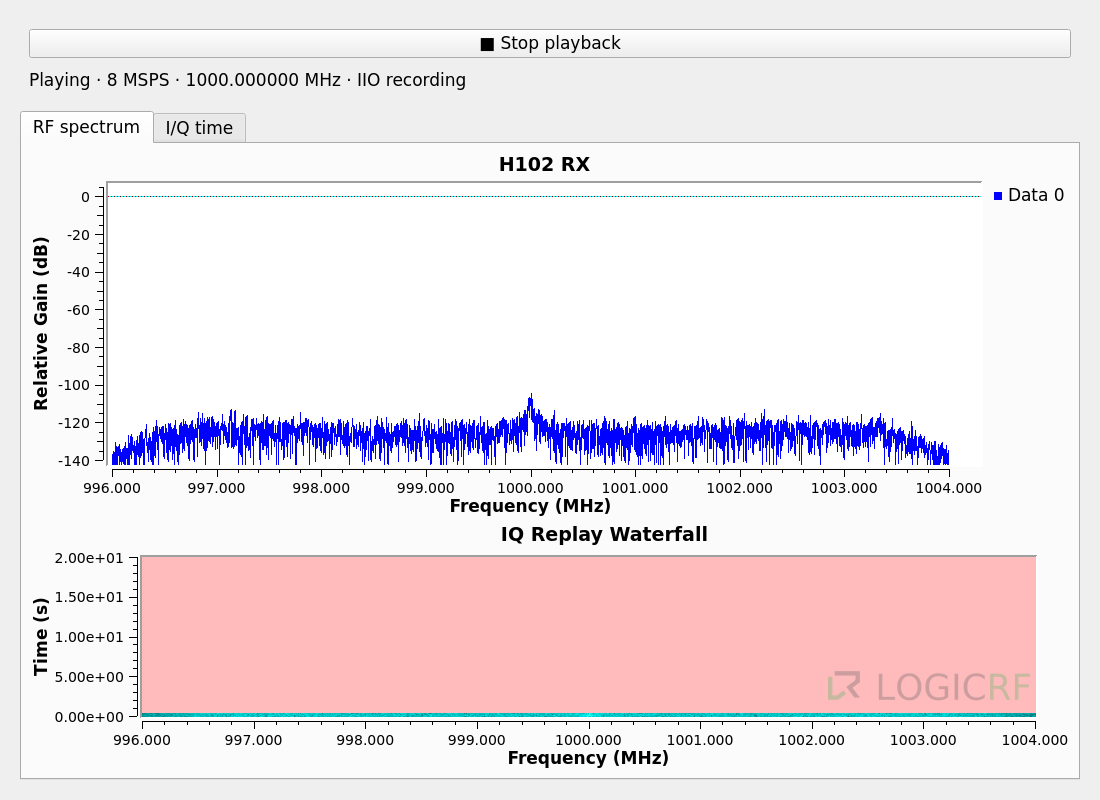
Offline replay of recorded cf32 IQ at 8 MSPS and 1 GHz, RX1. The input is a recording directory and its metadata; no H102 connection is needed. Playback state and original rate/frequency appear at the top. This view uses an actual recording file and does not indicate live reception.
¶ FM listening and station search
Connect an appropriate receive antenna, select the FM example/channel/broadcast frequency and start. Tune with the frequency control or candidate list. Volume and mute affect audio output, not RF gain.
Automatic search produces spectrum candidates, not RDS station names without decoding. Scan time includes tuning, acquisition and recovery and depends on profile and frequency range. Switching profiles may require cold programming; same-profile hot-tuning time does not predict it. Wait for UI state and device recovery during start/stop rather than forcing multiple instances.
¶ Transmission and other applications
Before TX, check loads, connections and receiver protection using hardware reference, then explicitly enable TX in the matching example. Backend-specific RX/TX combinations are defined by the module's usage guide and API. A Source block does not establish every real-time Sink capability.
For busy devices, discontinuities or incomplete stopping, retain application state and follow troubleshooting.