Applies to the SDK1 toolchain for LogicRF Hawk H102 Kuiper 1.2.1. Select built-in packages on H102 for routine operation. Windows development tools are needed when adding or regenerating profiles.
¶ Windows environment and downloads
There are three different file types: a TES session (.taxidi) opens through File → Load Session; request JSON is input to the LogicRF generator; profile.json and stream.bin are generated chip configurations. They are not interchangeable, and renaming an extension does not convert them.
| Tool or input | Download | Version to use |
|---|---|---|
| ADI TES and SDK | ADI installation guide · Official SDK 1.0.0 ZIP | adrv9001-sdk-1pt0pt0.zip, matching API 68.21.6 |
| .NET Framework | Microsoft download | .NET Framework 4.8; check the existing installation first |
| LogicRF generation and import tools | Matching H102 source | Complete directory at h102-kuiper-1.2.1-image; authorized GitHub access required |
| Generator request templates | Request ZIP · customer access | Two 29-entry catalogs and independent/shared-LO 8/4 single-entry examples; not TES sessions |
| TES session templates | 29-session ZIP · customer access | 29 .taxidi files matching the built-in configuration index; TES v1.0.0, independent LO |
SDK ZIP SHA-256: 5bd9ae08e9eedda15b48c643c01328557dcce9a52172dc52f4f32e180aad6653. Template hashes are in downloads. Do not write ADI's ZC706/ZCU102 system images to H102.
The official version page and ZIP address were checked on 2026-10-28. Follow ADI's login and license process if prompted; keep the version pinned even if the download page later changes.
¶ Install TES and save an editable session
- Download and verify the complete SDK ZIP, then extract it to a new directory. The archive contains
adrv9001-sdk.1.0.0-ga\adrv9001-sdk\pkg. - Run ADRV9002 Transceiver Evaluation Software setup.exe in
pkg\evaluationand complete the ADI installer. The user must read and accept the applicable license. - Start TES from the Start menu. Use Demo Mode for offline work. This does not require H102 or establish support for direct TES control of H102.
- Use File → Load Session for a matching
.taxidisession. Check the part, reference clock, SSI, channels, sample rate, bandwidth and intended LO mode before editing. - Use File → Save Session to save the editable session. Generate Profile File and Generate Stream Image are separate export operations; saving a session does not produce the runtime files.
See ADI's TES description and UG-1828. Default evaluation-board settings are not automatically suitable for H102.
The reproducible batch workflow below uses the SDK's native generation interfaces. Pass request JSON to -PresetCatalog, not TES Load Session. Files exported manually from TES do not automatically include LogicRF generation receipts and cannot be passed directly to the managed import workflow without meeting its requirements.
¶ Use the 29 TES session templates
Download and extract the 29 TES session templates · customer access, for example into C:\H102-TES. The package contains 29 .taxidi files matching the built-in configuration index, a parameter index, bilingual instructions and checksums. This package provides independent-LO sessions.
1. Start TES in Demo mode. Select Use Demo Mode (No Hardware). Close and restart TES before opening another template.
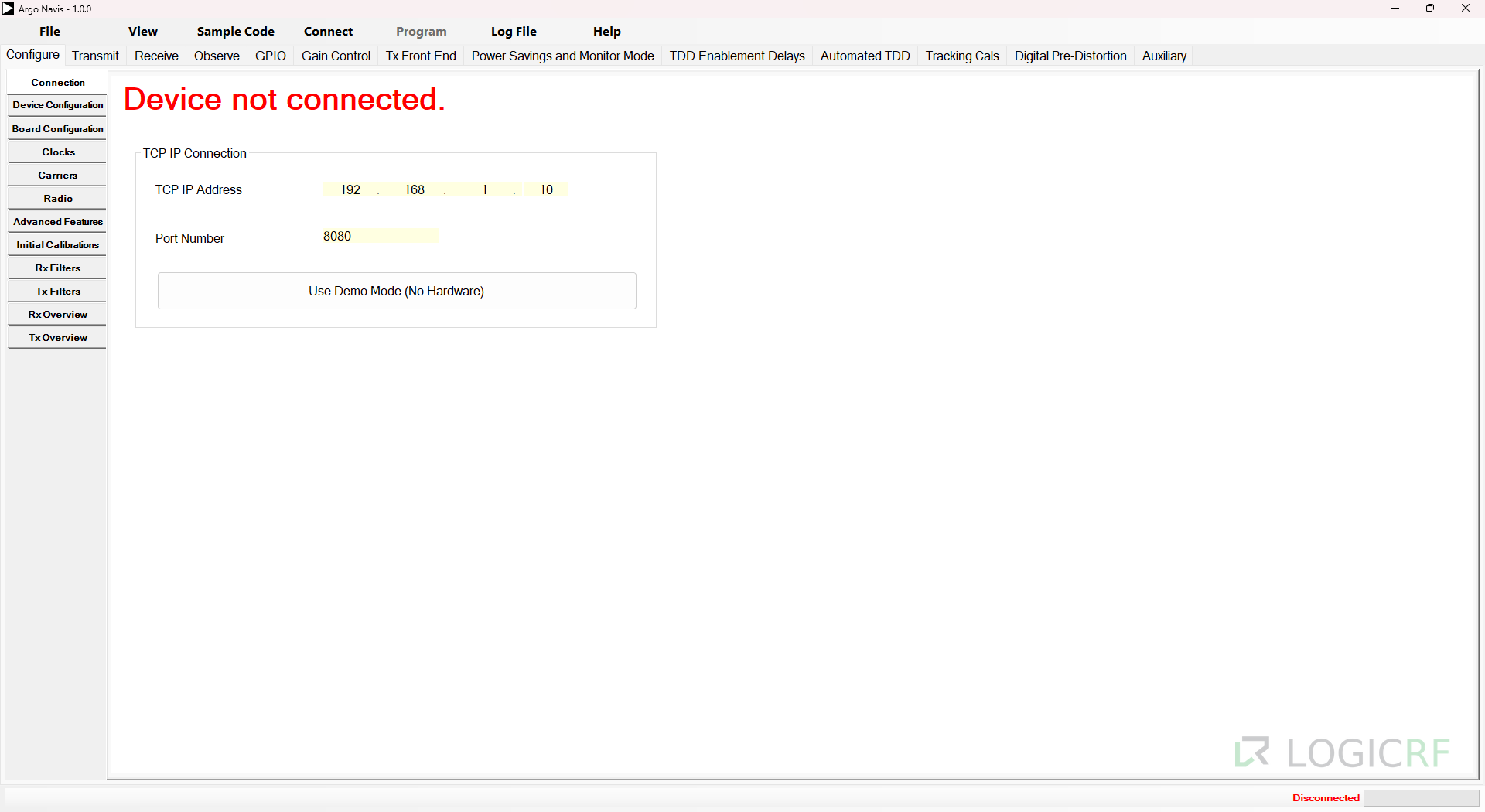
Native TES screen. The address shown on the connection page is not the H102 address; choose Demo mode for offline editing.
2. Load a session. Choose File → Load Session, then open a file such as H102-independent-8msps-4mhz.taxidi.
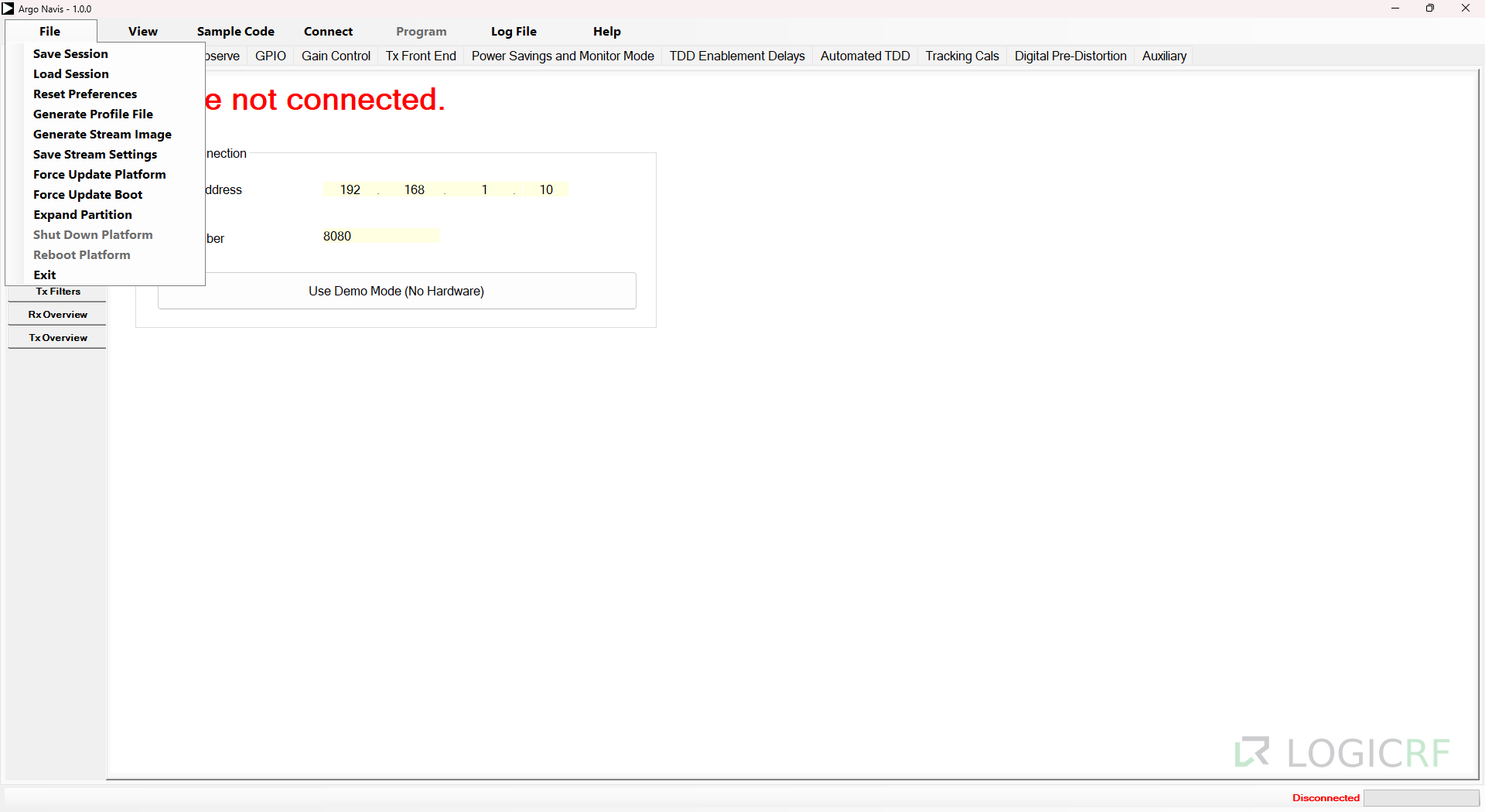
Load Session opens a session and Save Session saves it. Generate Profile File and Generate Stream Image are separate generation operations.
3. View and edit the settings. File names identify sample rate and RF bandwidth, not carrier frequency. For the 8 MSPS / 4 MHz example:
| Check | Example value |
|---|---|
| Part / setup | ADRV9002 / Custom |
| Device reference clock | 300 MHz |
| Channels / duplex / RX ports | RX1, RX2, TX1, TX2 / FDD / RX1A, RX2A |
| Data interface | LVDS, 2 lanes, DDR, IQ16 |
| Sample rate / RF bandwidth on all four channels | 8 MSPS / 4 MHz |
| RX analog filter corner | 3000 kHz; the first-order filter's 1 dB frequency is 1.5 MHz |
| LO mode | Independent RX/TX; intended RX1/RX2→LO2 and TX1/TX2→LO1. Check the actual mapping after generation |
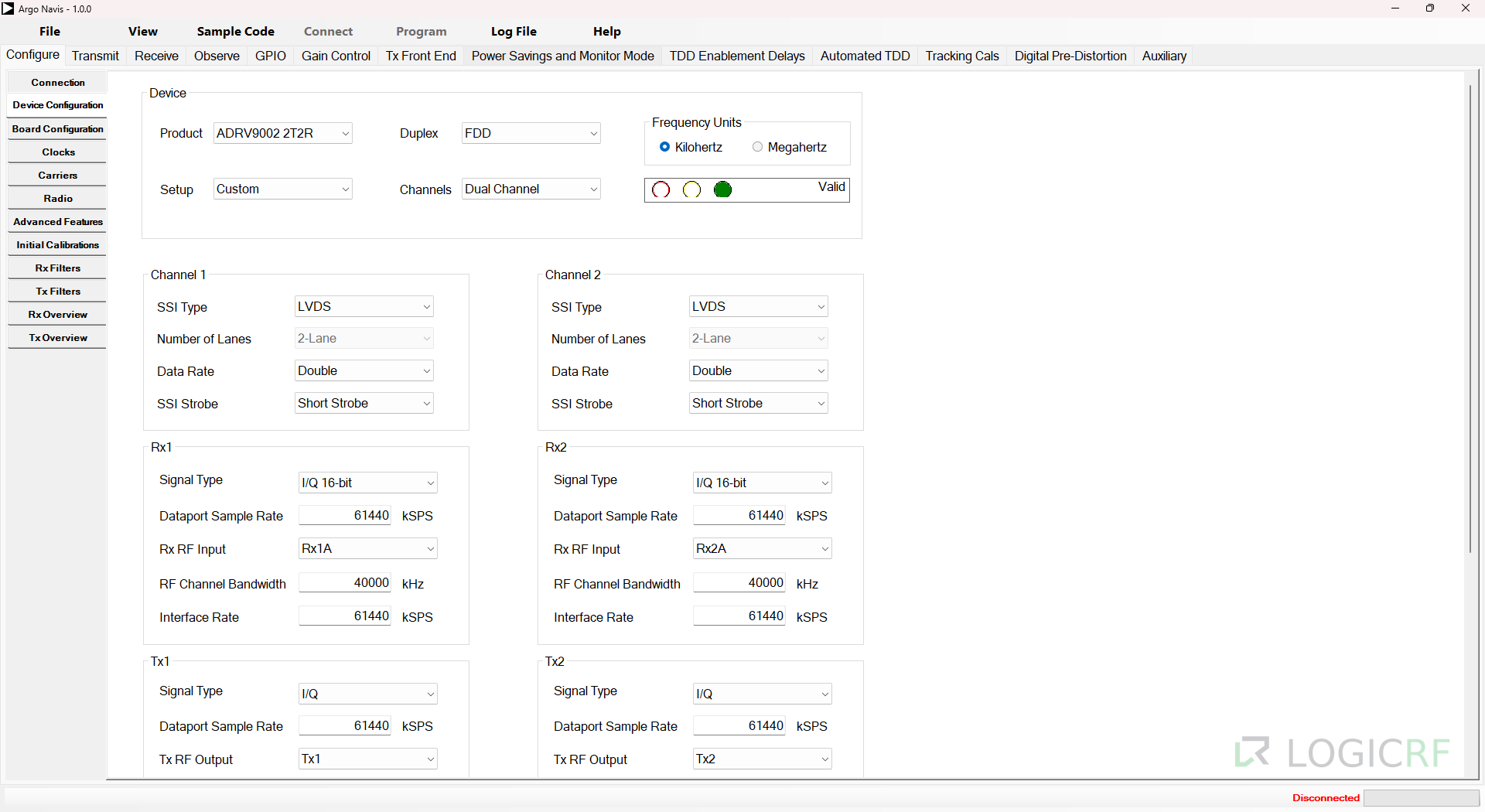
Native screen for a different 61.44 MSPS / 40 MHz combination. With kSPS/kHz display units, the values are 61440 and 40000; the 8 MSPS / 4 MHz example should show 8000 and 4000.
4. Save edits. Use File → Save Session to save under a new name and keep the original template. The default 900 MHz carrier, gains and attenuation can be edited as needed.
The TES 1 dB frequency is different from RF bandwidth. With ORDER_1, its native generation logic obtains SDK analogFilterCorner_kHz from Lpf1dBFrequency_Hz × 0.001 × 2. Do not change only the 3 dB display value or substitute half the RF bandwidth.
For everyday operation, select an existing H102 configuration without regenerating it. To add or regenerate configurations, continue with the Windows generation and import workflow below. TES sessions, request catalogs and device runtime packages serve editing, generation-input and device-runtime purposes respectively.
¶ Do I need both Windows and Linux?
Windows runs the SDK generator described here. Linux runs the offline importer and the existing H102 client; they may be separate computers. This guide does not establish a virtual-machine, Wine or Windows-only reception workflow. Selecting built-in configurations needs only the existing Linux client.
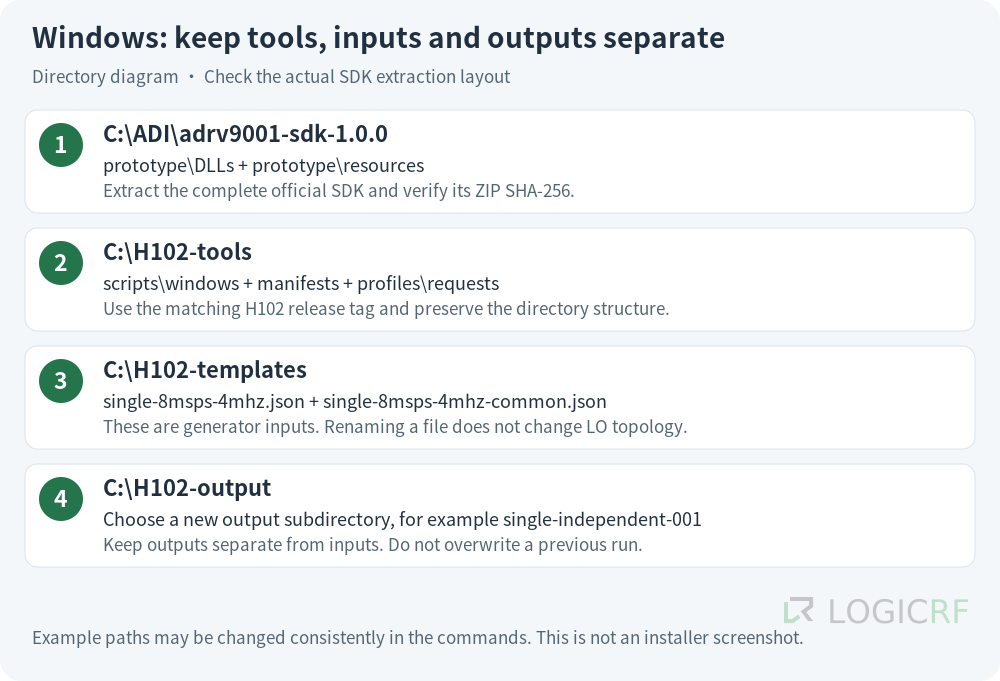
Directory illustration, not an installation screenshot. If retaining the SDK ZIP's nesting, point SdkRoot to the pkg directory containing prototype.
¶ Check the Windows environment
Open Windows PowerShell as an ordinary user and run these read-only checks. Adjust SdkRoot to the actual extraction path.
Windows PC · PowerShell. Obtain the matched ADI tools and set the installation and export paths.
$SdkRoot = 'C:\ADI\adrv9001-sdk-1.0.0'
$PSVersionTable.PSVersion
[Environment]::Is64BitProcess
Get-ItemPropertyValue 'HKLM:\SOFTWARE\Microsoft\NET Framework Setup\NDP\v4\Full' -Name Release
Test-Path 'C:\Windows\Microsoft.NET\Framework64\v4.0.30319\csc.exe'
Test-Path "$SdkRoot\prototype\DLLs"
Test-Path "$SdkRoot\prototype\resources"
This workflow uses Windows 11 x64, Windows PowerShell 5.1 and .NET Framework 4.8. The 64-bit process and three path checks should return True. The .NET Release value should be at least 528040; see Microsoft's version check. Resolve missing runtime/compiler components before generation; do not mix DLLs from different SDKs.
¶ Generate one combination before a batch
Extract the complete matching source into C:\H102-tools, with scripts, manifests and profiles directly below it. Extract the request ZIP into C:\H102-templates. Create the parent C:\H102-output, but do not pre-create the final output subdirectory.
Windows PC · PowerShell. Obtain the matched ADI tools and set the installation and export paths.
Set-Location C:\H102-tools
Get-FileHash C:\Downloads\adrv9001-sdk-1pt0pt0.zip -Algorithm SHA256

powershell.exe -NoProfile -ExecutionPolicy Bypass `
  -File .\scripts\windows\h102-generate-profiles.ps1 `
  -SdkVersion 1.0.0 -SdkRoot C:\ADI\adrv9001-sdk-1.0.0 `
  -PresetCatalog C:\H102-templates\single-8msps-4mhz.json `
  -OutputDirectory C:\H102-output\single-independent-001
This generates 8 MSPS / 4 MHz with independent LO. For shared LO, use single-8msps-4mhz-common.json and a different new output directory. Each single-entry file selects an unchanged entry from its corresponding 29-entry source catalog. Neither input file can be loaded directly into TES or H102.
Completion check: exit code 0, no failures in the aggregate receipt, and generation-pass.json, profile.json and stream.bin in each output directory. Retain the original request, full output and receipts. Keep failed directories and use a new directory after correcting an error.
| Change | Where to make it |
|---|---|
| Select an existing rate/bandwidth | Prefer an original request entry; choose the installed package directly for routine device use |
| Add a rate or bandwidth | Edit a request copy and regenerate with the pinned SDK; validate the new supported range |
| Independent / shared LO | Use the corresponding complete catalog and retain the actual lo_topology |
| 300 MHz, LVDS, two lanes, DDR, IQ16, FDD, RX-A | Fixed H102 conditions in this tool, not ordinary tuning controls |
| RX or TX carrier frequency | Normally set at runtime without redesigning the filter profile |
rx_analog_corner_khz and rf_bandwidth_hz differ in both units and meaning. The original 8/4 request uses a 3000 kHz analog corner, not half the RF bandwidth. Commands for each complete 29-entry catalog appear under “Prepare Windows and generate” below.
¶ Transfer the Windows results to Linux
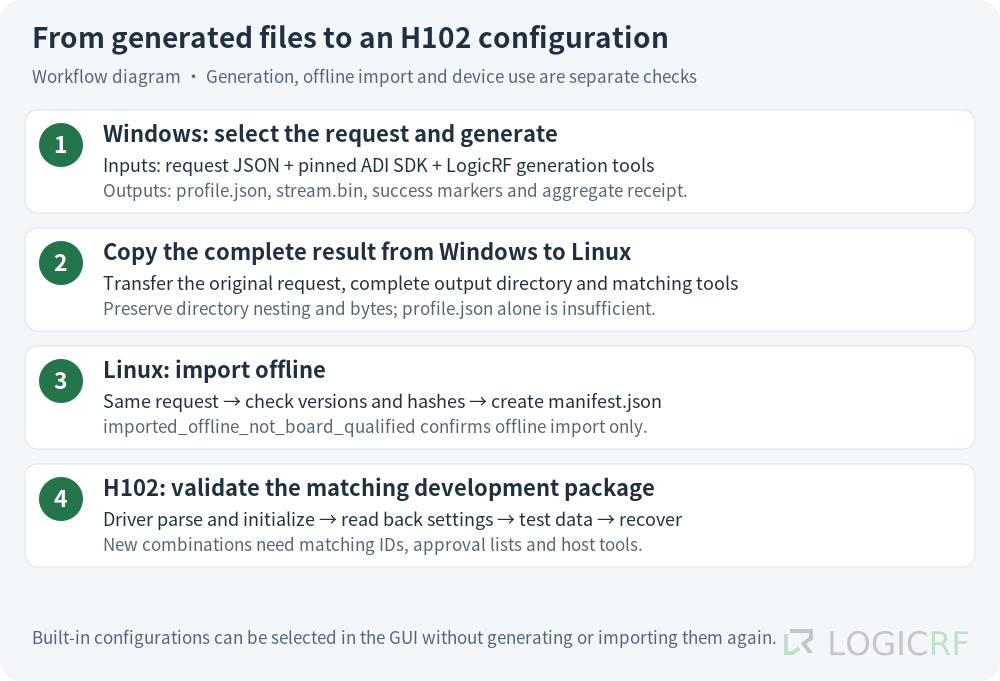
Workflow illustration: offline generation, offline import and device use are separate stages.
Copy the entire single-independent-001 directory and its original single-8msps-4mhz.json to Linux using removable storage or your existing transfer method. Use the complete tools from the same release tag. Run from their root directory:
Linux PC · Run in the tool or project directory named here; set paths to the actual installation and files.
python3 scripts/h102_import_generated_profiles.py \
  --request-catalog /path/H102-templates/single-8msps-4mhz.json \
  --generation-directory /path/H102-output/single-independent-001 \
  --output-directory /path/H102-packages/single-independent-001
Replace all three paths and use a new output directory. The importer verifies the originals and creates manifest.json. imported_offline_not_board_qualified means offline import only: this command neither installs packages nor operates H102.
¶ Use a newly generated configuration on a device
Select the existing 58 packages using configuration switching. New files do not appear in the GUI automatically. A new combination needs matching development-device installation manifests, package IDs, approval lists and host tools, followed by parsing, initialization, four-channel readback, data-path and recovery checks.
Retain the request, complete outputs, receipts and target image version. Follow system development for integration, or describe the target parameters through support. Do not overwrite production configuration directories or alter hashes to bypass matching checks.
¶ 1. Required tools
| Tool | Purpose in this release | H102 connection required? |
|---|---|---|
| ADI ADRV9001-SDK Evaluation Software 1.0.0 | TES, ProfileGen DLLs/resources, API and chip ARM firmware | No for offline generation |
| Windows 11 x64, .NET Framework 4.8, Windows PowerShell | Run the pinned SDK's native .NET generator | No |
scripts/windows/h102-generate-profiles.ps1 and H102ProfileGenerator.cs |
LogicRF batch entry point calling ADI ProfileArchitect/Profile interfaces, with validation and receipts | No |
Linux, Python 3.9 or later, scripts/h102_import_generated_profiles.py |
Verify original Windows outputs and produce H102 package manifests | No for offline import |
H102 h102-config-sdk1, IIO h102-profile-control, matching GUI |
Select profiles already generated, installed and approved | Yes |
ADRV9002 uses the ADRV9001-named SDK as part of the same product family. This guide uses the delivery-matched SDK 1.0.0, which includes TES, DLLs and resources, and the C API. ADI TES installation guide. TES can help explain parameters; the scripts above provide this project's reproducible batch workflow. An ADI evaluation-board SD image or connection feature does not establish H102 support.
The current H102 image includes neither a native ARM arbitrary-profile generator nor a profile-generation Web page. libiio/Python IIO provides control and data access, not filter design. The libadrv9002-iio v0.2.0/v68.10.1 documentation explicitly targets API 68.10.1 and does not replace this release's API 68.21.6 generator. Generate custom profiles for this release with the toolchain listed below. Scopy is a host client, not a replacement for the pinned generation toolchain; assess compatibility for the actual client, plugin and device driver versions.
¶ 2. Match versions and hardware parameters
| Item | Pinned values for 1.2.1 |
|---|---|
| SDK / API | 1.0.0 / 68.21.6 |
| Chip ARM firmware / stream | 1.0.2 / 0.7.22.0; generator receipts use the three-part stream version 0.7.22 |
| Original SDK ZIP | adrv9001-sdk-1pt0pt0.zip |
| SDK ZIP SHA256 | 5bd9ae08e9eedda15b48c643c01328557dcce9a52172dc52f4f32e180aad6653 |
| Chip template / device reference clock | C0 / 300,000,000 Hz; PCB Rev.B is not chip revision B0 |
| Channels / mode / ports | Dual RX, dual TX, FDD, RX1A/RX2A; all four channels use the same sample rate and RF bandwidth |
| SSI | LVDS, two lanes, DDR, 16 bits per I/Q component |
| Device software | Matching kernel 6.6.0-h102-sdk1-candidate-calfix1-regbounds1-sharedlo1 |
See manifests/h102-profile-generator-sdk-pins.json for the complete DLL/resource digests. Verify the complete API, firmware and stream set rather than one DLL. Prepare Windows runtime and SDK components under their respective licenses; the script does not download, install or accept licenses.
¶ 3. Why 29 combinations produce 58 packages
| Request catalog | Packages | Actual LO mapping |
|---|---|---|
profiles/requests/h102-built-in-sdk1-presets.json |
29 | independent: RX1/RX2 use LO2, TX1/TX2 use LO1 |
profiles/requests/h102-common-lo-sdk1-presets.json |
29 | shared-lo2: RX1/RX2/TX1/TX2 all use LO2; IDs end in -common |
profiles/requests/h102-built-in-dual-lo-mode-sdk1-presets.json |
58 total | Approved runtime-asset catalog; not a single generation request |
See built-in configurations for sample rates and bandwidths. Generate and import each LO mode separately; renaming a package does not create shared LO. Center frequency is separate from the sample-rate/filter design: tuning an existing package within its allowed range does not require regeneration. All carriers share the same frequency in shared-LO mode.
¶ 4. Prepare Windows and generate
- Obtain image-release tag
h102-kuiper-1.2.1-image(source commit57d5baaf88c70d70922bc4c818accf8f343fbc1c), keeping SDK pins, request catalogs and both generator sources from that version. - Download the pinned SDK ZIP from ADI, verify SHA and extract it completely into a separate directory. For example,
C:\ADI\adrv9001-sdk-1.0.0must directly containprototype\DLLsandprototype\resources. Do not merge SDK versions. - Check native .NET Framework and
C:\Windows\Microsoft.NET\Framework64\v4.0.30319\csc.exe. Usepowershell.exe; this workflow does not depend on Wine or PowerShell 7. - Run from the repository root.
C:\H102-outputis an example parent; neither output subdirectory may already exist.
Windows PC · PowerShell. Obtain the matched ADI tools and set the installation and export paths.
Get-FileHash C:\Downloads\adrv9001-sdk-1pt0pt0.zip -Algorithm SHA256

powershell.exe -NoProfile -ExecutionPolicy Bypass `
  -File .\scripts\windows\h102-generate-profiles.ps1 `
  -SdkVersion 1.0.0 -SdkRoot C:\ADI\adrv9001-sdk-1.0.0 `
  -PresetCatalog .\profiles\requests\h102-built-in-sdk1-presets.json `
  -OutputDirectory C:\H102-output\independent-new

powershell.exe -NoProfile -ExecutionPolicy Bypass `
  -File .\scripts\windows\h102-generate-profiles.ps1 `
  -SdkVersion 1.0.0 -SdkRoot C:\ADI\adrv9001-sdk-1.0.0 `
  -PresetCatalog .\profiles\requests\h102-common-lo-sdk1-presets.json `
  -OutputDirectory C:\H102-output\common-new
ExecutionPolicy Bypass applies only to this process. Specify -PresetCatalog explicitly: omitting it generates only the 40/20, 20/10 and 8/4 presets. Each combination runs in a separate process so SDK diagnostic state does not accumulate. Check exit code 0, no failures in the aggregate receipt, and each success marker together. Keep failed outputs for diagnosis and use a new directory when retrying.
¶ 5. Outputs and import
Each output root contains generation-receipt.json; each profile directory contains:
| File | Purpose |
|---|---|
profile.json |
Complete chip configuration, filters/rates/interfaces and LO mapping |
stream.bin |
32,768-byte chip stream configuration; not an FPGA BIT |
request-blueprint.json, stream-settings.json |
Native generation inputs and stream settings |
generation-pass.json |
Success marker indicating no SDK warning was accepted |
Aggregate generation-receipt.json |
SDK/API/firmware/stream versions, requests, source scripts and output SHAs |
Transfer both complete output directories unchanged to Linux, retaining the original ZIP and SHA. Account for Windows backslash separators when extracting ZIPs: restore real directory nesting rather than files with backslashes in their names.
Run from the same system repository root, replacing example paths:
Linux PC · Run in the tool or project directory named here; set paths to the actual installation and files.
python3 scripts/h102_import_generated_profiles.py \
  --request-catalog profiles/requests/h102-built-in-sdk1-presets.json \
  --generation-directory /path/generated/independent-new \
  --output-directory /path/packages/independent-new

python3 scripts/h102_import_generated_profiles.py \
  --request-catalog profiles/requests/h102-common-lo-sdk1-presets.json \
  --generation-directory /path/generated/common-new \
  --output-directory /path/packages/common-new
The importer checks versions, original hashes, success markers, all four channels' Fs/BW, TIA corners, actual LO mapping and stream length/version. Shared LO additionally binds the current generator and request hashes. Success is imported_offline_not_board_qualified; it adds manifest.json to each package. Offline import does not connect to or modify H102. Output directories must be new. Original packages reside in profiles/sdk1-candidate, and shared-LO packages in profiles/sdk1-common-candidate; these directory names do not change the image release status.
¶ 6. Use on a released H102
The 58 built-in packages are installed. Routine use requires no import, Windows host or RTL rebuild. Stop RX, TX, scanning and recording first:
H102 shell · Run after SSH or serial login. Use the interface and configuration names on this unit.
sudo h102-config-sdk1 list
sudo h102-config-sdk1 status
sudo h102-config-sdk1 validate 20msps-10mhz
sudo h102-config-sdk1 apply 20msps-10mhz
# Exact shared-LO ID for a common carrier:
sudo h102-config-sdk1 validate 20msps-10mhz-common
sudo h102-config-sdk1 apply 20msps-10mhz-common
sudo h102-config-sdk1 status
# Restore the previous managed configuration:
sudo h102-config-sdk1 restore
The two apply commands are independent examples for the two LO modes; running both in sequence is unnecessary. Runtime selection does not rewrite the boot configuration. The base image defaults to 40 MSPS / 20 MHz with separate LOs; see the system guide for Kuiper 1.2.1 startup behavior. The profile-switching commands in this guide affect runtime state only. IIO users read h102-profile-control.available, write select, wait for that request's terminal request_id/status, then verify active_info; queued does not mean success. The GUI shows 29 logical choices per mode. Start a new data session only after application completes.
Do not overwrite production packages or edit profile/manifest hashes to bypass checks. For a custom combination, change requests in a development copy, run the pinned generator, import offline, verify matching-driver parsing/initialization, read actual parameters and verify recovery. Test the required data paths. Include new packages in product approval catalogs, configuration control and matching USB runtime SHA/configuration IDs, then publish through the image release process. This release covers the approved set only. SSI, reference-clock or channel-mode changes, and new native rates, require driver/RTL assessment. See development.
¶ 7. Troubleshooting
| Symptom | Cause and action |
|---|---|
| Missing DLL, resource or compiler | Correct SDK root nesting, complete extraction and Windows .NET environment; do not copy DLLs from another SDK |
| SDK hash mismatch or unpinned files | Mixed/different versions; use the complete separate package matching the pins, without disabling validation |
| Output already exists | Generation and import refuse overwrites. Use new directories and retain failed originals |
| Only three profiles generated | -PresetCatalog was omitted. Specify each 29-profile request catalog separately |
| SDK filter generation fails or warns | Sample rate, RF bandwidth, ADC mode and analog corners must jointly satisfy the SDK. Change the request and regenerate; do not edit result JSON |
| Selecting the RX analog corner for 8 MSPS / 4 MHz | This release uses 3 MHz. The analog corner and RF bandwidth are separate parameters; do not substitute half the RF bandwidth |
| RX analog corner for the first three narrowband choices | The release request catalog fixes it at 12 MHz while retaining each combination's sample rate and RF bandwidth. Do not derive the analog corner as BW/2 |
| API/stream or LO mismatch | Match the complete software stack, requests and outputs. Verify SDK 1.0.0, API 68.21.6 and the actual LO mapping; do not merely rename IDs with -common |
| Offline generation succeeds but loading fails | Offline success is not device initialization. Retain the original error and transaction recovery evidence; check kernel/firmware/package matching before starting data |
| Profile loads but acquisition is discontinuous | Check transport budget, device buffers, host processing and sustained storage performance. Start dual-RX network recording at 8 MSPS / 4 MHz and check the recording result and source overflow status |
¶ 8. Checks after generation
Keep original requests, generated outputs and generation-receipt.json. After import, verify parsing, initialization and actual sample rate/bandwidth/carriers on a development device, then test IIO, USB, RX/TX and time fields for the intended application. Match driver and RTL when changing SSI, reference clock or channel modes.
Never directly overwrite an active configuration. Stop data sessions, deploy under a distinct package ID with fixed digests, and keep a recoverable profile. Obtain SDK/runtime/vendor files under their original licenses; this guide does not redistribute the complete SDK.