A package defines sample rate, RF bandwidth, device clocks and digital interfaces together. Select built-in packages on H102 for routine use; Windows and an online generator are not runtime dependencies. Generate and validate custom packages during development.
¶ 29 built-in configurations
Kuiper 1.2.1 includes these 29 combinations, each in two LO modes. Sample rate means complex IQ samples per channel per second; one IQ16 sample occupies 4 bytes. All packages use dual RX/dual TX, FDD, RX1A/RX2A, a 300 MHz device reference and two-lane LVDS DDR.
| No. | Exact profile ID | Sample rate MSPS | RF bandwidth MHz |
|---|---|---|---|
| 1 | 0p192msps-0p05mhz |
0.192 | 0.05 |
| 2 | 0p192msps-0p1mhz |
0.192 | 0.1 |
| 3 | 0p768msps-0p2mhz |
0.768 | 0.2 |
| 4 | 1p536msps-0p5mhz |
1.536 | 0.5 |
| 5 | 1p536msps-1mhz |
1.536 | 1 |
| 6 | 2msps-0p25mhz |
2 | 0.25 |
| 7 | 2msps-0p5mhz |
2 | 0.5 |
| 8 | 2msps-1mhz |
2 | 1 |
| 9 | 4msps-0p5mhz |
4 | 0.5 |
| 10 | 4msps-1mhz |
4 | 1 |
| 11 | 4msps-2mhz |
4 | 2 |
| 12 | 8msps-1mhz |
8 | 1 |
| 13 | 8msps-2mhz |
8 | 2 |
| 14 | 8msps-4mhz |
8 | 4 |
| 15 | 10msps-5mhz |
10 | 5 |
| 16 | 16msps-2mhz |
16 | 2 |
| 17 | 16msps-4mhz |
16 | 4 |
| 18 | 16msps-8mhz |
16 | 8 |
| 19 | 20msps-5mhz |
20 | 5 |
| 20 | 20msps-10mhz |
20 | 10 |
| 21 | 23p04msps-15mhz |
23.04 | 15 |
| 22 | 30p72msps-15p36mhz |
30.72 | 15.36 |
| 23 | 30p72msps-20mhz |
30.72 | 20 |
| 24 | 40msps-10mhz |
40 | 10 |
| 25 | 40msps-20mhz |
40 | 20 |
| 26 | 40msps-30mhz |
40 | 30 |
| 27 | 61p44msps-20mhz |
61.44 | 20 |
| 28 | 61p44msps-30mhz |
61.44 | 30 |
| 29 | 61p44msps-40mhz |
61.44 | 40 |
p represents a decimal point, as in 0p192msps-0p05mhz. The default is 40msps-20mhz. One sample rate can have multiple RF bandwidths: do not derive bandwidth from rate or substitute the chip maximum for the selected profile.
¶ 1.2.1: separate RX/TX frequencies and shared LO
note Version scope
Kuiper 1.2.1 provides 29 sample-rate/bandwidth combinations, each with independent-LO and common-carrier shared-LO packages: 58 packages total. Loading a profile does not establish sustained sample continuity on every transport. Check channel count, link and storage budgets before streaming.
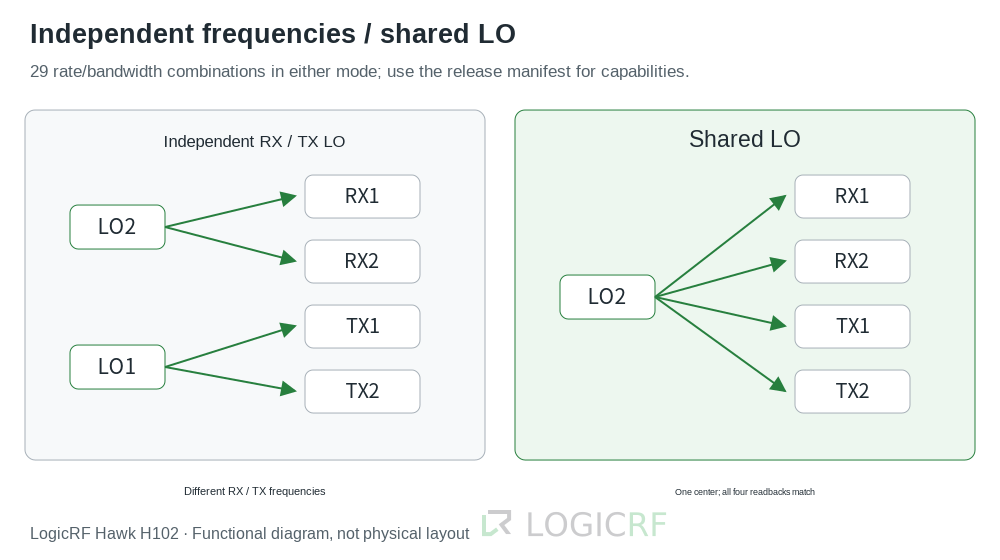
| Mode | Carrier relationship | GUI operation | Use |
|---|---|---|---|
| Separate RX/TX LOs | Both RX share LO2; both TX share LO1. RX and TX frequencies can differ | Main frequency control sets RX; the TX panel sets TX separately | Different RX/TX frequencies or existing wideband scan |
| Shared LO, common carrier | RX1/RX2/TX1/TX2 all share LO2 at the same carrier | Use only the main frequency control; TX panel shows actual read-only shared carrier | Same-frequency RX/TX. Do not tune during TX; wideband scanning is not currently provided in this mode |
Each logical choice has another physical package ending in -common: for example, 8msps-4mhz and 8msps-4mhz-common. The GUI groups 29 choices by mode instead of mixing 58 similar names. Use the device's actual available list.
Stop reception, recording and transmission before selecting and applying a mode/profile. Entering shared LO uses the current actual RX carrier as the shared target. After returning to separate LOs, tune RX and TX separately. A menu selection is only a proposal; wait for terminal state and actual readback before streaming. LO mode selection does not remove network, recording or USB stream-combination limits.
¶ Choose a profile
| Task | Selection and limits |
|---|---|
| First Gigabit Ethernet reception | Start with 4 MSPS / 2 MHz and one RX; check host processing and error counters |
| 40 MSPS USB RX/TX | 40 MSPS / 20 MHz, using combinations supported by the USB backend and sustained host service |
| Lower-bandwidth reception and common lower-bandwidth profiles | 20 MSPS / 10 MHz or 8 MSPS / 4 MHz |
| Narrowband or other rates | Choose a matching package and calculate transport/storage bandwidth from the per-channel sample rate |
| 40 MHz RF bandwidth | Built-in 61.44 MSPS / 40 MHz package. Budget its actual data path; Gigabit Ethernet cannot continuously carry full-rate IQ |
The three lowest-rate packages use an SDK-generated 12 MHz analog corner to satisfy initialization. Analog corner, RF bandwidth and measured frequency response are different quantities; the corner is not a calibrated passband edge.
¶ Switching workflow
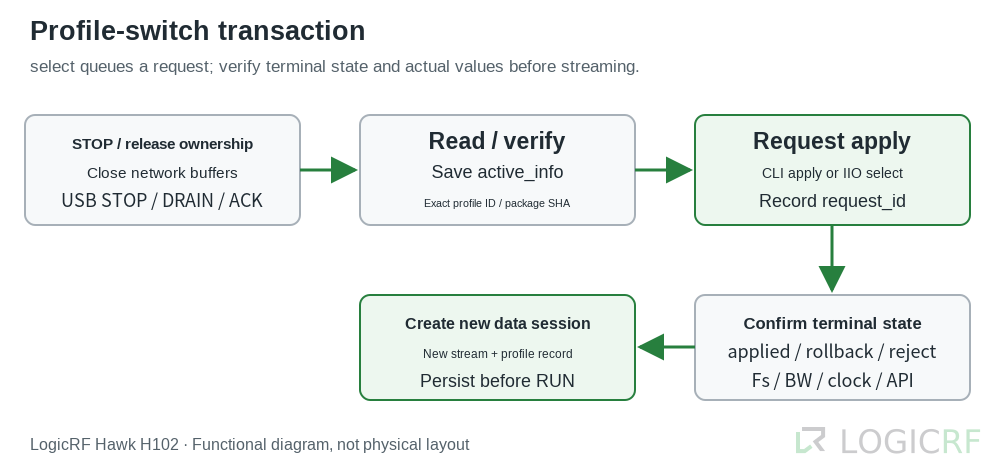
- Stop reception, sweeping, recording and transmission in the application, then wait for the device to become idle.
- Select the sample rate, RF bandwidth and LO mode in the profile controls, then apply the profile.
- Wait for completion and check the actual rate, bandwidth and channels. Resolve any reported error before continuing.
- Start reception again after the profile is ready. For a carrier-only change, use the application frequency control without reloading a complete profile.
The CLI and IIO-property procedures below are for administrators and developers. Normal GUI/GRC sessions use the application profile controls.
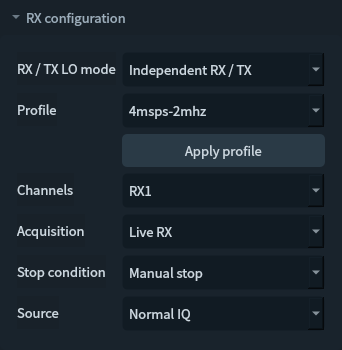
Offline interface example: choose the LO mode, profile and channels. The staged selection is 4 MSPS / 2 MHz; Apply profile submits the change. A dropdown value is not actual device readback. Apply while idle, wait for completion and verify the actual settings before receiving.
¶ Board CLI — H102
H102 shell · Run after SSH or serial login. Use the interface and configuration names on this unit.
sudo h102-config-sdk1 list
sudo h102-config-sdk1 validate 20msps-10mhz
sudo h102-config-sdk1 status
sudo h102-config-sdk1 apply 20msps-10mhz
apply loads the requested ID; restore loads the previous profile. Neither starts streaming. Runtime selection does not change the boot profile. The base image defaults to 40 MSPS / 20 MHz with separate LOs; see the system guide for Kuiper 1.2.1 startup behavior. The profile-switching commands in this guide affect runtime state only. If the device is busy, stop the application using it before retrying. The displayed restore command is for returning to the previous profile, not a required step after every apply.
To return to the previous profile, run sudo h102-config-sdk1 restore separately.
¶ Network software IIO — PC
Linux PC · Use the connected device’s actual IP or URI and your local installation paths.
H102_IP=192.168.1.100
iio_attr -u "ip:$H102_IP" -d h102-profile-control available
iio_attr -u "ip:$H102_IP" -d h102-profile-control select 20msps-10mhz
iio_attr -u "ip:$H102_IP" -d h102-profile-control request_id
iio_attr -u "ip:$H102_IP" -d h102-profile-control status
iio_attr -u "ip:$H102_IP" -d h102-profile-control active_info
A successful select write means queued, not applied. Wait for applied/rolled_back/rejected, matching request_id and target ID to the result. active_info can return ENODATA during queued/applying. See API for complete properties/errors.
¶ Frequency, gain and TX attenuation
Use standard adrv9002-phy IIO properties for LO, RX gain mode/gain and TX attenuation. Enumerate actual attributes, read, modify and read back; do not hard-code an iio:device number.
Linux PC · Use the connected device’s actual IP or URI and your local installation paths.
# PC: enumerate PHY attributes/channels and use the actual names.
iio_attr -u "ip:$H102_IP" -d adrv9002-phy
| Parameter | Rule |
|---|---|
| LO / center frequency | Check LO sharing and actual carriers. Default: both RX use LO2, both TX use LO1 |
| RX gain | Distinguish manual and AGC. A fixed number does not represent actual per-frame AGC gain |
| TX gain/attenuation | Preserve PHY attributes/units; USB TX manual_gain_mdb is the negative of actual attenuation_mdb |
| DDS frequency | Check Nyquist bounds before lowering rate. Disabled DDS may retain a nominal target; an active out-of-range request is rejected |
| RF enable | Control explicitly. Loading a profile, writing IQ or sending digital zero does not itself mean RF enabled or disabled |
When changing acquisition-related parameters, stop the old stream, read back and persist the new configuration. Do not reuse old USB templates or fields.
¶ Clock matching
The device reference is fixed at 300 MHz. Sample-domain counting follows sample rate: measured counter clocks for 40/20, 20/10 and 8/4 are 80, 40 and 16 MHz. Interpret time using the confirmed profile and on-wire tick_hz, not Linux wall time or a historical 80 MHz constant.
active_info.clock comes from the package manifest and is a configuration snapshot. Native counters/PPS and on-wire frame readback are separate validation. Reference-clock, SSI, lane, DDR or custom-rate changes require regenerated profile/stream plus matching RTL and board verification.
¶ If switching fails
| Result | Action |
|---|---|
| Unknown ID / EINVAL | Use an exact ID from available and check package version |
| EBUSY | Wait for the current request, stop existing streams and wait for the device to become idle |
| rolled_back | Retain error/request ID and read the actual restored active_info |
| ENOTCONN / unavailable | Check bootstrap/broker and matching kernel module |
| BACKEND_RECONNECTED_REQUEST_OUTCOME_UNKNOWN | Confirm current active_info; ready state does not establish the interrupted request succeeded |
Record the error, request ID and actual profile. Confirm a usable profile before issuing a new request.
¶ Match the USB profile catalog
USB tools identify installed packages using matching catalog digests. Adding/changing profile or stream requires matching data tools and validation of actual frame parameters, continuity and stop/recovery. Renaming directories or copying old digests is insufficient. Check image/host versions on catalog-identity mismatch; do not bypass the check.
¶ Generate custom profiles
For custom parameters, obtain the official ADI SDK and request templates from downloads. See ADRV9002 profile generation for pinned SDK1.0.0, Windows preparation, separate generation of both LO modes, Linux import, device selection and errors. Switching built-in packages does not require Windows.
To inspect settings and save an editable Windows session, use the TES .taxidi example. Built-in packages need no regeneration; a TES session is different from a device runtime package.