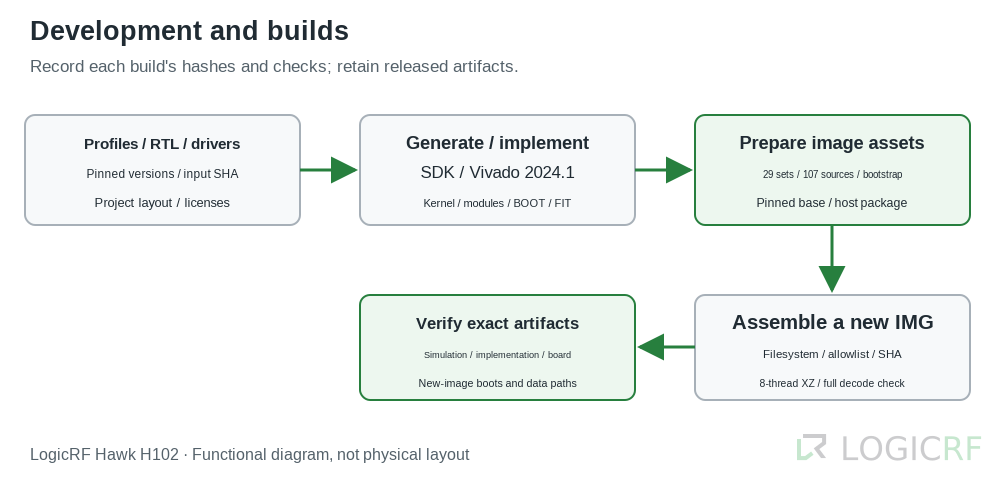
This chapter covers changes to applications, configuration packages, host data programs, drivers and RTL. Keep the released image and tags as a rollback point. Record the inputs and outputs of each new build and verify the changed component and affected data paths.
¶ Current Kuiper 1.2.1 development baseline
Use the Kuiper 1.2.1 release manifest to identify the complete installed combination, including RTL, device control and network components. Match development inputs to the sources, versions and digests below.
| Component | Pinned identity |
|---|---|
| Image integration source | h102-kuiper-1.2.1-image, commit 57d5baaf88c70d70922bc4c818accf8f343fbc1c |
| Image manifest | manifests/h102-deployment-1.2.1.json; acceptance in docs/receipts/20261027-1.2.1-exact-image-acceptance.json |
/etc/h102/sdk1-image.json SHA-256 |
7b58e2f3eb0d8427d35af6378e91f7c138e9386b2f0acf981830ebf79aeafd42 |
| Included RTL build source | panel_addon.compiled_commit = 134a61febce9d9ddf831609c252a017d033ddaf3 in the image manifest; obtain the matching RTL materials under the development delivery scope |
| Released BIT SHA-256 | d6a2412cd32c767b29f08b077f9ee3eae159a5bf1188417db243e55ab33e3eff |
| Device control / configuration interface | API 0.1.0-ip36-panel1, capability 3; IIO profile ABI 1; 58 installed IDs |
| RF stack | SDK 1.0.0 / API 68.21.6 / firmware 1.0.2 / stream 0.7.22.0 |
| Current SD writer source | h102-deployment-tools-1.2.1-en-r3, commit e27d31c5feba2c4dfe831feceb3925fa2553fe97; network provisioning is separate from the unchanged image |
| Current host applications | IIO GUI 0.8.1 and gr-logicrf 1.2.3; see matching downloads |
The current image exposes the same 13 devices, 95 channels and 761 attribute names/directions/owners as the reference inventory. The basic Python/C++ status and profiles queries were checked against 1.2.1. This does not qualify every attribute value/write or RF operation. See example scope.
¶ Repositories and pinned versions
Use the pinned system integration, SD tools and host versions listed in the current development baseline and matching downloads. Obtain complete RTL, BOOT/FIT and vendor SDK inputs within the development delivery scope; provide the target component and hardware revision through support.
¶ Project layout
| RTL path | Contents |
|---|---|
h102_logicrf.srcs/sources_1/new |
Top level and handwritten RTL |
h102_logicrf.srcs/sources_1/bd, ip, ip_repo |
Stable BD/IP seeds, custom IP and ADI libraries |
h102_logicrf.srcs/constrs_1/new |
Pin, clock, timing and CDC constraints |
h102_logicrf.srcs/sim_1/new/regression |
Nine mandatory regression tops |
h102_logicrf.scripts/build/check/test/config |
Build, audit, test and path-resolution tools |
h102_logicrf.docs, h102_logicrf.reports |
Design conventions, baselines and build evidence |
project_layout.json |
Canonical paths, filesets and regression inventory |
| Linux path | Contents |
|---|---|
scripts |
Configuration, IIO, host, kernel and image tools |
profiles/sdk1-candidate, sdk1-common-candidate |
29 independent-LO and 29 shared-LO packages, with native generation sources |
profiles/requests |
Approved parameters and development requests |
kernel, patches |
External control module and SDK1 driver adaptation |
overlays/h102 |
Boot, services and downstream configuration |
tools/runtime-wire-host |
Managed deployment entry point for an external host |
manifests, docs/receipts |
Pinned inputs, versions and verification records |
releases |
XZ LFS objects, manifests and release files |
¶ Rebuilding the RTL
Linux PC · Run in the tool or project directory named here; set paths to the actual installation and files.
cd hawk-h102-rtl
python3 -I h102_logicrf.scripts/config/layout.py check
VIVADO_BIN=/opt/xilinx/Vivado/2024.1/bin/vivado \
  bash h102_logicrf.scripts/build/build_rtl.sh all \
  "$PWD/../build/rtl-new/project"
Use a fresh output directory, Vivado 2024.1 and device xc7z030ffg676-2. Select concurrency according to build-host CPU and memory. Retain the project's constraints, resource checks and layout rules; assess timing and interface effects before changing them.
After an RTL change, check that build’s implementation timing, resource use, clock-domain crossings and data paths. Record its BIT SHA256, source identity and verification results.
¶ SDK and configuration generation
See ADRV9002 profile generation for the complete procedure and tool setup. The following example generates independent-LO packages; all 58 packages also require generating and importing the shared-LO catalog.
At runtime, select installed packages. For development, use ADI SDK Evaluation Software 1.0.0 with API 68.21.6, Firmware 1.0.2 and Stream 0.7.22.0.
The Windows entry point is scripts/windows/h102-generate-profiles.ps1 in the system repository:
Windows PC · PowerShell. Obtain the matched ADI tools and set the installation and export paths.
powershell.exe -NoProfile -ExecutionPolicy Bypass -File scripts/windows/h102-generate-profiles.ps1 `
  -SdkVersion 1.0.0 -SdkRoot C:\path\sdk-1.0.0 `
  -OutputDirectory C:\path\new-output `
  -PresetCatalog profiles/requests/h102-built-in-sdk1-presets.json
Linux PC · Run in the tool or project directory named here; set paths to the actual installation and files.
python3 scripts/h102_import_generated_profiles.py \
  --request-catalog profiles/requests/h102-built-in-sdk1-presets.json \
  --generation-directory /path/to/generated-results \
  --output-directory /path/to/new-packages
The import checks versions, parameters, markers and SHA values. Keep generation receipts and original ZIPs, and write to a new package directory. SDK DLLs and download caches are not redistributed with the profile library; follow ADI's license. Validate generation, parsing and actual initialization first, then the required finite IIO capture, streaming, USB, RF and GNSS functions. A package loading successfully does not establish those results.
¶ Kernel and image generation
The SDK1 kernel and device tree are pinned together in the FIT. External modules must match the exact kernel. Development uses h102_prepare_sdk1_kernel.py, the SDK1 IIO driver patch and control-module build scripts, with PetaLinux/cross-compilation tools 2024.1. Supply the actual source/SDK ZIP and configuration-root paths from the build environment.
Image preparation and assembly operate on ordinary IMG files; they do not write an online SD card:
Linux PC · Run in the tool or project directory named here; set paths to the actual installation and files.
cd hawk-h102-linux
python3 scripts/prepare_h102_sdk1_assets.py \
  /path/to/pinned-inputs.json "$PWD/artifacts/NEW-assets"
sudo python3 scripts/build_h102_sdk1_image.py \
  /path/to/pinned-h102-base.img "$PWD/artifacts/NEW-assets" \
  "$PWD/artifacts/NEW-image"
The pinned-inputs.json schema is 1. Each boot_bin, fit, bit and modules entry has an absolute ordinary-file path, bytes and sha256; optional portable_host pins a host package. See the recipe source and image manifest for exact fields and hashes. The base is the pinned H102 SDK1 base IMG produced by the recipe. Do not substitute an unmodified ADI Full IMG. Rebuilding also requires the authorized base, BOOT, FIT, module package and host SDK inputs. A source checkout does not download or generate all these inputs automatically.
Outputs include an ordinary RAW image, installed-asset and permission manifests, and filesystem/difference-allowlist checks. XZ compression uses eight threads, followed by a complete decompression SHA256, length and CRC check. Filesystem UUIDs, device-identity initialization and boot configuration are also part of the image contract. Replacing files in an old IMG does not, by itself, qualify a kernel or RTL upgrade.
¶ Host development
Obtain the pinned FTDI D3XX 1.1.8 headers and library under their original license. Use the repository scripts and fresh output directories:
Linux PC · Run in the tool or project directory named here; set paths to the actual installation and files.
bash scripts/build_h102_rf_usb_rx.sh "$H102_D3XX_DIR" "$H102_RX_BUILD"
bash scripts/build_h102_runtime_digital_mixed_dma.sh "$H102_D3XX_DIR" "$H102_MIXED_BUILD"
Set the environment variables to real absolute paths first. The RX tool uses an asynchronous USB request queue. The mixed program reuses bounded DMA mappings by handle and length and releases all mappings after close. New host controllers must preserve READY/END/STOP/DRAIN/ACK, configuration snapshots and native heartbeats. A GUI calls these contracts.
¶ Verification after a change
| Change | Required checks |
|---|---|
| Documentation or diagrams | Source-field comparison, links, build and rendered pages |
| Profile or stream package | Versions/SHA/C parsing, actual initialization readback, target data paths and RF functions |
| Host buffers or queues | Lifecycle, chunking and failure cleanup, same-device comparison, continuity and recovery |
| RTL clocks, queues or CDC | Targeted simulation, full implementation/STA and related CDC, board verification and new image |
| Boot, drivers or image | Offline whole-image checks, exact SD write/readback, default cold/warm boot and affected product paths |
¶ Reference sources
Use the source, manifests and schematic corresponding to the delivered version. See Source materials for availability.
| Definition | Source |
|---|---|
| Current 1.2.1 release and verification scope | docs/receipts/20261027-1.2.1-exact-image-acceptance.json at system repository tag h102-kuiper-1.2.1-image; use the verification scope stated in that record |
| Exact installation paths | scripts/prepare_h102_sdk1_assets.py and the RC2 asset manifest |
| 29 parameter sets | profiles/requests/h102-built-in-sdk1-presets.json |
| IIO attributes and behavior | Control module, h102_profile_iio_broker.py and configuration manager |
| RX/TX fields | docs/protocol/h102-rx-v3-layout.json, RX v3 C parser, TX protocol and current RTL |
| Hardware net names | Rev.B ydt6102_sch_rev_b_final.pdf, including pages 3, 8 and 11 |
| Device capabilities | ADI ADRV9002 documentation |
ADI Kuiper, ADI HDL/drivers, the FTDI SDK and other components retain their upstream attribution and licenses. LogicRF management tools and verification records do not replace vendor licenses.
¶ Development materials and dependencies
A system image is not a promise of a complete automatic rebuild from one repository checkout. Before rebuilding a component, check the base image, toolchain, SDK, generated profiles and prebuilt dependencies listed in Source materials.
Prefer IIO and managed control interfaces for application development. Change RTL or the kernel when the required behavior involves digital interfaces, transport or drivers. See Profile generation when adding configurations.