For a preinstalled unit, confirm its identity and the RAW, STREAM and SAM apps in ULMUS, with STREAM active. Follow Quick start for a short capture. For a new card or recovery, use the complete image and writer listed in the unit's delivery manifest.
¶ New card materials
| File | Verify |
|---|---|
| Complete image and writer | Unit and hardware revision, image identity and byte length, checksums and matching signatures |
| ULMUS framework and apps | Full UIDs, signatures and the apps supplied for the unit |
| Receiver software | Matched shared Device SDK and DAQ installers |
Get the matching files through the delivery channel.
¶ The complete first-use route
| Order | Where | Completion signal | Next |
|---|---|---|---|
| 1 Obtain image and writer | Linux flashing computer | Version and SHA match this page | Insert new card |
| 2 One-command writing | Linux flashing computer | PASS_FULL_WRITE_AND_DIRECT_READBACK |
Safely eject |
| 3 Insert card, network, power | Physical R508 | System boots and actual IP is known | Open Web |
| 4 First login and password change | Management browser | Log in again with the new password | Inspect default STREAM |
| 5 Check framework and matching apps | ULMUS Web | Framework and app identities match the manifest, with STREAM ready | Prepare receiving server |
| 6 Install SDK/DAQ/DPDK | User server | Healthy services, correct 100G and storage paths | First short task |
| 7 START→STOP and inspect files | DAQ Web/SDK | Completed task, valid data and counts | Shutdown/handover |
The flashing computer, R508 and receiving server are separate roles. Do not execute the writer on R508 or install server programs on the dedicated capture volume.
¶ Foundation image versus complete delivery
Use the step table to distinguish the flashing computer, R508 and receiving server. Example UI layouts below help explain login, readiness and App versions.
A flashed PYNQ foundation image is not an installed ULMUS system. A complete device requires the matching hardware image, OS prerequisites, signing trust keys, formal ULMUS-Cython runtime, managed App packages and device-specific authentication. RAW/STREAM/SAM are separate delivered Apps, with STREAM selected by default. Follow the matching delivery manifest.
| Delivery item | Destination | Verify |
|---|---|---|
Matching R508 .img or .img.xz |
Boot SD card | Hardware revision, compressed/decompressed SHA256, minimum capacity, release notes |
| OS prerequisites/configuration | Device system disk, via managed image/installation | USB-storage shutdown finalization, service policy, libraries and identity |
| Formal ULMUS-Cython framework | Managed framework release | Platform, Python ABI, signature, version/release UID |
| RAW/STREAM/SAM packages | Independent App slots | Matching framework, BIT/HWH and initialization files |
| Trust keys, identity, initial credentials | Assigned protected locations | Trusted delivery, permissions, per-device identity; never private signing keys |
| SDK/API/DAQ and host configuration | Receiving server system disk | Architecture, versions, DPDK ABI and host profile |
Confirm whether the image is a foundation image or a fully provisioned device image. Do not assemble a formal device from development source, arbitrary pip packages or another device's directories. A Studio installer declaring only preview capability cannot execute first installation. Obtain the matching production provisioning package/bootstrap before continuing; successful preview is not successful installation.
¶ Prepare and record
You need a card reader, a reliable card with sufficient capacity, management networking, the delivered power arrangement and an administrator Linux computer. Flashing erases the entire selected card. Preserve any required old-card records first; never leave the sole credentials or evidence on the card being overwritten.
| Record | Source |
|---|---|
| Model, hardware revision, serial | Device markings and delivery sheet |
| Image name/version and both SHA256 values | Trusted release manifest |
| Card model/capacity and whole-device path | Compare lsblk before/after insertion |
| Framework and four App release UIDs | Matching delivery list |
| Management IP and how to obtain it | DHCP lease or delivered network settings; do not copy example addresses |
| Credential handover channel | Record recipient/channel, not the secret |
| Host, data network and capture volume | Server deployment record |
¶ One-command SD writing with full direct readback
Run this section on the administrator's Linux flashing computer, not R508. Shut R508 down before removing its old card. Use a new card that may be erased. Writing destroys all contents of the selected whole card. The tool does not make a backup or automatically choose a disk.
¶ Step 1: Verify the image and checksums
Get the complete .img.xz, image manifest and SHA-256 from the delivery set. Check that the card can hold the decompressed image and the writing host has working space. The required commands include Bash, GNU coreutils, util-linux, udev and xz-utils.
¶ Step 2: Verify the matched writer
Extract the writer supplied with the image. Run sha256sum --check SHA256SUMS and bash r508-write-sd.sh --help from its directory. Use the command options supplied for the unit.
¶ Step 3: Insert and identify the whole card
Run before and after inserting the reader:
bash r508-write-sd.sh --list
findmnt /
ls -l /dev/disk/by-id/
Compare the newly added device, capacity, reader identity and mount points. The target must be a whole disk (TYPE=disk) and removable (RM=1), never a partition. Prefer the freshly verified /dev/disk/by-id/... path. A generic reader's serial is not necessarily a unique SD-card identifier; do not identify a target by name alone.
If the desktop mounted card partitions, explicitly unmount those confirmed card partitions first. The writer refuses mounted targets, fixed/system disks, partitions, read-only media, active swap and LVM/RAID holders. It does not automatically unmount anything. Capacity must be at least 9,776,416,768 bytes.
¶ Step 4: Verify, decompress, write and read back with one command
Replace the deliberately invalid CARD placeholder with the whole-card path just verified. Set IMAGE to the actual download location.
IMAGE="$HOME/Downloads/REPLACE_WITH_DELIVERED_FACTORY016.img.xz"
CARD=/dev/REPLACE_WITH_VERIFIED_WHOLE_CARD
sudo bash r508-write-sd.sh --image "$IMAGE" --device "$CARD"
| Message | Meaning/action |
|---|---|
Checking compressed image SHA-256 |
Rejects a different compressed image before card writing |
Decompressing ... raw image |
Stages locally and verifies complete raw length/SHA |
IMAGE_SHA_PASS |
Image verified; the card has not been written yet |
WARNING: ALL existing data ... |
Recheck the printed real device name and capacity |
Type exactly ERASE /dev/... |
Type the exact displayed phrase; other input cancels without writing |
WRITE_STARTED and dd progress |
Writing; do not remove the card or suspend/power off the computer |
DIRECT_READBACK_STARTED |
Reads the complete image length directly from media and hashes it |
PASS_FULL_WRITE_AND_DIRECT_READBACK |
All writing, direct-reading and SHA checks passed |
100% write progress, WRITE_COMPLETE or IMAGE_SHA_PASS alone is not qualification. A removed card or any read/write error requires investigation; keep the failed output rather than treating the card as successful.
¶ Step 5: Keep the result and safely eject
The current working directory receives a new r508-sd-write-UTC-PID/ directory:
| File | Purpose |
|---|---|
run.log |
Actual output, write/readback progress and errors |
result.txt |
Final status, image length/SHA, target and durations |
readback.sha256 |
Direct-read hash covering the image length |
device-before.txt / device-after.txt |
Reader/device path and capacity identities |
Use the actual path printed at completion. Files are created by sudo; use sudo cat /actual/path/result.txt when needed. Logs contain no passwords or Tokens. Use your OS's safe-eject function and wait for completion before unplugging the reader. Never remove a card during write/readback.
¶ Verify the write and readback
Confirm PASS_FULL_WRITE_AND_DIRECT_READBACK, check the target identity, and match the complete readback SHA-256 to the image before ejecting the reader.
¶ Read-only checking and common rejections
sudo bash r508-write-sd.sh --image "$IMAGE" --device "$CARD" --check-only verifies the full image and target without card writing. PASS_CHECK_ONLY_NO_CARD_WRITE does not mean a card has been written. --yes skips the interactive erase phrase only and bypasses no guard. Keep the default interaction for first use.
| Rejection | Action |
|---|---|
| SHA/raw-length mismatch | Obtain the correct official image; do not edit hashes |
| fixed disk / partition | Re-identify the target; no forced fixed-disk mode exists |
| mounted / active swap / holder | An administrator must verify ownership and explicitly release it |
| Cannot query ... | Stop; resolve missing tools, permissions or device-query failure |
| Insufficient capacity / read-only | Use sufficient writable media/reader |
| Direct readback failure | Preserve the error; cached reading is not an equivalent pass |
| Output directory already exists | Keep the evidence and choose a new --output-dir |
¶ Insert the written card into R508
- Confirm normal OS shutdown and power removal. Use the physical SD-slot label and delivered hardware guide; never swap the system card while powered.
- Seat the qualified card and connect the management port to a network that provides an address.
- Initial management checks require no RF source, DAC connection or 100G acquisition. Do not enable RF output just to open Web management.
- Apply power through the delivered supply arrangement. Allow initialization and management startup to finish without repeated power cycling.
- Follow the two management-network routes: find the actual DHCP lease, or use this version's fallback on a network without DHCP. Do not copy other device addresses from screenshots.
- Follow the time, first-password and default STREAM and matched app checks below; install host SDK/DAQ/DPDK separately on the receiving server.
¶ First boot and management network
- Insert the card with the device off; connect management networking and the delivered power arrangement. DAC/RF output is unnecessary for first setup.
- Allow filesystem expansion and first boot to finish; do not repeatedly power-cycle. Obtain the management address using the DHCP/fallback routes below. Do not assume other image versions have this fallback behavior.
ping DEVICE_IPchecks reachability only; ICMP may be filtered. Openhttp://DEVICE_IP:8080/for the formal Web endpoint.- A foundation image without ULMUS may legitimately have no8080 listener. Check installation stage instead of repeatedly reflashing.
- For SSH maintenance, use delivered credentials and a verified host fingerprint. After reflashing, verify device identity before updating trust; do not disable host-key checking.
- Verify clock/timezone/time synchronization and record this boot's identity. Incorrect wall-clock time can misorder logs.
¶ Management networking: DHCP first, fallback without DHCP
This section applies to the current factory-system management port, separate from 100G capture data. Each boot first requests DHCP. If no lease is obtained within about 30 seconds, the device uses ARP to check whether 10.168.1.99 is occupied, and uses 10.168.1.99/24 only after that check succeeds. The 30 seconds describes the DHCP attempt window, not total power-on-to-Web time; filesystem expansion and application startup also take time.
This image illustrates the unchanged networking rule, not this version's new-card test or version evidence.
| Network | Device address | Management-computer setting |
|---|---|---|
| DHCP lease obtained | Actual address from the administrator's lease record | Usually automatic addressing, with a route to the device |
| No DHCP; window expired and no ARP conflict detected | 10.168.1.99, mask 255.255.255.0 |
An unused 10.168.1.x/24 on the same management link; never .99 |
10.168.1.99 occupied or conflict check failed |
Do not assume the fallback was assigned | Preserve boot/network errors, confirm through the delivered console and resolve the conflict |
¶ Route A: A management network with DHCP
- Connect the management port to a switch/network that the administrator confirms supplies DHCP. Connect the management computer where it can reach that network.
- Power on and allow boot to finish. Use the delivered device identity to ask the administrator for its router/server DHCP lease. A closed device does not need a serial connection; use the direct-connect fallback below when DHCP is unavailable. Addresses in old screenshots are not fixed addresses for your device.
- Enter
http://ACTUAL_DHCP_IP:8080/in the browser address bar, retaininghttp://and:8080. Continue to first-login password setup when the login page appears. - A boot that obtains a DHCP lease uses that address; do not expect
.99as a simultaneous second address.
¶ Route B: Direct connection or a network without DHCP
- For initial setup, connect one R508 and one management computer directly by Ethernet or through an isolated switch. Confirm that no other device on the link uses
10.168.1.99. Multiple devices cannot all be managed through the same fallback address simultaneously. - Record the computer's original wired IPv4 settings. Temporarily set only the adapter connected to R508 to an unused address such as
10.168.1.10, mask255.255.255.0(prefix 24). The example.10must also be unused locally. Leave default gateway and DNS empty; R508 is not an Internet gateway. - On Windows, use Settings → Network & Internet → Ethernet → IP assignment → Edit → Manual, enable IPv4 and enter the address/mask. On Ubuntu Desktop, use Settings → Network → Wired → IPv4 → Manual. If asked for a prefix length, enter
24. Preserve unrelated adapters. If Wi-Fi/VPN already routes10.168.1.0/24, ask the administrator to resolve that overlap first. - Wait for the DHCP attempt window and service initialization to finish, then open
http://10.168.1.99:8080/.ping 10.168.1.99can check connectivity, but blocked ICMP alone does not prove Web is unavailable. - After login, verify device identity/version. Fallback provides local management. Without a default gateway or DNS, do not expect Internet access or NTP synchronization; offline fallback does not guarantee NTP synchronization or RTC time retention. Use the startup-time checks to establish a trustworthy time source before tasks that require accurate UTC.
- After direct management, restore this computer adapter's original automatic or administrator-specified settings before returning to a normal office network.
After entering fallback, this boot does not automatically switch back to DHCP when a DHCP network becomes available. To use DHCP, stop owned tasks, shut down normally and restart according to delivery instructions. The next boot tries DHCP first again. Do not pull power to change addressing or repeatedly reflash the card.
¶ If the address or page is still unreachable
Check management-port link/carrier, the selected computer adapter's address/mask, address conflicts and overlapping VPN routes, then check boot completion and the port-8080 service. An assigned management address does not prove FPGA readiness or 100G reception. For no carrier, preserve boot/link records using management-PHY troubleshooting; changing IP settings does not resolve a physical-link fault.
¶ Startup-time checks
The device provides no onboard RTC time-retention guarantee. It uses saved software time and NTP. Normal Web use does not require a serial connection. These optional administrator SSH checks are not prerequisites for the first Web login:
date -u +%FT%TZ
timedatectl show -p NTPSynchronized --value
The date should match current UTC; the second command should return yes after NTP synchronization. The first network synchronization can still be pending immediately after boot. Reread the actual state later, and do not rely on board UTC before synchronization completes. If synchronization is absent or the date is clearly wrong, check the management network, DNS and the time server specified in the delivery configuration. A working Web page or locked PLL does not establish trustworthy time. Do not edit log state to hide a time problem. The existing log-year guard remains, but does not replace accurate synchronization.
An offline first boot may show the old time saved in the image and does not guarantee accurate UTC. Establish time before timestamp-dependent work and record the current boot identity. Writing a complete image replaces the card contents and authentication identity; maintain working delivered systems using the matching update procedure rather than reinstalling identical App packages.
¶ First administrator login with the complete factory system
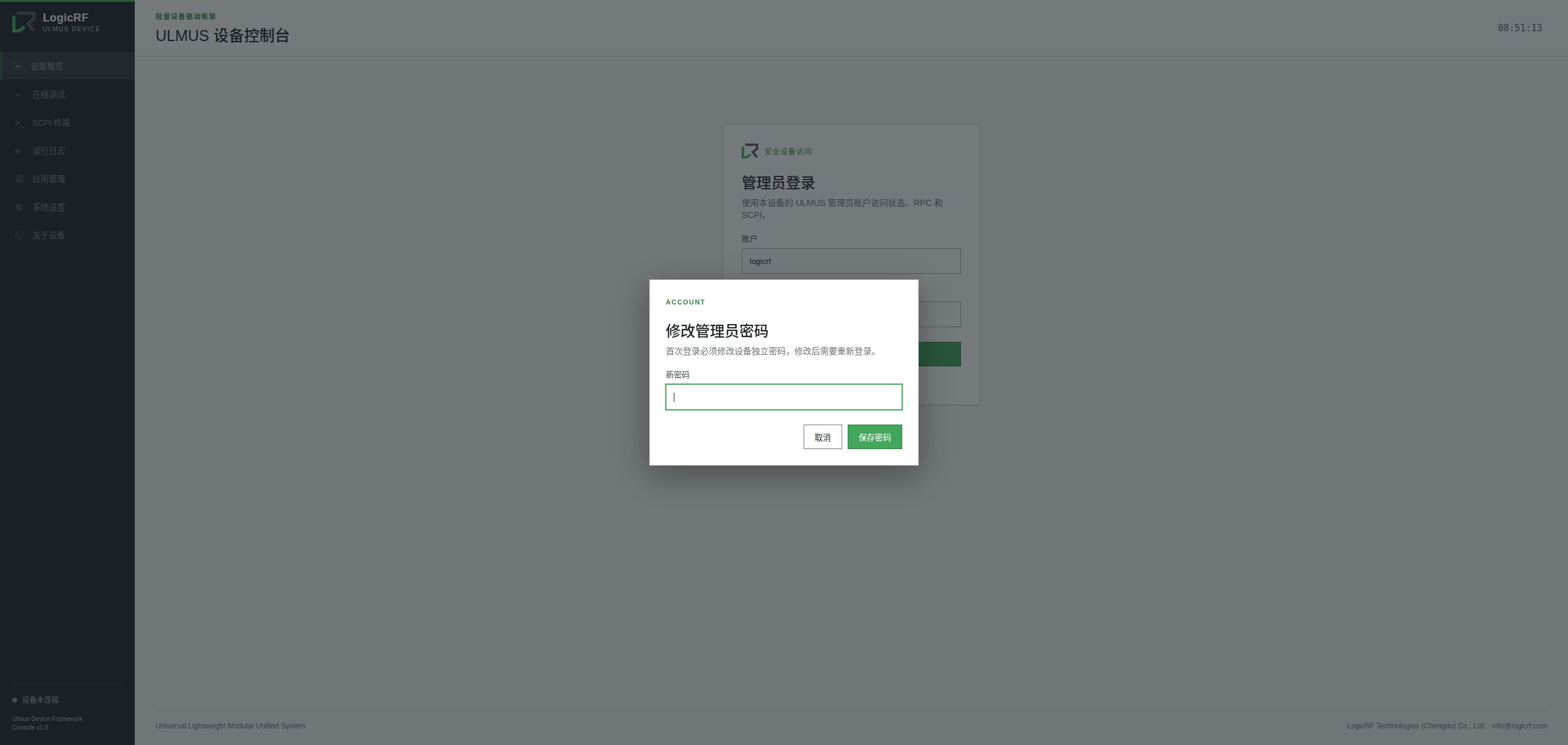
Open the device's management address on port 8080. For first login, use logicrf and the initial password supplied with the device, then change it when prompted. Use the current credentials for a device that has already been set up.
| Entry | Current initial username | Purpose and later credentials |
|---|---|---|
| Linux/SSH | logicrf |
Device administration; a Web password change does not change the Linux password |
ULMUS Web :8080 |
logicrf |
Requires a new device-specific password and a fresh login on first use |
Optional Samba share \\DEVICE_IP\logicrf |
logicrf |
Shares the onboard user's home directory. Recordings use the receiver's data volume. |
| SDK/DAQ device API | Named client Token | Create through Web; do not use a Linux or Web password as a Bearer Token |
- Connect management networking and wait for startup. Find the actual address in the DHCP lease, or follow the direct-connect fallback below. Customers use a browser; serial access and factory identity enrollment are not required.
- Open
http://DEVICE_IP:8080/, replacingDEVICE_IPwith the device's address. Sign in aslogicrfwith the delivered initial password. To manage API tokens, first complete the required password change and sign in again. - Set a new Web password: the form requires at least 12 characters, with at most 128 UTF-8 bytes (the backend API accepts 12–128 bytes). The old session expires after submission. Sign in again as
logicrfwith the new password. This does not change Linux/SSH or Samba passwords. - Follow the screenshot guide to check the active application, readiness and the versions in the delivery manifest. The standard factory image starts STREAM. If your delivery specifies another preset application, use the settings for that application.
- Create a named SDK/DAQ client on the Token-management page, then configure its Token securely on your server using server deployment. Device API Tokens and DAQ inbound client Tokens serve different connections.
A normal reboot preserves SSH identity, the changed Web password and Tokens; it does not repeat initial setup. Rewriting the complete system card generates a new SSH identity and restarts that image's initial-login flow. Verify the new fingerprint and delivered credentials. Keep passwords and Tokens out of screenshots, issues and ordinary configuration examples. This account change does not change Jupyter's existing authentication policy.
The password dialog below illustrates the workflow only. Use the current page and delivery manifest for actual fields and versions.
¶ Verify the framework and apps
ULMUS is a shared framework. RAW, STREAM and SAM have individual app signatures and release UIDs.
¶ Overview, Application Management and About Device
Check the management address, time, reference clocks and active app in Overview. In Application Management and About Device, verify UIDs against the unit manifest. Confirm STREAM is ready and stopped. Management UI
¶ Pair the server and perform minimum acceptance
Use Server Deployment for SDK/DAQ on the system disk, actual100G hardware/MTU9000, matching DPDK and capture storage. A reachable management Web interface does not prove data reception.
| Check | Action | Keep |
|---|---|---|
| Image/boot | Checksums, direct card readback, first-boot logs | Image/card/boot identity and actual I/O errors |
| Framework/App | About, App Manager, manifest | Matched app slots, active STREAM, matching release, ready |
| Read-only API | Declared system.status/clock.status/sensor.sysmon | Actual identity/fields; interpret lock fields separately |
| First short capture | Low-rate STREAM START→status→STOP | Committed task, valid bytes and correct manifest/format |
| Data | Matching SDK decoder and channel/rate/header checks | Protocol-specific continuity limits, not invented zero-loss claims |
| Shutdown/restart | STOP and DAC OFF, normal OS shutdown, then power removal; boot again | Filesystem finalization, persistent identity/authentication, service ready; capture parameters configured again |
These are minimum deployment checks, not qualification of every bandwidth/RF/phase/long-duration condition. Refer to delivery verification reports for additional product claims.
¶ First capture check
Record the image, framework, app, network and reference clock state. Use the first recording walkthrough to save a small file and verify task commit and valid bytes.
¶ Recovery and handover
Separate network, OS boot, framework, App and DAQ failures. Record identity/error before replacing components. Use managed previous/rollback for upgrades. If a card must be reflashed, preserve required task/configuration/credential handover information and repeat verification. Do not blindly copy authentication from another device.
Hand over version/checksum lists, management/data networking, system/capture paths, credential delivery method, first login, normal shutdown, first-task ID/results and recovery procedure. Secrets travel separately from ordinary reports.