This guide takes a new Ubuntu receiving server from cabling and storage to a short IQ recording. If the software is already installed, start at Step 7.
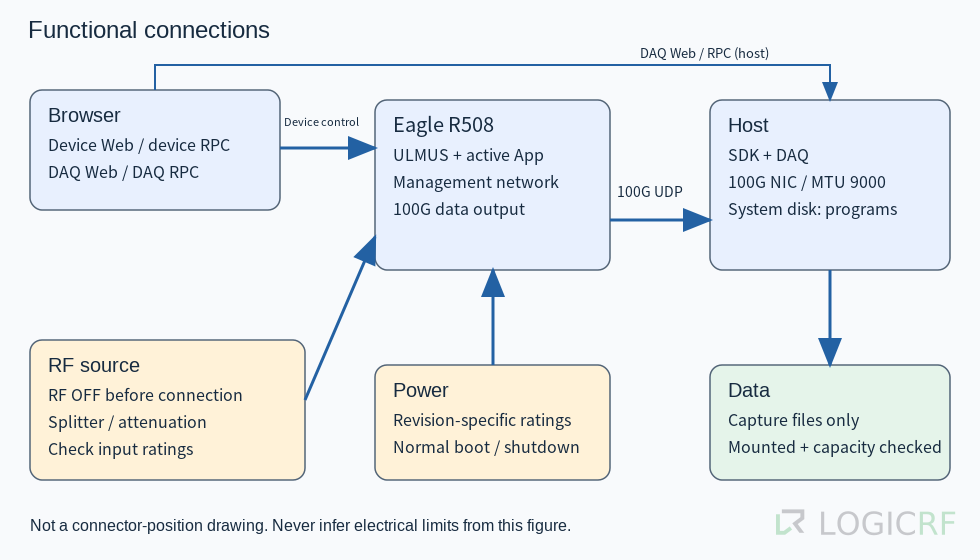
¶ Before you start — Identify the two networks and two disks
| Connection or storage | What to record |
|---|---|
| Server management port → LAN | Address assigned by your administrator. Use it for SSH, downloads and DAQ Web |
| R508 management port → management network | Device address used to open ULMUS and for DAQ control |
| R508 QSFP28 → server's dedicated 100G port | Separate data subnet with one address for each endpoint. MTU 9000 |
| Server system disk | Ubuntu, drivers, SDK, DAQ, configuration and installation receipts |
| Dedicated NVMe capture volume | IQ files and task metadata. Record its actual mount point and capture subdirectory |
This example starts from Ubuntu Server 22.04 x86-64, a dedicated mlx5 100G port, and Netplan with systemd-networkd. Obtain your interface names, addresses, PCI identity and storage paths from inventory and the delivery record. If the data and management networks overlap, have your administrator assign a separate data subnet before filling the template.
¶ Step 1 — Log in through the management port and install tools
Run these commands on the receiving server. Connect through its management port and use the delivered management information to open the device Web page.
hostname
cat /etc/os-release
ip -br address
ip -4 route show default
sudo apt-get update
sudo apt-get install --no-install-recommends \
  ca-certificates git python3 python3-yaml iproute2 util-linux \
  netplan.io pciutils ethtool xfsprogs fdisk nano
Ready when Ubuntu reports 22.04, the default route uses the management port, and you can still reach the server terminal and device Web page. Keep this management path during data port configuration.
¶ Step 2 — Identify the dedicated 100G port and record the addresses
Connect the QSFP28 cable and read the interfaces on the receiving server. Replace enp1s0f0 with your dedicated port. On a dual-port card, identify the port that the cable actually uses.
ip -br link
lspci -Dnn | grep -Ei 'Ethernet|Mellanox|NVIDIA'
DATA_IF=enp1s0f0
sudo ethtool -i "$DATA_IF"
systemctl is-active systemd-networkd
ip -4 route show default
ip -br -4 address
Record driver: mlx5_core and the full PCI address reported as bus-info. If the selected interface carries the default route, use the wiring diagram to identify the dedicated data port instead.
| Example network values | Address |
|---|---|
Receiving server data port network.address |
192.168.4.1/24 |
R508 data interface network.device_data_ip |
192.168.4.99 |
R508 management network.device_management_ip |
Address used to open ULMUS on your management network |
Substitute your own delivery values. The data destination on the R508 points to the host's data port. Leave gateway and DNS off the dedicated data interface. The deployment script writes the persistent data port and MTU settings later.
¶ Step 3 — Prepare and mount the dedicated capture volume
Identify the system and capture disks. Both commands below are read-only. Match the model, serial, capacity, UUID and mount point to your disk plan.
findmnt -no SOURCE,FSTYPE /
lsblk -o NAME,PATH,MODEL,SERIAL,SIZE,FSTYPE,UUID,MOUNTPOINTS
- Existing XFS or ext4 volume Keep its filesystem and read its UUID.
- New capture disk approved for erasure Have the administrator create GPT and a data partition according to the disk plan. This example formats the verified empty data partition as XFS. For a disk with no partition, have the administrator confirm its whole-disk by-id path and open it with
sudo fdisk. Usegfor GPT,nfor a new partition, andpto review the proposed table. Usewto write it only after confirming the disk. Check the new partition withlsblk. Set the variable below to the partition's complete by-id path.
DATA_PART=/dev/disk/by-id/REPLACE_WITH_CAPTURE_PARTITION
lsblk -o PATH,SIZE,FSTYPE,UUID,MOUNTPOINTS "$DATA_PART"
After confirming the new partition is the one approved for erasure, run sudo mkfs.xfs "$DATA_PART". For an existing volume, use the same variable for its partition. Read its UUID with sudo blkid -s UUID -o value "$DATA_PART".
Choose an empty mount point for the volume. This example uses /data/r508. Open sudoedit /etc/fstab, and add this XFS entry with the actual UUID. Keep one matching mount entry for the device and target. For ext4, use ext4 with 2 in the last column.
UUID=CAPTURE_VOLUME_UUID /data/r508 xfs defaults,nofail 0 0
sudo mkdir -p /data/r508
sudo mount /data/r508
findmnt -M /data/r508 -o TARGET,SOURCE,FSTYPE,OPTIONS
df -h /data/r508
Ready when findmnt -M shows /data/r508 directly, from the selected data volume, with XFS or ext4 and a writable mount. Set storage.mount to that mount point and storage.capture_directory to a subdirectory such as /data/r508/captures.
¶ Step 4 — Download the published tool and inventory the server
Run on the system disk. Use the public tool's pinned v0.1.0 tag. Obtain matching signed SDK/DAQ packages, installers, profiles, release UIDs, the trust key and independent checksums from your delivery contact.
git clone --branch v0.1.0 --depth 1 https://github.com/logicrf/r508-host-setup.git
cd r508-host-setup
git describe --tags --exact-match
/usr/bin/python3 r508_host_setup.py inventory > inventory.json
/usr/bin/python3 -m json.tool inventory.json
Ready when the tool reports v0.1.0 and inventory identifies the hostname, dedicated port and PCI address, and capture volume. If an unaddressed data port is missing during inventory or planning, for example with Data NIC disappeared during inventory, check the physical port and routes from Step 2. After verifying that it is the idle dedicated port and the intended address is free, assign the data address from the delivery and run inventory again. Replace both example values and skip the address command if the address already exists.
DATA_IF=enp1s0f0
DATA_CIDR=192.168.4.1/24
sudo ip link set dev "$DATA_IF" up
sudo ip address add "$DATA_CIDR" dev "$DATA_IF"
ip -br -4 address show dev "$DATA_IF"
/usr/bin/python3 r508_host_setup.py inventory > inventory.json
This assigns a runtime IPv4 address. After plan review the deployment tool writes persistent configuration. For NetworkManager hosts or DAQ packages using the newer SDK dependency contract, obtain the matching tool and configuration from the delivery channel.
¶ Step 5 — Fill in host.json and review the plan
Prepare the DAQ service account and credential directory as specified in the delivery. The device API token allows DAQ to control the R508. The DAQ client identity signs in to the receiving server. Use the delivered credential tool and keep the installation template to file paths and public checksums.
test -e host.json || cp host.example.json host.json
chmod 600 host.json
nano host.json
/usr/bin/python3 -m json.tool host.json >/dev/null
| Field | Where to find the value |
|---|---|
hostname |
Local name in inventory.json |
network.interface, network.pci |
Interface name and bus-info from Step 2 |
network.address, device_data_ip, device_management_ip |
Host data IPv4/CIDR, device data IP and device management IP |
storage.mount, storage.capture_directory |
Successful volume mount and capture subdirectory from Step 3 |
storage.min_free_gib, storage.service_user |
Minimum free space and the DAQ service account from the delivery |
releases.public_key, releases.sdk, releases.daq |
Delivered files, checksums, profiles and release UIDs. Paths are relative to host.json |
Before the privileged plan, use sha256sum to check the trust key, installers and packages against the delivery record. Replace every REPLACE_WITH_… value. Run:
sudo /usr/bin/python3 r508_host_setup.py plan host.json > plan.json 2> plan.stderr
Ready when the exit code is 0 and the data port, address, capture directory and both release_uids agree with your records. View the plan with python3 -m json.tool plan.json. On failure, read plan.stderr. For DAQ package requires a different SDK runtime, correct the package pair or installation entry using the matched delivery and run plan again.
¶ Step 6 — Deploy SDK and DAQ on the idle server
Confirm that capture is idle. From the same directory, run this command. The tool configures the dedicated port and capture directory, then installs Device SDK and DAQ Server.
sudo /usr/bin/python3 r508_host_setup.py deploy host.json > deploy.json 2> deploy.stderr
Ready when the exit code is 0 and deploy.json lists SDK and DAQ under install_results with status ok and the planned UIDs. Check signature, preflight and health receipts. Record the DAQ service name, Web and RPC addresses and capture directory. Keep deploy.stderr and the component receipts if deployment fails.
¶ Step 7 — Read back the settings and record one file
Replace the interface, capture mount and DAQ service name with the actual values from your delivery.
DATA_IF=enp1s0f0
ip -4 route show default
ip -br -4 address show dev "$DATA_IF"
ip -d link show dev "$DATA_IF"
sudo ethtool "$DATA_IF"
findmnt -M /data/r508 -o TARGET,SOURCE,FSTYPE,OPTIONS
systemctl is-active logicrf-device-sdk-host.service
systemctl is-active REPLACE_WITH_DAQ_SERVICE
| Check | Expected result |
|---|---|
| Management network | Default route still uses the original management port. The server is still reachable from your management computer |
| 100G data port | Intended IPv4 and MTU 9000. An established link reports Link detected: yes. Speed and FEC match the delivered link setup |
| Capture volume | Mounted at the recorded path, with a capture directory writable by the DAQ service account |
| Services | SDK and DAQ report active. DAQ Web opens with the correct device identity and application |
| First recording | Save a short 8 MHz recording from DAQ Web. Wait for commit and confirm valid bytes and packet counters |
To check persistence, reboot the idle server normally and repeat this step. Keep inventory.json, plan.json, deploy.json and the first task ID. After the low-rate capture succeeds, verify DPDK and sustained write throughput for the intended profiles.
¶ Receive host, DPDK and data volume
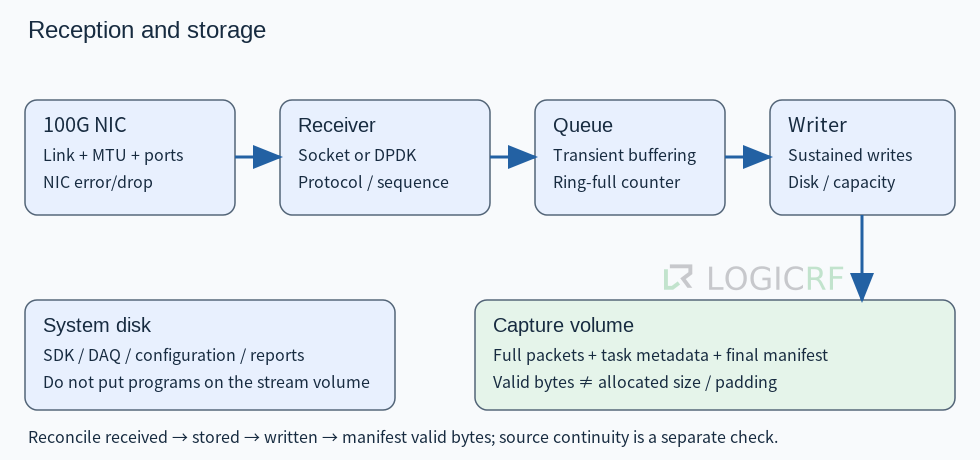
A management computer running only a browser or standard API client needs no 100G NIC. The high-speed receiver needs a matched dedicated 100GbE NIC, modules/fiber or DAC/AOC, consistent MTU and actual PCIe bandwidth. For mlx5, check compatible PMD, RDMA user libraries and kernel drivers; the ordinary management interface is not the data port. RAM size, CPU count or an NVMe's advertised rate alone does not guarantee the intended throughput.
Prepare hugepages, hugetlbfs, service memlock/network permissions, NUMA and thread affinity from the delivery configuration. Do not overwrite resources owned by another deployment or disguise an ABI mismatch with library symlinks. Keep programs, installation materials, logs and credentials on the system disk, and captured data on a mounted volume with sustained write capacity and sufficient space.
¶ Software, hardware and aggregate throughput budget
Installing SDK/DAQ cannot create missing hardware bandwidth. Management and web access can use ordinary Ethernet; high-speed IQ needs a matched 100G NIC/PMD, link, PCIe path and receive resources. Offline file decoding does not initialize DPDK. Socket reception may serve development or diagnostics at a suitable rate; it is not a guarantee for the required high-rate profile.
| Resource | Check against the actual load |
|---|---|
| Software | Matched Linux/Python, SDK/DAQ and native libraries, DPDK/PMD/RDMA ABI; service permissions, memlock and interface MTU. |
| CPU/NUMA | Aggregate RX/merge/writer/staging threads and effective affinity for all instances; NIC/memory placement and capacity for the OS, web service and disks. |
| Memory | OS plus each instance's hugepages/mbufs/queues and writer buffers. Do not count the same free hugepages once per process; swap does not replace pinned memory. |
| PCIe/network | Negotiated lane width/rate, shared uplinks and the sum of every device's raw packet rate, not the nominal 100G label alone. |
| Storage | Sustained data-volume writes, space, filesystem and headroom. Page-cache bursts or an SSD's advertised rate do not establish continuous recording capability. |
Start with channels × IQ samples/s/channel × bytes/complex sample; I16/Q16 uses four bytes. For raw datagrams containing a 64-byte header and 8128 IQ bytes in 8192 bytes total, multiply by 8192/8128 when saving full packets. Eight channels at 10MSPS mean 320,000,000B/s of IQ and approximately 322,519,685B/s of raw packets. This is a format budget, not measured throughput, and excludes Ethernet and filesystem overhead. Add device rates before validating the host; do not multiply a single-device result into a performance promise.
¶ Addresses and DAQ instances for multiple R508 devices
Keep three address roles separate: the R508 management IP serves device Web/RPC; the server management IP serves DAQ Web/RPC; data IPs belong to the UDP link between each R508 and its receiver. Changing one role does not configure the others. All addresses below are documentation examples, not customer host settings or evidence of an operational parallel deployment.
| Parameter/resource | Instance A | Instance B |
|---|---|---|
| R508 management address | 192.0.2.101 |
192.0.2.102 |
--device-web-url |
http://192.0.2.101:8080 |
http://192.0.2.102:8080 |
--device-rpc-url |
http://192.0.2.101:8081/rpc |
http://192.0.2.102:8081/rpc |
--web-bind / --rpc-bind |
192.0.2.10 |
192.0.2.10 |
--web-port / --rpc-port |
8088 / 8089 |
18088 / 18089 |
--web-origin |
http://192.0.2.10:8088 |
http://192.0.2.10:18088 |
Server --udp-bind |
Data port A: 198.51.100.1 |
Independent data port B: 203.0.113.1 |
R508 --udp-device-ip |
198.51.100.2 |
203.0.113.2 |
--udp-port, one flow here |
60133 |
60233 |
--application, in this example |
stream250, when supplied by the release |
stream250, when supplied by the release |
--rx-backend, high-speed reception |
dpdk |
dpdk |
--dpdk-pci-address |
Actual PCI BDF for data port A | Actual PCI BDF for data port B |
--storage-root |
/data/r508-a/captures |
/data/r508-b/captures |
--device-token-file |
/etc/logicrf/r508-a/device.token |
/etc/logicrf/r508-b/device.token |
--admin-password-store |
/var/lib/logicrf/r508-a/admin.json |
/var/lib/logicrf/r508-b/admin.json |
--api-token-store |
/var/lib/logicrf/r508-a/clients.json |
/var/lib/logicrf/r508-b/clients.json |
--schedule-store, if enabled |
/var/lib/logicrf/r508-a/schedules.json |
/var/lib/logicrf/r508-b/schedules.json |
Paths are planning examples. The matched provisioning tools must create them with appropriate permissions; no password or token value is shown. Configure --library, --application, PMD/CPU settings and permissions from each instance's delivery manifest. Inspect the supported entry and arguments in the installed matched Python environment without starting a server:
python3 -m logicrf_daq.products.eagle_r508_apps_server --help
The shared entry defaults to the socket backend. A high-speed delivery configuration must explicitly use --rx-backend dpdk and meet the matched resource requirements. --application selects the process contract, not device firmware. Use stream250 here only when supplied by the matched release. --udp-bind is the server receive address; --udp-device-ip is used for the corresponding device's data-link/neighbor reachability. Neither option rewrites device management/data IPs or its stream destination. Configure those on the device through the delivered network procedure and check both ends agree.
Matched STREAM header mode supports 1/2/4/8 flows; headerless mode is single-flow. Reserve each instance's complete consecutive port range: base 60133 with four flows occupies 60133–60136; do not put another instance inside that range. Flow count belongs to capture configuration, not the --udp-port argument.
If devices have identical factory addresses, use separate initial connections or the supported delivery procedure to assign unique management addresses. Identical data IPs may remain on strictly isolated independent data networks; this does not establish distinguishability after combining them onto one switch port. Shared NICs, separate DPDK processes, shared data IPs, RSS/queues/VLANs and switched aggregation require confirmation for the actual delivery. This example gives no concurrent-reception guarantee for those arrangements. A software bind-address change alone does not configure the device network.
Use a separate managed service, credentials/state/logs and write scope for each instance. Avoid two controllers starting or stopping the same device. When stopping one instance, confirm its device stop, receive drain and file commit before releasing its resources; do not alter shared services or the NIC in a way that disrupts another instance.