For Hawk H102 Rev.B on a bench that has passed the receive-only check. Verify both attenuation paths, permitted input levels and disabled outputs before connecting. ADI receive-only check
¶ Dual TX-to-RX RF loopback
This example uses the FPGA DDS to send a different CW tone through each RF transmit and receive chain. It was checked on Kuiper 1.2.1 with ADI v0.18-main at 1 GHz, using 4 MSPS / 2 MHz. It requires no waveform file or device Linux login. Keep DDS disabled during receive-only checks. Enable it in the transmit step below.
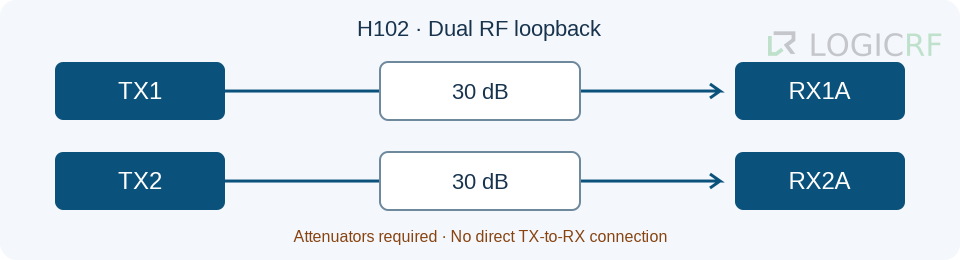
Connect with both transmitters off. Never connect TX directly to RX. Fit a 30 dB RF attenuator chain in each path, rated for the frequency and power. Remove receive antennas from these two test inputs. Keep the unused ports disconnected and do not increase transmit power to find a missing tone.
| Transmitter | External attenuation | Receiver | Expected tone offset |
|---|---|---|---|
| TX1 | 30 dB | RX1A | approximately +250 kHz |
| TX2 | 30 dB | RX2A | approximately +500 kHz |
¶ Set up with RF off
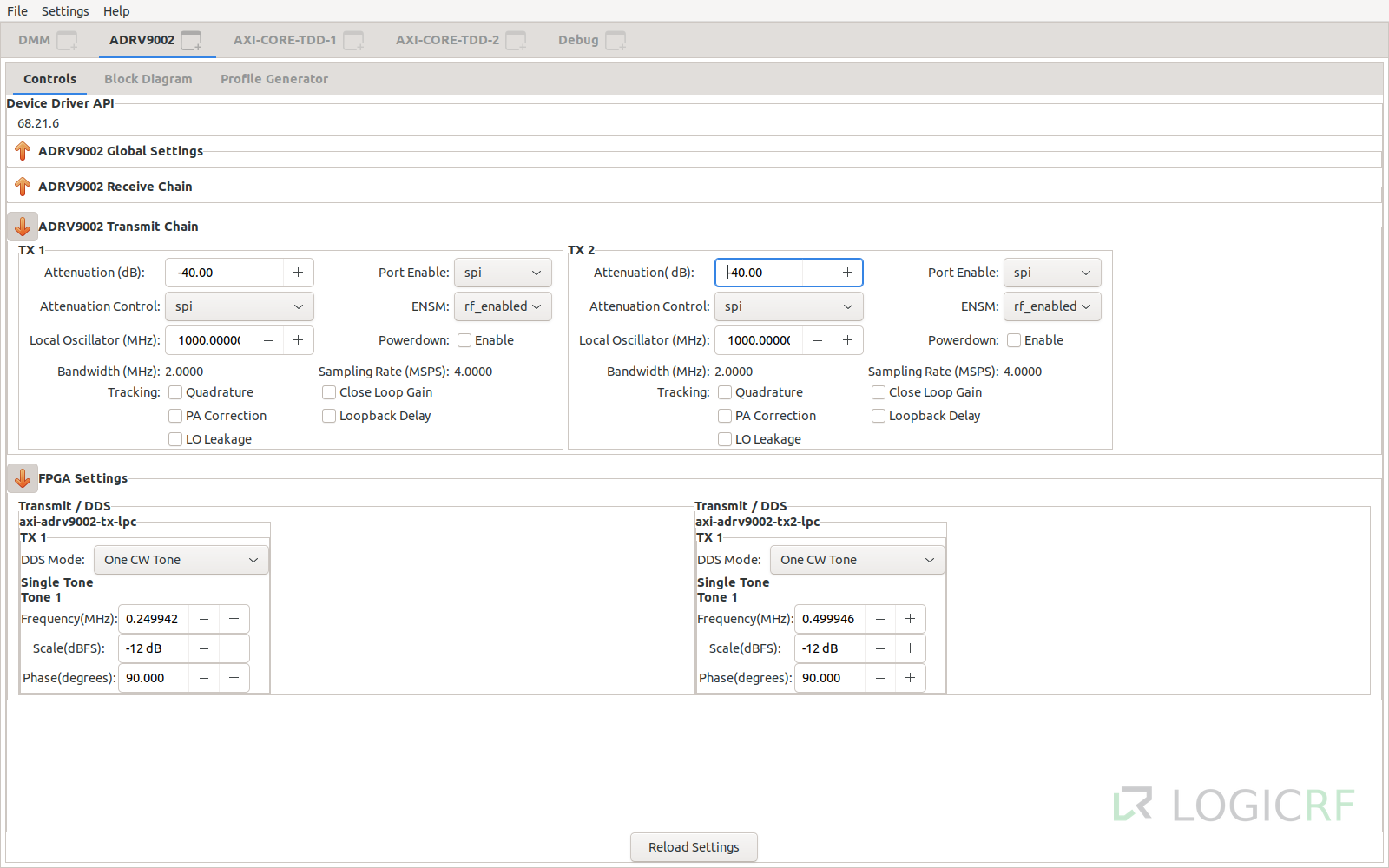
- Complete Prepare and connect in the ADI guide. In both TX sections, check Powerdown → Enable; checked means the transmitter is powered down. Set both DDS Mode lists to Disable.
- Set RX1/RX2 and TX1/TX2 Local Oscillator to 1000 MHz, RX gain control to spi and both RX hardware gains to 20 dB. Verify both receive chains and both transmit chains show 4 MSPS / 2 MHz. Leave the shared-LO pairing supplied by this profile unchanged.
- Set TX Port Enable and Attenuation Control to spi. The ADI Attenuation (dB) field uses the signed IIO gain value: enter −40.00, corresponding to 40 dB attenuation. A positive
40is not equivalent. - With both TX chains still powered down, temporarily choose One CW Tone in each FPGA DDS panel to set TX1 Frequency to 0.25 MHz, TX2 to 0.5 MHz, both Scale to −12 dBFS and Phase to 90°. Then return both DDS Mode lists to Disable. The stored frequency readbacks in this example were 0.249942 MHz and 0.499946 MHz; small quantization differences are normal.
- Create two FFT Captures. In one, select
axi-adrv9002-rx-lpc; in the other, selectaxi-adrv9002-rx2-lpc. Manually verify both I and Q are checked in each window, even when loading a saved layout. Choose Frequency Domain, FFT 16384, Hanning and Peak Markers. Start both captures and observe the TX-off baseline.
¶ Enable briefly and verify actual attenuation
In each TX section, select ENSM calibrated, uncheck Powerdown → Enable, then select ENSM primed. The transmitter is now prepared; it is not yet in rf_enabled.
Keep both DDS modes Disabled while selecting rf_enabled for the two transmitters. Select Reload Settings, enter −40.00 in each TX Attenuation field, then reload again and confirm both actual readings are −40.00. If a field already displays −40.00, explicitly change it to −41.00, then −40.00, to trigger a new write. Only after both readbacks are correct, select One CW Tone in both DDS panels and verify the stored frequency, scale and phase above. The corresponding tones should now appear. Keep the external attenuators installed throughout.
Why refresh after changing ENSM? The ADRV9002 SDK can report about 40 dB of protective attenuation outside RF operation; this is not proof that the user requested 40 dB. Returning to RF restores the last explicitly requested attenuation. ADI v0.18-main does not automatically refresh its attenuation field when ENSM changes, and entering the unchanged displayed number may not issue a write. The verified sequence is therefore DDS off → RF enabled → reload → explicitly set and verify attenuation → DDS on. This is state-dependent readback behavior, not evidence that the RTL changes the requested gain. See the ADI attenuation API notes.
| Check | Expected result | Observed example |
|---|---|---|
| RX1 complex FFT | A tone near +0.25 MHz | +0.250 MHz, approximately −84.8 dBFS |
| RX2 complex FFT | A tone near +0.50 MHz | +0.500 MHz, approximately −85.0 dBFS |
| TX disabled again | Both corresponding tones disappear while RX continues | Confirmed on both channels |
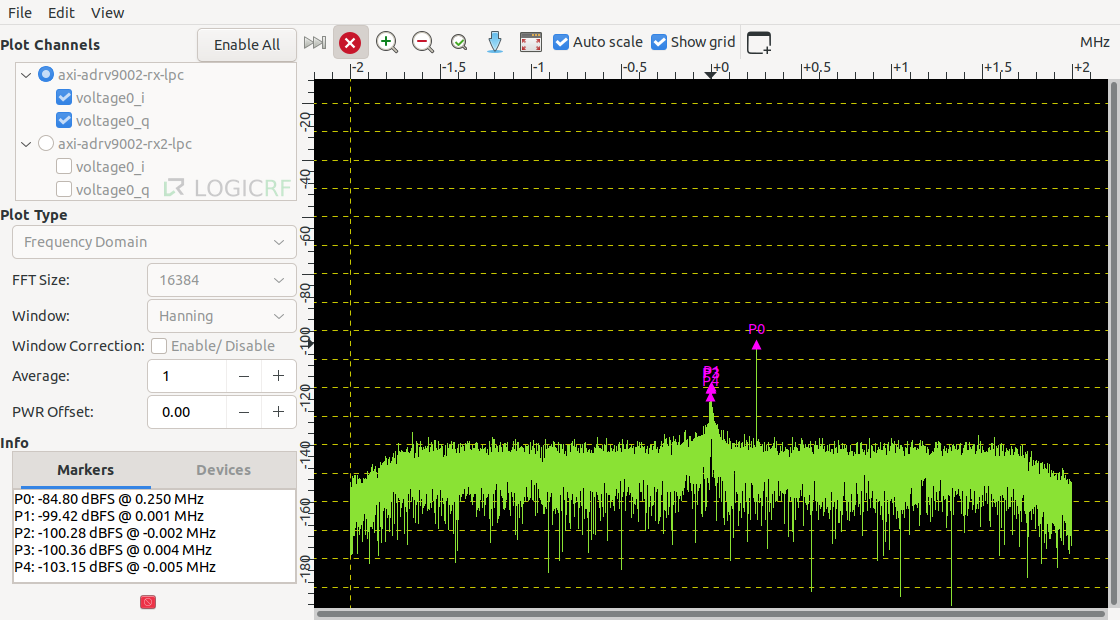
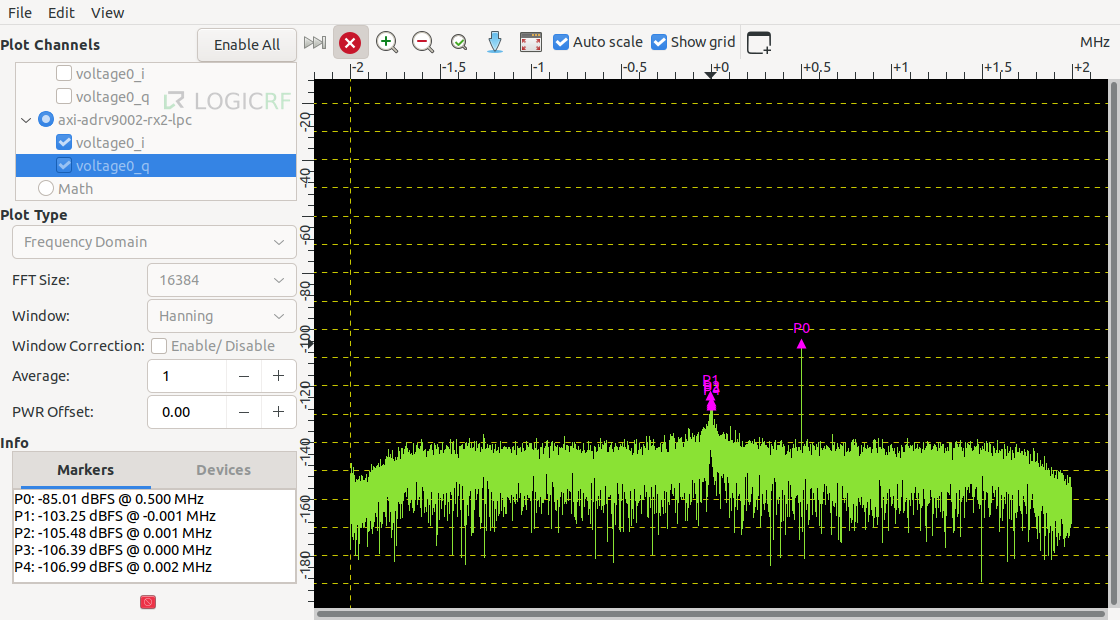
These amplitudes are example digital dBFS readings, not calibrated RF input power in dBm, sensitivity limits or guaranteed levels. This check establishes the two paths and their tone frequencies at these settings. It does not establish full-band RF performance, channel phase alignment or lossless recording.
¶ Stop and compare
- In both TX sections, check Powerdown → Enable, then set both DDS Mode lists to Disable. Keep RX running briefly: the +250 kHz and +500 kHz tones must disappear. Closing a plot alone does not stop RF transmission.
- Stop both Captures and close ADI. Before another application takes control, verify both TX chains are off and reapply the intended profile, carrier and gain in the H102 application. This example was followed by restoration of the original 40 MSPS / 20 MHz configuration and verification of all saved settings and disabled TX sources.
- If a tone is missing, stop TX first. Check the physical RX A ports, attenuation, equal RX/TX LO frequencies, selected I/Q pair, actual DDS mode and active TX attenuation. Do not compensate by removing attenuators or increasing power.
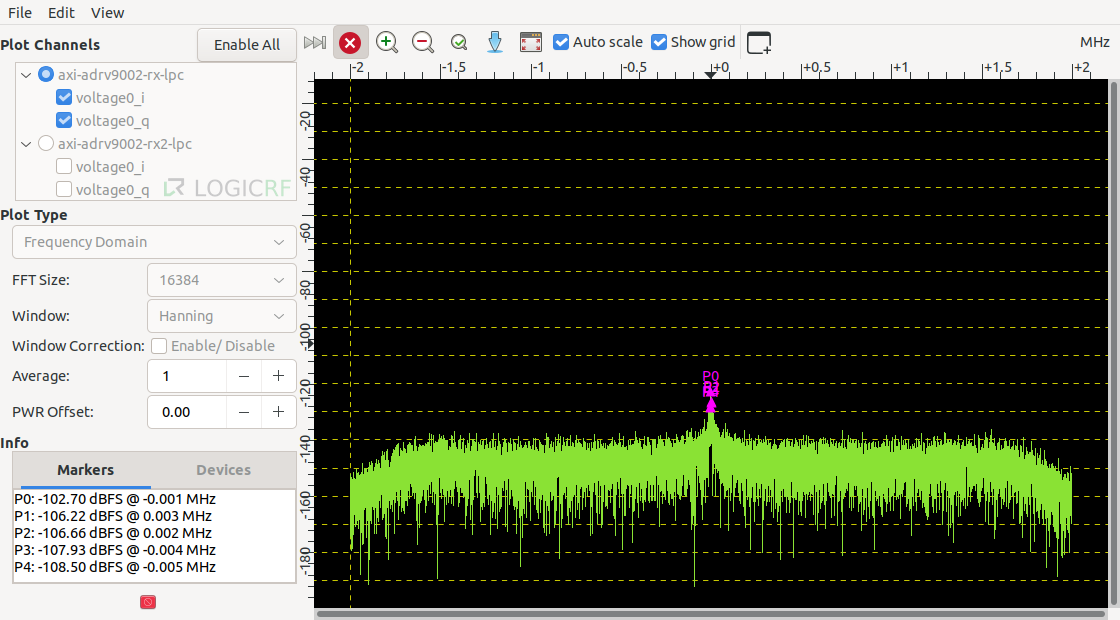
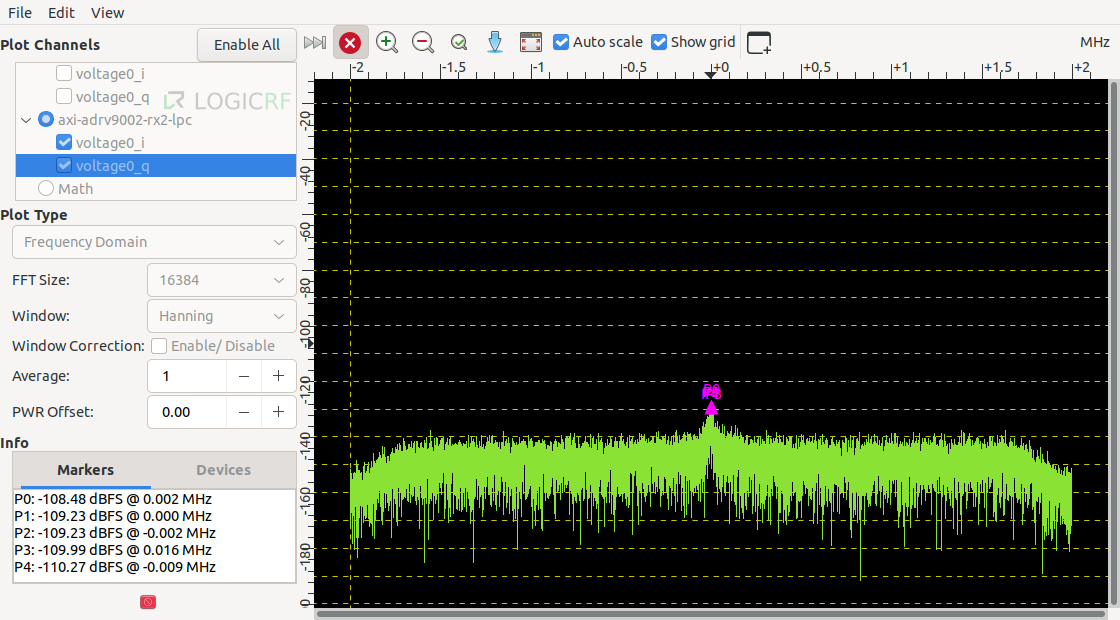
Stop every Capture before closing ADI. Reconnect the H102 application and verify profile, carrier and gain, reapplying the intended configuration if needed. ADI display and ordinary saving do not provide H102 end-to-end lossless-recording validation; use the strict recording functions in H102 GUI or gr-logicrf when that is required. Windows and ADI profile generation/file import are outside this checked combination. RF transmission is covered only by the bounded loopback example above.