Device SDK supports device access, application development and integration. It provides product-specific interfaces on the development or receiving host for your application or DAQ. The model and delivery determine the available control operations, receive modes and formats. Software overview
¶ What the SDK does in the system
The Device SDK provides host-side APIs and runtime libraries for device-control wrappers, matched packet reception and decoding, and borrowed-buffer ownership. It is not the R508 firmware and is not a separate desktop application that an operator must keep open.
| Workflow | Who calls the SDK | What the user prepares |
|---|---|---|
| DAQ Web or Workbench | DAQ calls the SDK on the receiver; the browser or desktop calls DAQ | The administrator installs the matched runtime. Operators connect with their assigned access; they do not need to write another SDK receiver. |
| A custom C/C++ or Python acquisition program | The user application calls the SDK directly | Matched runtime libraries, development interfaces/examples and host receive resources. The application owns configuration, buffers, stopping and saving. |
| Device control only, or a user-written receiver | SDK calls are optional | Use device JSON-RPC. For IQ, implement UDP reception, the application packet format and continuity handling; see options without the SDK. |
Do not let a custom receiver and DAQ control the same device or receive resources concurrently. Available SDK APIs do not establish that the host can sustain the selected rate. NIC, memory and storage requirements are covered in server deployment.
¶ Runtime packages, development files and source
- Runtime packages provide matched shared libraries, Python components and required runtime dependencies for DAQ or user applications.
- Development files provide public headers, linking information, Python APIs and examples within the delivery scope. Using installed APIs does not require all SDK, DAQ, RTL or firmware implementation source.
- Source materials, when supplied, follow the applicable license and delivery manifest. API documentation, a source repository revision or a shared version string does not identify an installed runtime package.
DAQ depends on the SDK. The matched installation workflow checks compatibility and applies SDK → DAQ in order; operators do not maintain another SDK installation manually. The public r508-host-setup v0.1.0 is a deployment tool: SDK/DAQ signed packages, installers and a trusted verification key are still obtained through delivery. Those payloads are not embedded in the tool repository, and it does not install Workbench. Do not infer download URLs from example paths or private repositories.
¶ Choose a development interface
Obtain the matching SDK and device contract before accessing a device. For a receiver, identify the wire format and follow the buffer ownership and release rules. To record a task, use DAQ Server to manage the task and storage.
Device identity and active application · Tasks and storage · Product-specific protocols
¶ R508 integration: real-time receiver lifecycle
| Order | Call/action | Ownership/check |
|---|---|---|
| 1 | Read-only discovery, correct controller and preflight | App, manifest and privileges match; no task owned by another client |
| 2 | logicrf_device_stream_default_config | Override backend, dataIP, ports, flows, packet mode and resources; do not copy default PCI |
| 3 | stream_create, stream_start | Host receiver ready; this does not start the device |
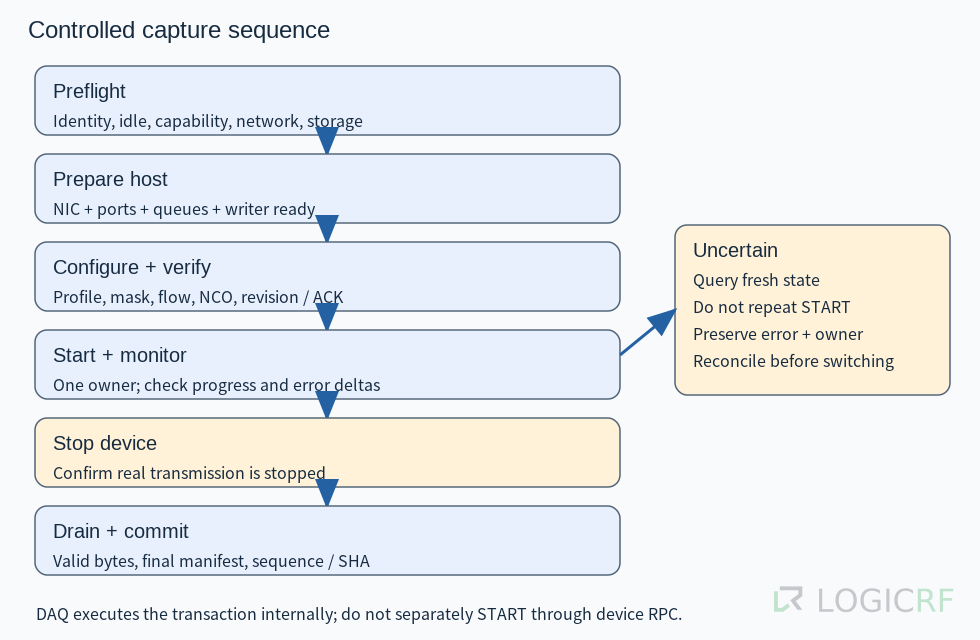
| 4 | Controller configure/readback/START | One owner handles the transaction; reconcile unknown outcomes before retrying |
| 5 | acquire→process→release | Release each successful lease by its returned sequence; pointers valid only during the lease |
| 6 | Controller STOP, confirm device idle | Converge owned resources on error too; do not stop other owners |
| 7 | Drain, stream_stop, final stats | Reconcile reception, merging and storage separately under the current SDK stop contract |
| 8 | stream_destroy | Recreate the handle for another capture; do not restart the stopped handle |
The table abbreviates the common logicrf_device_ prefix in C function names. This table explains lifecycle, not a copy-and-run complete acquisition program. Start with deployed DAQ. Custom integration must handle timeouts, unknown stop outcomes, releases and failure cleanup.
¶ Block versus packet-batch
| Mode | C ABI | Use/limit |
|---|---|---|
| Contiguous block | stream_acquire / stream_release | Merged contiguous memory; packet format and valid length still matter |
| Packet-batch | stream_acquire_packet_batch / stream_release_packet_batch | DPDK read-only packet views hold mbufs; every view becomes invalid after release |
For asynchronous work, copy or transfer valid ownership according to the SDK contract. Never use a released pointer. Headerless data has no guaranteed global order across flows; batch order is not established source-sample order. Explicitly select V1/V2.
¶ Reconcile statistics
| SDK field | Meaning | Additional evidence |
|---|---|---|
| received_packets / received_bytes | SDK reception | Source, NIC and protocol counters |
| merged_packets / merged_bytes | SDK merged delivery | Consumer processing and DAQ valid write length |
| invalid_datagrams / sequence_errors | Contract/sequence anomalies | Protocol, flow and start/stop boundaries |
| ingress_ring_full / output_ring_full | Bounded-queue exhaustion | Consumer speed, budget and CPU contention |
| nic_missed_packets | NIC-reported missed packets | Counter definition/reset scope |
| nic_rx_nombuf | Allocation failures | Not automatically source packet loss; examine mbuf budget and leases |
SDK delivery does not imply disk completion. DAQ separately checks valid receive/store/write bytes, writer errors and task manifests; preallocation is not valid length. HOST examples, socket regression and single-packet parsing do not replace DPDK/100G/long-duration hardware acceptance.
¶ R508 examples and compatibility
The documented combination is ULMUS FW58, RAW42, STREAM App04 and SAM2. Check the device management page and delivery manifest for your unit.
Obtain the signed Device SDK matched to your receiving host. Start with the listings for r508_direct.py (read-only device query) and stream_first_packet.py (one STREAM V1 datagram). Save them together and supply the actual management address, receive-interface IP and UDP port as shown in the guide.
Receive the first V1 packet · Delivery components and access · Host setup
¶ Earlier offline examples and current development
These bookmarks referred to offline Python and C++ examples for FLEX. Current deliveries start in STREAM. Match the SDK to the active application and delivery manifest. STREAM V1