SAM provides bounded spectrum snapshots from four logical ADC channels and DAC control. This release uses the paired SAM App revision 2 / BUILD005 packages, not the old SAM34 image. Use the delivered application ID and actual manifest exactly; do not normalize hyphens or underscores.
¶ Spectrum snapshots
- Stop existing acquisition, select the matching SAM application through ULMUS and wait for ready.
- Select SAM in DAQ, read channel state and configure FFT, decimation and center frequency.
- Explicitly start the required channels, wait for ready and obtain bounded SAM1 batches using the SDK decoder.
- Check header, configuration, channel, bins, software sequence and task metadata before saving.
- Issue fresh STOP for channels owned by this task and confirm stopped state/DMA convergence.
SAM does not initialize UDP receivers or DPDK. Its output is a power spectrum without continuous IQ phase. Software sequence/time are not continuous ADC sample indices or hardware UTC.
¶ DAC output
Check output and instrument input ratings before connecting. Add attenuation as needed, keep output off, configure frequency and a very low amplitude, read back, then enable. Explicitly disable and verify afterwards; process exit does not imply permission to stop another owner's output.
Scoped SAM1 checks include four logical channels, FFT1024/8192, decimation8 snapshots, CH0 RF-OFF versus a 401.2 MHz tone, and DAC0 at 400 MHz with gain1/32767 ON/OFF. Digital gain is not calibrated dBm.
Snapshot success does not qualify continuous lossless frames, all DAC1 RF characteristics or arbitrary FFT/window settings.
¶ First snapshot compared with UDP capture
| Item | SAM | UDP applications |
|---|---|---|
| Data | Bounded power-spectrum snapshots | Continuous datagrams interpreted per application |
| Host | SAM decoder and snapshot storage | socket/DPDK, merge and writer |
| Axis/content | FFT, decimation, center frequency and actual metadata | IQ rate, channels and format |
| Phase | No continuous IQ phase | Check the active application and matching interface |
| Sequence/time | Software snapshot sequence/time | Source-continuity support depends on each protocol |
Start with a checked simple combination such as the selected logical channel, FFT1024 and decimation8; actual choices come from the manifest. Leave DAC off: status → configure → start owned channels → save snapshot → inspect channels/bins/configuration/raw frames → fresh STOP. A plausible curve does not replace stop/file checks.
¶ DAC0 procedure
- Confirm the correct instrument input and both sides' ratings. Do not enable without known limits.
- Leave output OFF; connect appropriate attenuation/load and choose frequency and very low digital gain.
- Read back before enabling. Watch for instrument overload; the same owner turns output off on failure.
- Explicitly turn OFF and verify before disconnecting. Process exit does not establish output-off state.
The limited historical DAC0 400 MHz, gain1/32767 check does not qualify arbitrary direct connections. For dBm settings, establish calibration at the relevant frequency, load and attenuation.
¶ Web numbering and API indices
| Web display | API index | Meaning |
|---|---|---|
| Output channel 1 | DAC channel=0 | DAC0, not channel=1 |
| Output channel 2 | DAC channel=1 | DAC1, not channel=2 |
This is software numbering, not connector position. Verify physical board labels. Web Frequency / MHz and dac.frequency.set frequency_mhz use MHz;Thus 400 MHz is 400 or 400000000 respectively.
With output OFF, apply parameters and check actual frequency/gain before enabling. Avoid unintended mouse-wheel changes in the gain input while output is on; the supplied UI supports live wheel adjustment. A low gain rounded to 0.00 does not establish physical zero. Use actual readback and explicit OFF state.
¶ Complete snapshot-save task
Prerequisites: matching SAM App revision 2 / BUILD005 active/ready, DAQ sam contract, DAC not enabled by this task and no competing CH0 owner. JSON below is DAQ params, not the outer HTTP envelope.
| Order | DAQ method | params | Check |
|---|---|---|---|
| 1 | server.status, device.status, clock.status | {} each |
Identity, clocks and service state match |
| 2 | spectrum.status | {"channel":0} |
CH0 state; handle an existing owner first |
| 3 | spectrum.configure | Object below | FFT1024, decimation8, successful configuration |
| 4 | spectrum.start | {"channel":0} |
DAQ explicitly acquires CH0, once |
| 5 | spectrum.status | {"channel":0} |
Matching configuration and data readiness |
| 6 | snapshot.save | {"task_id":"first-sam-001","channels":[0]} |
Save one bounded SAM1 batch, not continuous recording |
| 7 | spectrum.stop | {"channel":0} |
Fresh STOP for owned CH0 |
| 8 | spectrum.status, server.status | {"channel":0}, {} |
CH0 stopped/resources converged; file task committed |
Active application’s device RPC · Parameter object. Verify service identity and replace example values for this task.
{
  "channel": 0,
  "fft_size": 1024,
  "decimation": 8
}
The example does not choose a center frequency for an unknown input. If required, set spectrum.frequency.set frequency_mhz while stopped, explicitly in MHz. Do not copy a displayed CH1 as API index1.
Find first-sam-001 in file management. Check data-000000.bin, manifest, SHA, snapshot channels/FFT/bins and configuration. SAM stores bounded SAM1 frames and metadata, without UDP fixed-size padded segments. It is not an I16Q16 time-domain file.
snapshot.save requires channels started by the same DAQ. resource_not_owned requires resolving ownership, not bypassing checks. On save failure, query state and stop owned channels; retain incomplete tasks instead of overwriting/retrying the same directory.
DAC testing is separate. Follow the procedure above when needed; a curve is not a reason to connect an instrument with unknown ratings.
Return to User guide.
¶ SAM Web: a complete first session
SAM has its own instrument page. In ULMUS Application Management, verify that SAM is active and ready, then enter http://DEVICE_IP:8080/sam/ in your browser. Replace DEVICE_IP with the device management address, not the DAQ host. Sign in with that device's administrator account if prompted. The normal manager sidebar does not contain a spectrum tab.
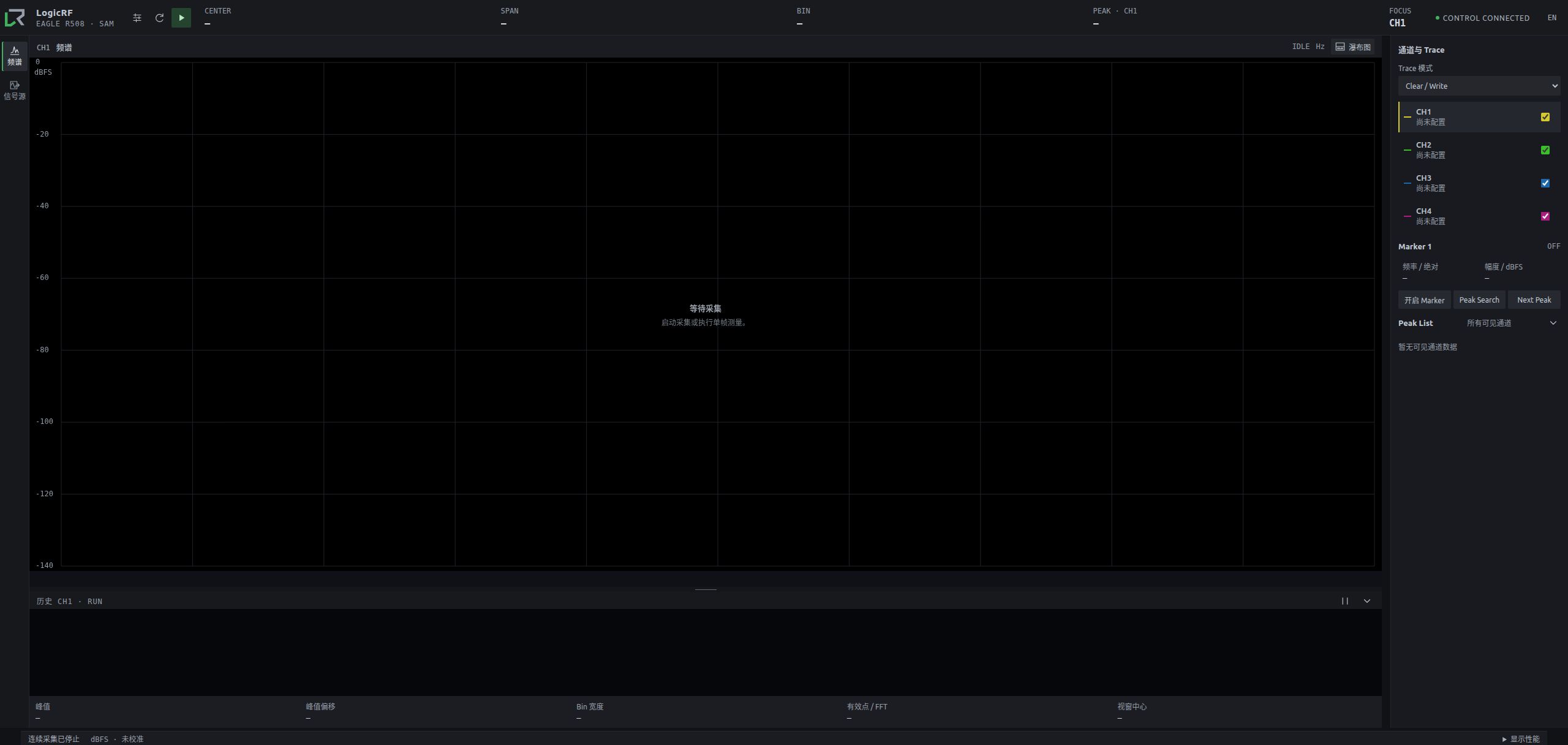
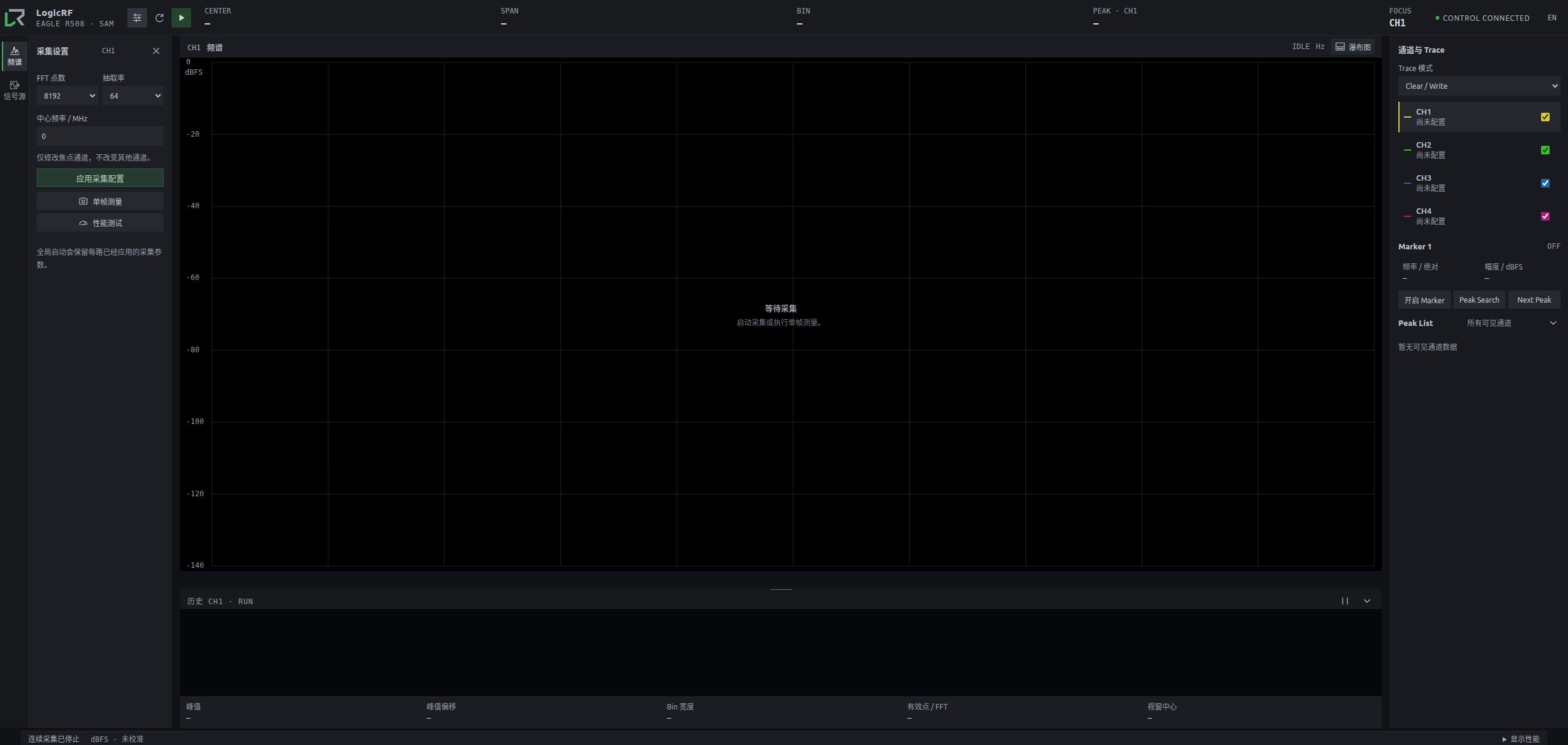
These three screenshots show the actual stopped SAM App revision 2 on the recorded factory-image hardware. This run records rendering and state readback only; it did not start SAM acquisition or enable DAC output. An empty spectrum means awaiting acquisition, not zero input. These are not RF, phase/amplitude or endurance qualification. Use your device management address. The screenshots use Chinese; the current UI also supports the language switch explained below. Click an image to enlarge it.
¶ Select the interface language first
The SAM top-bar language button showsEN in Chinese mode; click it for English. In English it shows中; click to return to Chinese. The choice is saved in this browser's local storage, so another browser or cleared site data may return to the Chinese default. It changes display text only: no acquisition/DAC start, API-field change or unit conversion.
After switching to English, use the following labels to follow the illustrated steps. The CH1→API0 mapping and MHz units still apply.
| Label in screenshot | Label in English mode |
|---|---|
| 应用采集配置 | Apply acquisition |
| 单帧测量 | Single frame |
| 全部关闭并锁定 | All off & lock |
¶ 1. Understand channels and readouts
| Control/readout | Meaning | Important limit |
|---|---|---|
| CH1–CH4 cards | Click a card to select the focus channel; its checkbox controls Trace visibility | Hiding a trace does not stop acquisition |
| CH1 / CH2 / CH3 / CH4 | API logical indices 0 / 1 / 2 / 3 | Not a physical connector map or the eight-channel RAW mapping |
| CENTER / SPAN / BIN | MHz center, displayed span and frequency-bin spacing | Bin spacing is not a calibrated RBW or analog antialias bandwidth |
| SEQ / SLOT | SAM1 software snapshot sequence/slot | Not a continuous ADC sample counter or hardware UTC |
| dBFS · uncalibrated | Spectrum relative to digital full scale | Not calibrated dBm |
¶ 2. Configure a stopped focus channel
- Ensure that no other owner is using the instrument. Have the previous owner stop its activity; closing a page is insufficient.
- Select CH1 and verify FOCUS CH1. Open the top gear button (采集设置 / Acquisition settings).
- For a first session, choose FFT1024 and decimation8. Enter the intended center in MHz, for example400 for400MHz.
- Click 应用采集配置 / Apply acquisition configuration. Wait for success and inspect the CH1 card and CENTER/SPAN/BIN readouts.
- These settings change only the focus channel. Select each other channel separately if required. A dropdown option is a request capability, not proof that every combination has been RF qualified.
¶ 3. Single measurement, continuous viewing and STOP
单帧测量 / Single measurement measures the focus channel once; it does not create a continuous IQ capture. 性能测试 / Benchmark runs50 frames and is an actual workload, unnecessary for a first view.
Close settings and click 启动四通道采集 / Start four channels to view ongoing snapshots. Existing per-channel settings are retained; unconfigured channels follow the current software configuration flow. Check RUN, changing SEQ and visible traces. Refreshing spectra do not prove continuous lossless sampling.
Finish with 停止四通道采集 / Stop four channels. Verify all cards are IDLE and the footer reports continuous acquisition stopped. The last trace may remain displayed after STOP. A closed tab or lost network connection does not stop hardware; if the result is uncertain, reconnect and query fresh status.
¶ 4. Trace, Marker, zoom and waterfall
| Action | How | Boundary |
|---|---|---|
| Select visible channels | Use Trace checkboxes, then a card to choose focus | Display selection does not stop channels |
| Clear / Write | Select this Trace mode for current snapshots | Browser display mode |
| Max Hold / Average | Select the mode and allow it to accumulate | Not hardware averaging or calibrated measurement; rebuild the observation baseline after configuration changes |
| Find peaks | Peak Search, then Next Peak; click peak-list entries | Marker gives absolute MHz and relative dBFS |
| Place Marker | Click the spectrum; toggle Marker visibility | Uses visible data, does not start a new task |
| Zoom / reset | Wheel or drag a box; double-click to reset, or click Spectrum again | Does not change ADC sample rate |
| Waterfall | Expand it, drag the separator, pause its history | Pausing waterfall display does not stop acquisition; use the top STOP |
For reproducible records, use DAQ snapshot.save to save original SAM1 frames and their manifest as described in this page’s snapshot workflow. A screenshot or saved webpage is not a raw-data record.
¶ 5. DAC signal source: OFF, configure, read back, enable
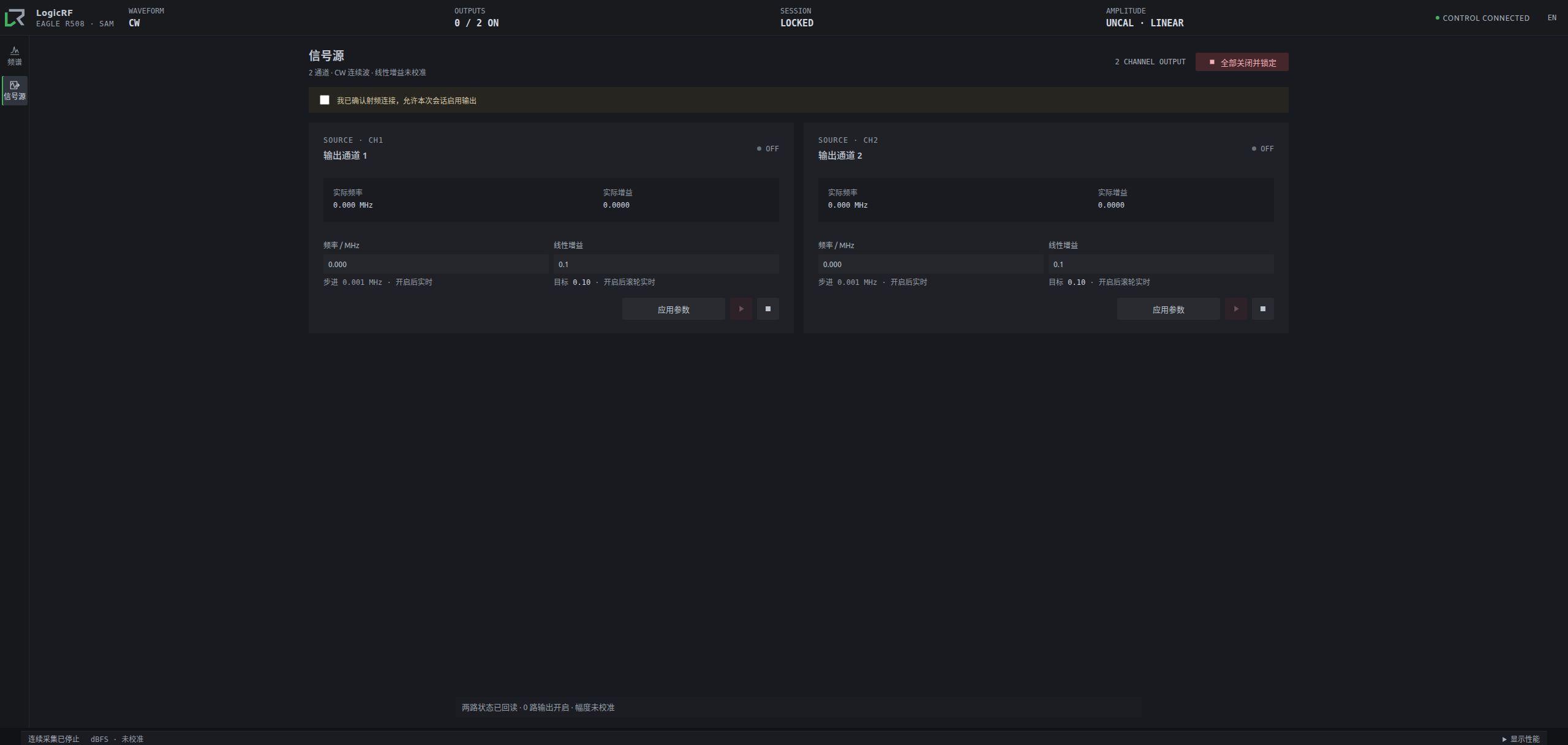
- Open 信号源 / Signal source. Verify both channels are OFF and readable. SESSION LOCKED is a browser enable interlock, not proof of physical disconnection or output OFF.
- Output channel1 is DAC0/API index0; output channel2 is DAC1/API index1. Verify the receiver input rating, load and required attenuation before proceeding.
- While OFF, set frequency in MHz and a suitable very low linear gain, then click that channel's 应用参数 / Apply. Inspect actual frequency and gain. The default0.1 is not a generally safe power setting.
- Only after checking the connection, tick 我已确认射频连接,允许本次会话启用输出 / I have verified the RF connection, then enable the intended channel. Verify ON. Linear gain is not dBm.
- Frequency changes and gain-wheel actions can apply in real time while enabled. Avoid unintended scrolling; stop output before major changes.
- Finish with the channel's immediate OFF button or 全部关闭并锁定 / All OFF and lock. Verify both OFF and0/2 ON before closing the page or disconnecting cables. Refreshing/locking the browser is not a substitute for an actual OFF action.
¶ 6. Troubleshooting
| Symptom | Check | Action |
|---|---|---|
| No /sam/ instrument | Active App, matching package, ready state | Confirm SAM in Application Management |
| Control disconnected / signed out | Device login, network and session | Sign in again and read status; do not blindly repeat START |
| Blank plot | Trace checkboxes, focus, RUN and measurement error | Inspect each item and logs; blank is not a calibrated zero-power result |
| Unexpected peak frequency | MHz center, actual span and FFT/decimation | Verify configuration and RF input before changing clocks/MTS |
| Trace remains after STOP | All channels IDLE and footer stopped | Last displayed data can remain |
| DAC enable unavailable | Session lock, readable output states and connection checks | Follow the normal interlock flow, never disable authentication |
| Need eight-channel IQ phase | SAM returns power spectra | Use the matching IQ App and SDK/DAQ instead |